
Contents
You may have noticed the new look to prettylinks.com a few months back. What you didn’t see, is that a redesigned website was only our first move in a much bigger plan — and our second move just launched!
🚀 PrettyLinks Version 4 is officially live, and it’s one of our biggest releases yet! We’re talking a full rebuild that touches the dashboard, the link creation experience, the redirect engine, reporting, and just about every corner of the plugin in between.
We’ve also built in 3 NEW add-ons and just as many NEW tools that expand what’s possible with PrettyLinks — including new ways to monetize, promote, and manage your affiliate links.
Plus, we did quite a few rewrites to improve the features you already use, along with a long list of additional wins you’ll notice the moment you update.
That’s a lot to take in, right? We thought so too… too much for one article to thoroughly introduce. Instead, what I’m going to do today is give you a quick intro tour.
Over the next several weeks, we’ll be following up with dedicated coverage on the biggest pieces.
Let’s kick things off with a full walk-through of what’s inside PrettyLinks v4 — what’s changed, what’s brand new, and what’s worth getting excited about!
A Whole New Look for the PrettyLinks WordPress Plugin
The first thing you’ll notice when you update to Version 4 is that PrettyLinks looks completely different — in the best way possible!
We rebuilt the entire back-end user experience to feel clean and modern for a more efficient link management experience from the moment you log in.
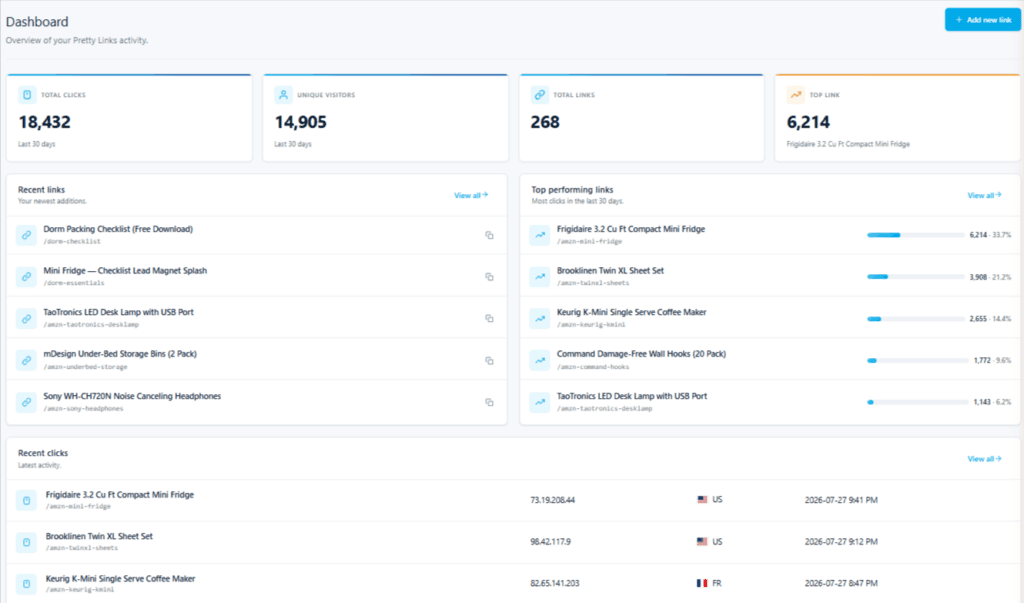
The dashboard is the centerpiece of that change. When you log in, you land on a fresh overview that gives your link performance at a glance:
Now onto the actual link management upgrades. Creating and adding links to your collection has been redesigned too — cleaner layout, clearer field labels, and fewer clicks to get a new link live and earning:
Before we move on to the real excitement of NEW PrettyLinks add-ons and tools, here are a few more UX upgrades worth calling out:
- A redesigned onboarding flow. Getting started with PrettyLinks has never been easier — personalize the plugin to fit exactly what you need, right from the Setup Wizard.
- A “What’s New” page. Pop in and explore everything this article covers (and a few things it doesn’t). It’s also where you’ll see future releases, features, and updates we make to PrettyLinks.
- An updated add-on browser. It’s looking a little fuller these days, thanks to all the new tools Version 4 brought with it. Here’s where you can browse, install, and activate the next addition to your PrettyLinks toolkit.
That’s just what PrettyLinks v4 looks like. Wait until you see what it can do…
NEW PrettyLinks Add-ons and Tools
PrettyLinks Version 4 comes packed with 3 NEW add-ons, 3 NEW Pro tools, and 1 upgraded integration. Here’s a quick rundown on what each of them does:
Splash Pages (Pro add-on)
Splash Pages have been a frequently requested tool for a while now, so we made it happen in this latest update.
With the Splash Pages add-on, you can create and insert a custom, branded page between the click on any of your pretty links and its final destination.
Simply pick a link, set one up, and what used to be a quiet redirect turns into a loud chance to promote additional offers, share an update, force an ad view, or put a message from your brand in front of a visitor before they hit the destination.
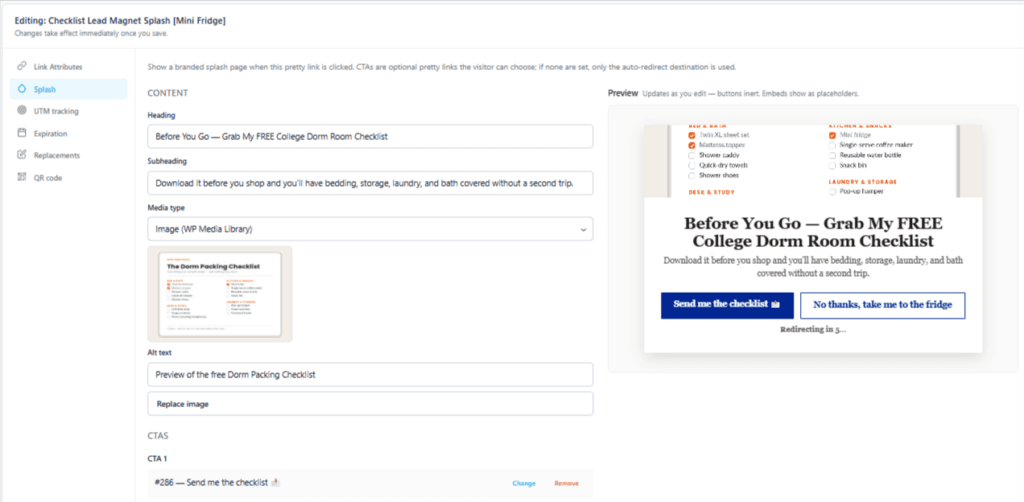
When you build yours, you’ve got real room to make it your own. Pick from multiple template styles, set up an auto-redirect with a countdown timer if you want one, and stack on CTA buttons to push visitors deeper into your funnel.
Oh, and each splash page comes with its own custom reporting — views, auto-redirect rates, CTA click rates, and bounce rates — so you can see which ones are making a splash and which ones are barely a ripple.
Turbo Mode (Pro tool)
Turbo Mode is a new Pro tool built entirely for speed. What it does is make every pretty link redirect fire faster – extremely faster – across your entire library.
Here’s how it works without getting too technical: Every time someone clicks one of your pretty links, WordPress has to briefly “wake up” on the back end to process the click and forward them on to the destination.
In most cases, that means loading up the theme, every other plugin, and doing all its usual startup work — just to answer that one redirect request.
Turbo Mode skips almost all of that. It intercepts the click before WordPress fully loads, recognizes it as a PrettyLinks redirect, and sends your visitor straight to the destination.
Some links crawl. Turbo links LAUNCH!
Same click, same destination. The only thing that changes is how much has to happen before your visitor is allowed to leave.
WordPress loads the theme, every other plugin, and all its usual startup work — just to answer one link click.
Turbo Mode skips almost all of that. It catches the click before WordPress fully loads and sends your visitor straight to the destination — less dead air between the click and your conversion.
While we were at it, we rewrote the engines behind keyword replacements to be 10x faster and URL replacements to be 3x faster.
Duplicate Keywords Tool (Pro tool)
The new Duplicate Keywords tool solves a problem you might not even know you have — when two or more pretty links accidentally share the same keyword.
PrettyLinks doesn’t exactly give you a heads up when that happens; instead, it just picks one at random every time someone clicks.
The catch? That random pick might not be the link you want your audience clicking on. It could be an older link, one pointing to a less profitable version of a product you’re promoting, or one you’d meant to replace but never got around to.
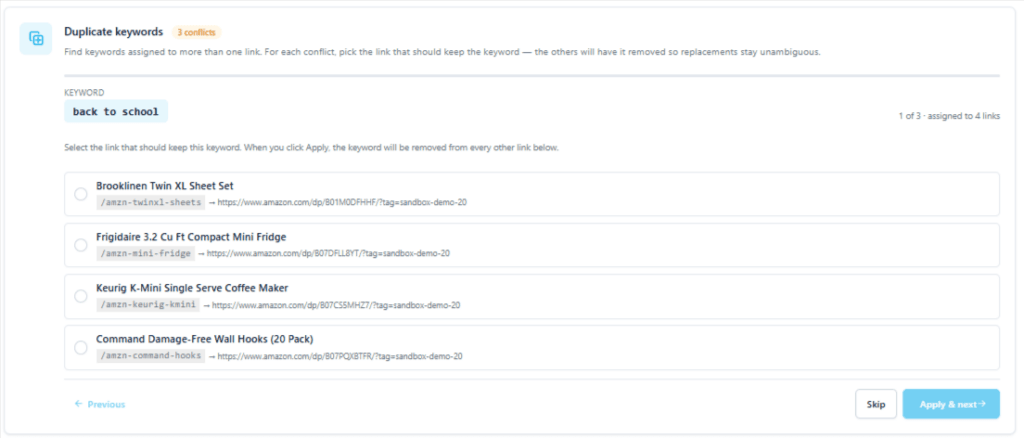
The Duplicate Keywords tool fixes that. Run it once, and it’ll scan your entire link library for keyword collisions, flag every duplicate it finds, and let you pick which link gets to keep the keyword:
It’s a quick cleanup scan worth running — especially if your library has grown past a few hundred links or you’ve got a team creating links alongside you (one of the most common ways duplicates sneak in without anyone noticing).
User Links (Pro add-on)
With the new User Links add-on, you’re getting a genuinely new way to use the PrettyLinks plugin. It turns your WordPress site into a self-serve link-shortening service, where logged-in users can create and manage their own short links.
Now, this isn’t a completely new idea for PrettyLinks — the concept of running your own link shortener on your site has technically been possible through a feature previously called Public Link Creation.
What’s new in User Links: users now get a real front-end dashboard where they can create AND manage the links they’ve built. Each user only sees their own, so there’s no bleed-over between users:
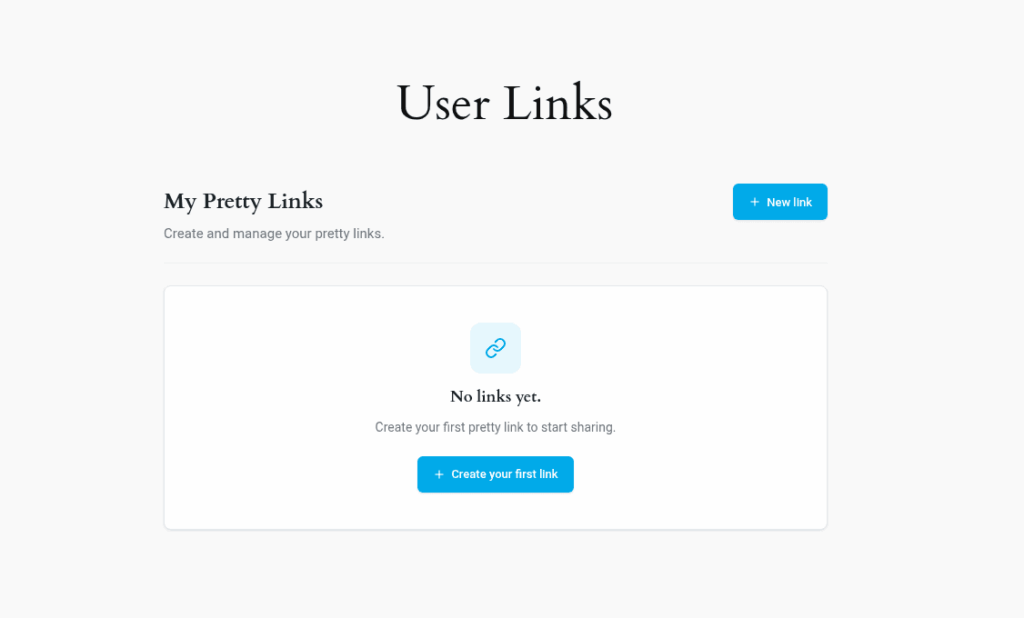
And you, the site owner, see every user link in your admin — kept separate from your own but fully tracked under Reports. Every click on a user’s link reports right back to you.
That upgrade opens up two ways to put PrettyLinks to work like never before:
- Pair the User Links dashboard with MemberPress, and you’ve got the foundation for a paid subscription-style link shortener (comparable to Bitly or Rebrandly) except your domain, your pricing, and your brand are tied to every link your members create.
- If you’re running an affiliate program through Easy Affiliate, you can extend that same self-serve dashboard to your affiliates, giving them branded short links built on your domain.
Two very different use cases, but the throughline is the same — User Links gives you a fully-owned service to build on top of and additionally profit from, with the same reliability and reporting you already trust from PrettyLinks.
UTM Builder (Pro add-on)
If you’ve ever set up UTM tracking for your affiliate campaigns inside PrettyLinks, you know it wasn’t impossible — but it sure wasn’t pretty. I’d know, because I was doing it for our own campaigns the hard way for ages!
My workaround looked something like this: build out every campaign link in a meticulously organized Excel sheet, double-check every column was in exactly the right order, export it, import it into PrettyLinks, and hope I hadn’t fat-fingered anything along the way.
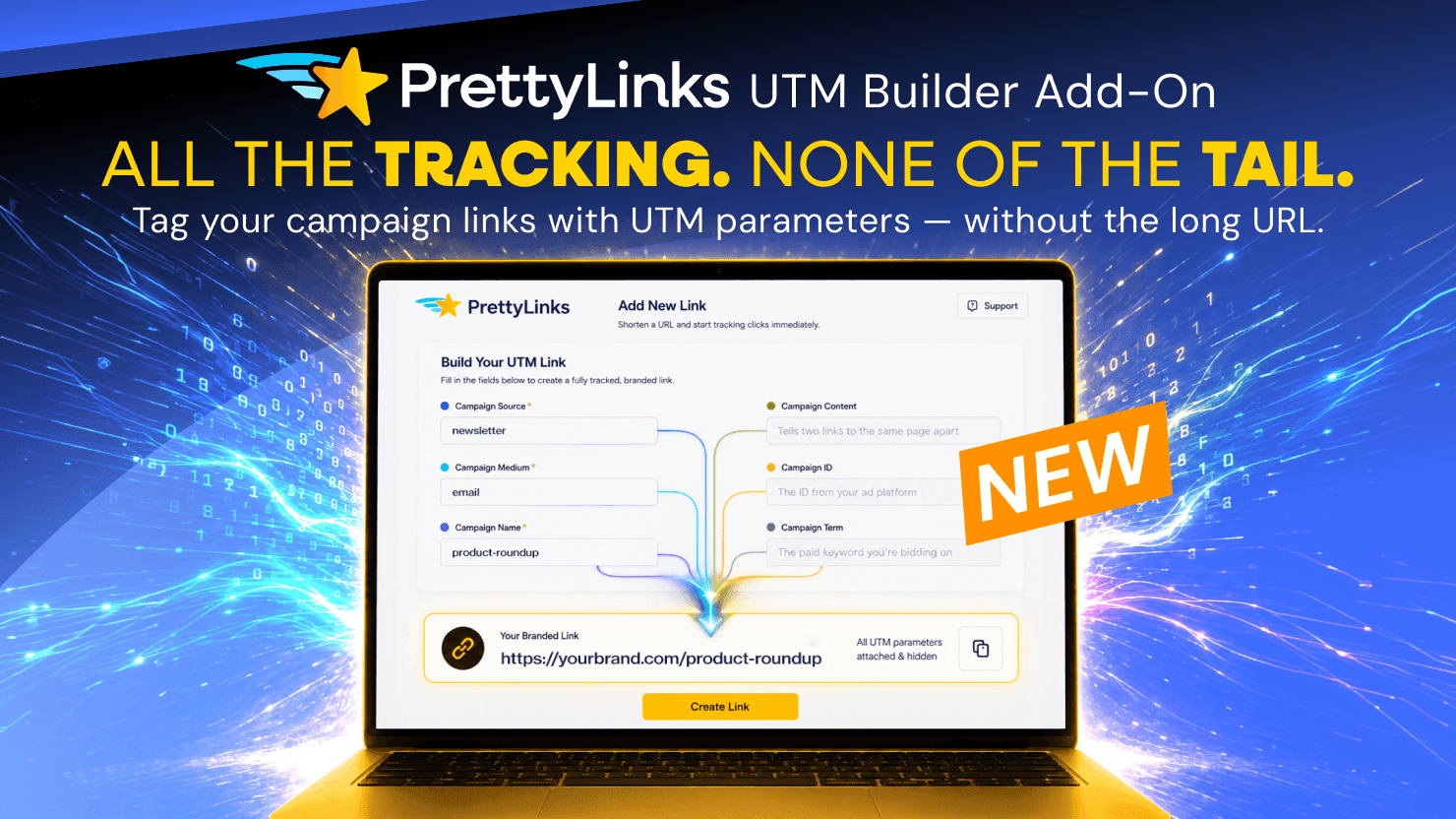
The new UTM Builder add-on cuts that whole workflow down to a single screen inside PrettyLinks.
Set your campaign source, medium, name, and the rest right where you’re creating the link, and PrettyLinks auto-attaches them to the target URL:
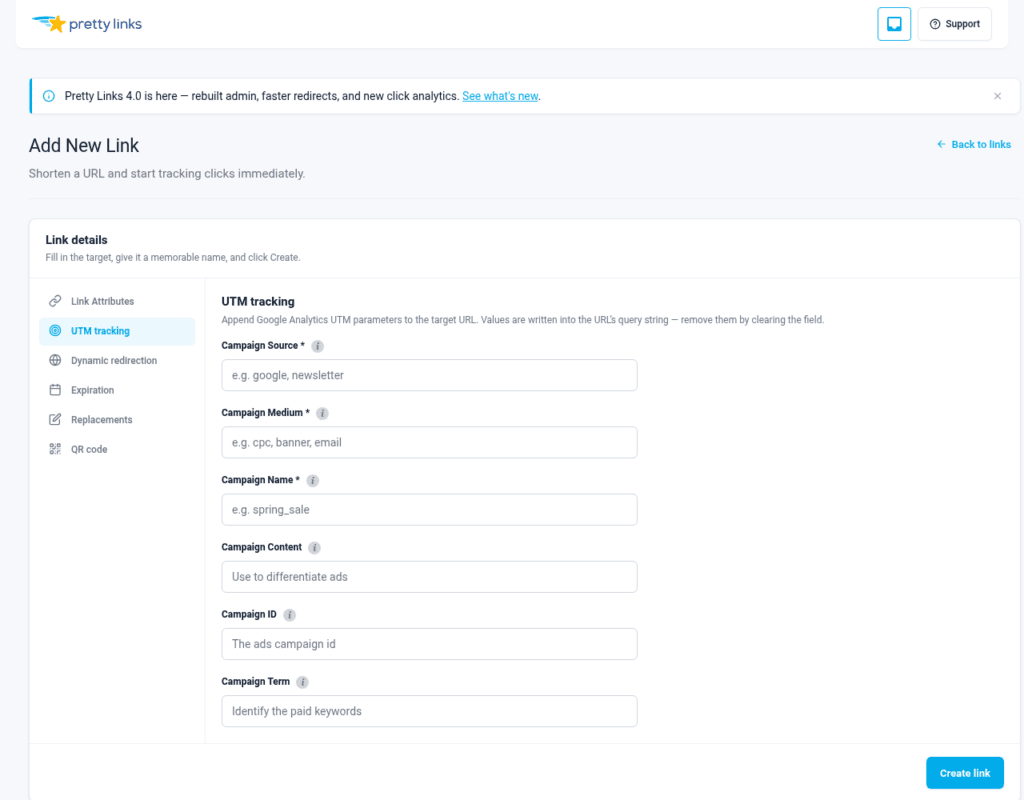
Whether you’re running campaigns across email, social, paid ads, or blog content, the UTM Builder add-on finally makes campaign tracking the easy part of the process instead of the tedious one.
CookieYes Integration (Free)
Speaking of tracking — none of it matters if you’re not collecting it compliantly. That’s where the updated CookieYes Integration comes in.
It’s a one-click integration that makes sure all that fine-grained tracking we just walked through stays on the right side of privacy laws like GDPR, CCPA, and LGPD.
Now, this isn’t the first time PrettyLinks and CookieYes have worked together — but the previous version took a fair amount of manual configuration. The updated integration handles most of that setup for you.
Once you have the CookieYes plugin installed, a single toggle inside PrettyLinks connects the two — auto-configuring your cookies, categorizing them correctly, respecting visitor consent preferences, and getting you ready to track responsibly from day one.
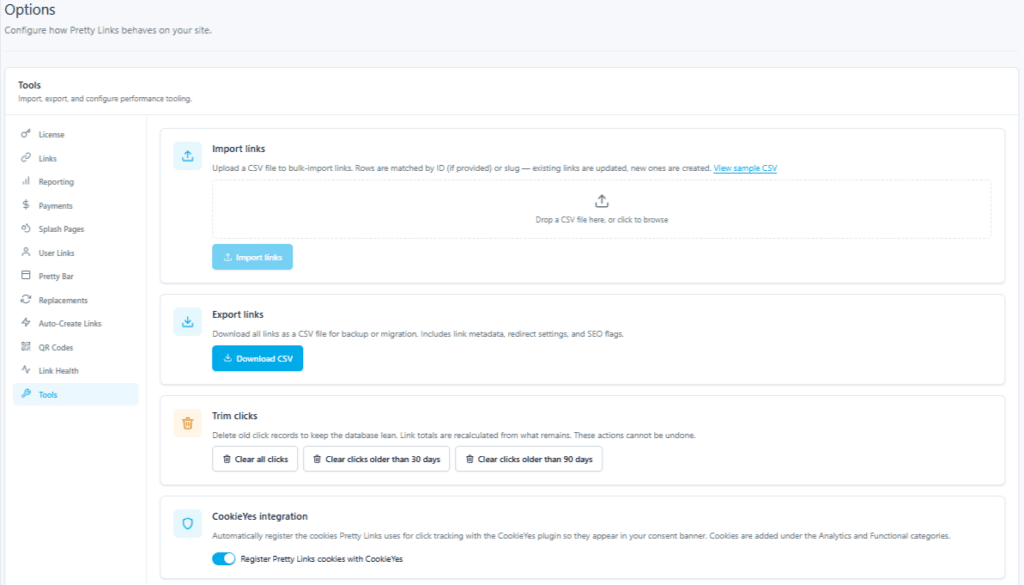
And here’s the best part: privacy compliance is a need that affects all affiliate marketers. So we made sure this one is FREE and available across all PrettyLinks Pro plans!
Tracking Pixel (Pro tool)
Last but not least on the new tool front, we’ve got the Tracking Pixel Block — one of the smartest ways we’ve ever given you to measure what your links are actually doing.
The way the block works is simple: Drop it onto any WordPress page, and it plants a hidden pixel that fires every time a visitor loads that page.
Pair the pixel with a Custom Report, and PrettyLinks shows you exactly how many people clicked each of your links and later landed on that page. That’s the whole tracking loop, closed from the click through to the conversion.
Which means this tool works anywhere a visitor only reaches a page after doing the thing you care about tracking, such as:
- A PrettyPay™ thank you page. Confirm which of your checkout links are closing sales — not just getting clicked.
- A MemberPress members-only page. See which of your links are converting free readers into paying members.
- A WooCommerce order-received page. Track which links are driving purchases through your store.
- A form’s thank you page. Track completed lead generation, contact submissions, or sign-ups tied back to the link that drove them.
- A newsletter “you’re subscribed” page. Track email opt-ins tied back to the exact link that got the signup.
- A webinar registration or replay page. See which links drove real registrations (and later, real attendees) instead of just curious clicks.
- A course completion or certificate page. Track who’s finishing your course — not just who enrolled.
- A/B testing landing pages. See which version of your funnel actually converts, tied back to the link driving each variant.
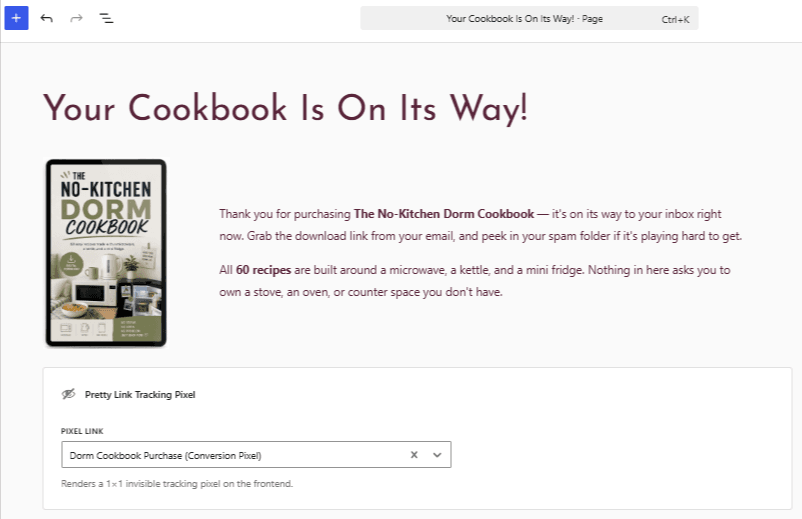
Whatever your version of “the page that matters” looks like, the Tracking Pixel Block ties every landing on it back to the exact pretty link that drove it.
We’ve barely scratched the surface on what each of these NEW add-ons and tools can do! So we’ve got dedicated walkthroughs queued up over the next several weeks to fix that.
Subscribe to the PrettyLinks newsletter and be the first to know when each one drops.
Major Upgrades to PrettyLinks Features You Already Use
New add-ons and tools are only half the Version 4 story. Just as much of our work went into upgrading the PrettyLinks tools you’re already using every day — making the features you love even better.
Live Previews on Pretty Bar, Product Displays, and Link in Bio
If you’ve used any of these tools in v3, you know the pain: build it, save it, open a new tab to see how it looks, jump back to adjust, save again, refresh again.
In PrettyLinks v4, all three now come with a live preview built into the editing experience. Every change you make shows up in real time, no extra tab juggling required.
The Pretty Bar in particular got a serious glow-up alongside the new live preview. It’s significantly cleaner, more customizable, and offers a stack of new template options to choose from, including my personal favorite: a sleek floating pill format:
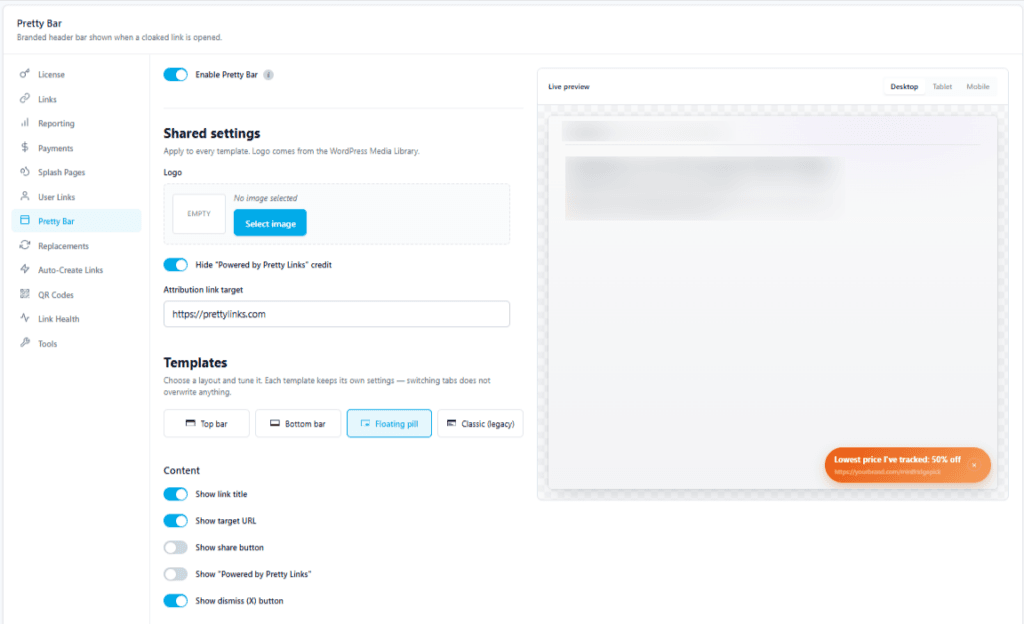
Product Displays finally got the missing live preview treatment for Groups too, which is a major upgrade for anyone building listicles, product roundups, or review-style content:
Link in Bio got the live preview treatment with a twist that makes a lot of sense. Since Link in Bio pages typically get most of their engagement on mobile, the new preview shows you a mobile view as you build.
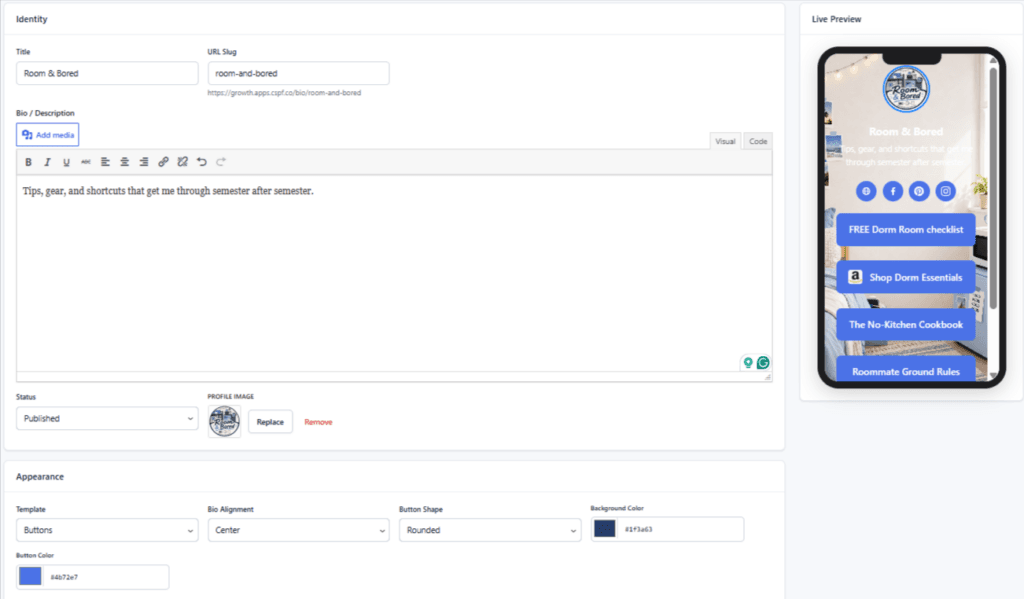
A Longer Look at Your Link Performance
Understanding how your links perform over time is one of the most important things PrettyLinks does — and in Version 4, that side of the plugin got a lot stronger.
PrettyLinks v3 gave you a healthy 90 days of click history at a time, which was plenty for short-term monitoring. For longer-range data though, you’d typically need to lean on our MonsterInsights integration to fill in that view.
What’s new is that PrettyLinks can now hold onto that history all on its own, with click history retention all the way up to 2 full years!
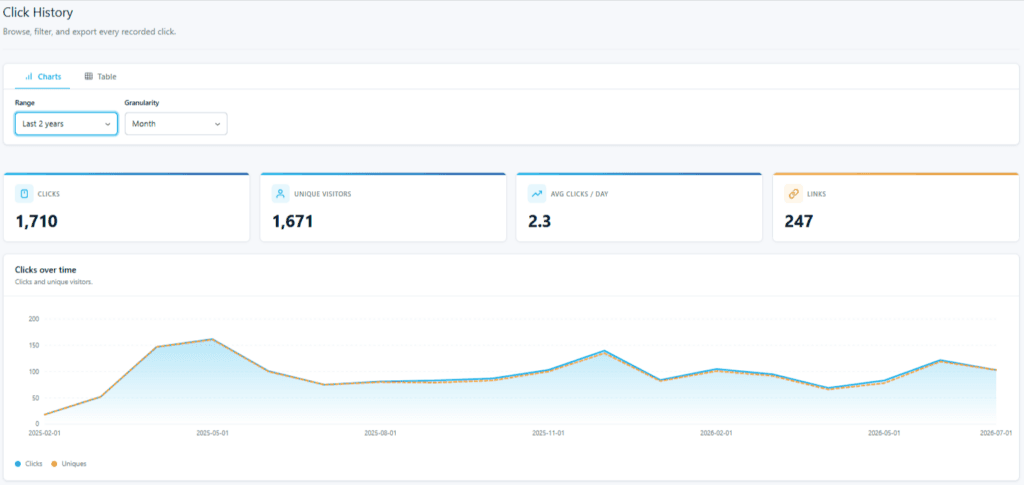
Suddenly, your top-performing links have a story you can actually read — not just a snapshot of the last quarter, but a real timeline of what’s been working and for how long.
Custom Reports is the other half of this upgrade. The report works the same way it always has: you pick the set of links you want to focus on, and the report lays them out bar graph style, showing totals for clicks, unique clicks, and conversions:
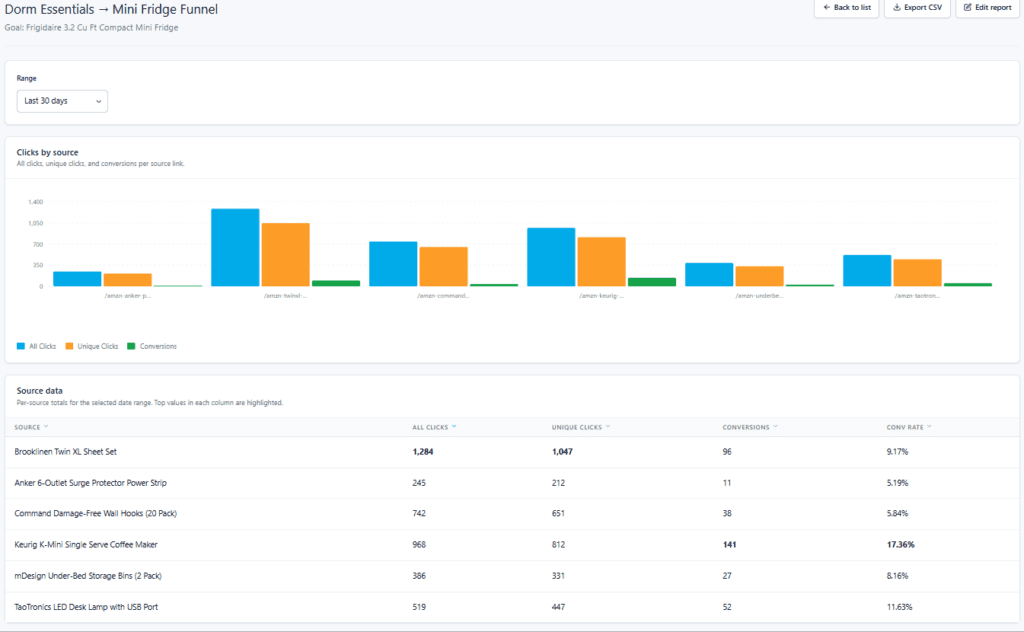
What’s better in v4 is how much easier the report itself is to build and read. Finding and selecting your links is faster and more intuitive, so a full report comes together in seconds — updated with the same modernized look you see throughout the plugin.
More Upgrades Across Your PrettyLinks Setup
With everything else happening in v4, this little lightning round of quick wins might fly under the radar. Don’t sleep on them, though — once you find them, you’ll wonder how you ever managed without them:
⚡ A new filter bar. Sort your links by trashed, expired, broken, or split-test status to find what you’re looking for in a fraction of the time.
⚡ Full column control. Customize your links list and click history to show only the data you want, and hide whatever isn’t useful.
⚡ Duplicate link button. Copy any link in one click, right from the list view. Perfect for creating variations fast.
⚡ Bulk actions. Tackle your link management in fewer clicks by editing, trashing, or updating multiple links at once.
⚡ Autocreate links. Now works across custom post types alongside standard posts and pages, automatically linking more of your content.
⚡ Rewritten import/export. Imports and exports now run in manageable batches instead of all at once, so large libraries can migrate or back up without timing out or crashing your server.
⚡ Smarter bot and spam filtering. PrettyLinks now automatically blocks 70+ bots from inflating your click data, with the option to add your own custom user agents and IP addresses to the list.
⚡ Slug protection. Prevents your PrettyLinks from accidentally overlapping with WordPress core paths and protects your site from broken routes.
⚡ Sequential round-robin link rotation. A new option in Dynamic Redirection that cycles visitors through your links one after another instead of distributing clicks by percentage.
⚡ Upgraded QR Codes. Now support custom logos (with adjustable sizing) and an optional white background for better scannability — all customizable on a per-link basis.
⚡ New Developer Tools webhook events. Trashed, updated, and restored events give anyone building custom integrations more granular hooks to work with.
⚡ Anonymize IP addresses. A simple toggle for GDPR, CCPA, and LGPD compliance.
Each of these updates came from you — the friction points you’ve flagged, the limitations you’ve worked around, and the ideas you’ve shared for what could make PrettyLinks more profitable to use.
PrettyLinks gets better because you keep showing up to tell us where it needs to.
What to Know Before You Update to PrettyLinks Version 4
The single most important thing you should know going into this update is: PrettyLinks Version 4 is fully backwards compatible.
Your existing link library, keyword replacements, click performance data, and redirect setups — every configuration preference you’ve tuned over time carries over to v4 exactly the way you built it in v3.
There is one small change worth noting in how you organize your affiliate links. We noticed categories were the clear favorite over tags. So in Version 4, we’re going all in on categories for a cleaner, more focused way to keep your library organized.
Rest assured, any tags you created in v3 will stay where they are and keep working the way they always have. The only change is that you won’t be able to create new tags going forward.
One last thing to keep in mind: if you ever decide to revert from v4 back to v3, anything you created using new PrettyLinks features (like a Splash Page or a QR Code with a custom logo) may not display correctly in the older version.
But from what we can tell so far, our users are loving the update and already saying they’ll never go back. Once you spend a few minutes inside Version 4, we think you’ll feel the same.
Now What?
Phew… I told you PrettyLinks Version 4 came with a lot! And there’s plenty more to come.
We’ve got dedicated articles lined up over the next several weeks. We’re talking deeper walkthroughs on what each feature does, how to set it up, and how to actually put it to work in your affiliate marketing strategy.
To make sure each one lands in your inbox the moment it’s live, don’t forget to subscribe to the PrettyLinks newsletter, and we’ll send them your way as they go live.
Don’t want to wait on the deeper coverage? Scroll back through any section of this article and you’ll see we’ve got support docs in place for every new feature — each one walking you through exactly how to set it up and start using it.
Hop into those and, who knows, maybe you’ll be the one teaching us a thing or two about how to use PrettyLinks Version 4.
Already using PrettyLinks? Head to your WordPress dashboard and hit update to get PrettyLinks Version 4 running on your site today.
New to PrettyLinks? Head to our pricing page to find the plan that fits your affiliate strategy. Version 4 gives you more ways to monetize your links than ever before.





Leave a Reply