
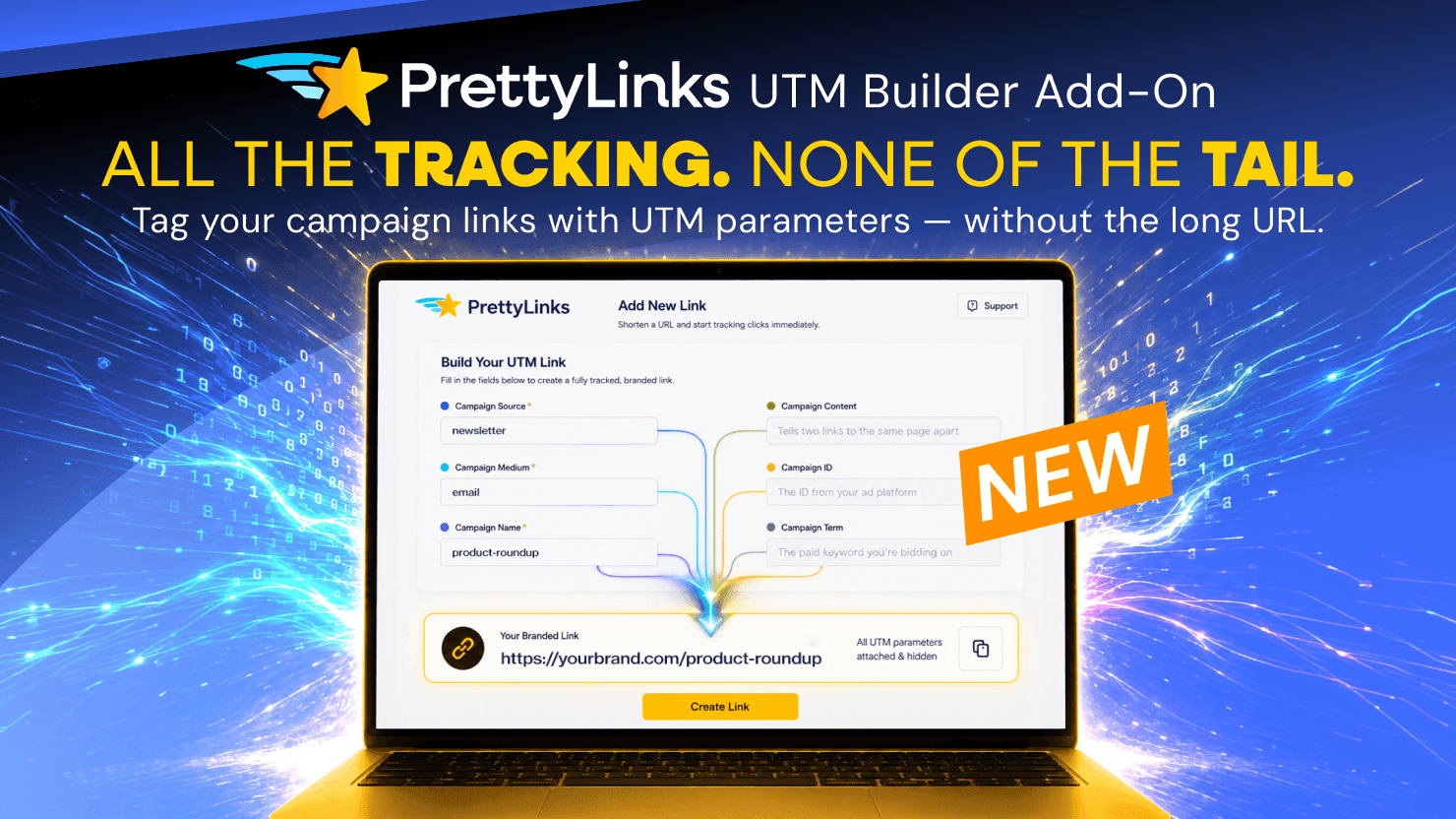
The NEW PrettyLinks UTM Builder is the easiest way to add campaign tracking to your links — and still keep them short enough to share anywhere you promote!
Fill in a few fields, and PrettyLinks builds your tagged URLs for you, attaching the campaign, source, and medium parameters automatically so every click traces back to where it came from.
And because we’re a link shortener at heart, we’re not about to leave you with a long UTM tracking tail to drag behind every link.
That’s why we’ve added the UTM Builder inside the same dashboard where you shorten, cloak, and manage your links. So your tracking stays hidden and only shows up where it counts: your analytics.
Your links come out organized, consistent, and precisely tracked across all your promotional content, so you can stop wondering where your visitors come from and start seeing exactly which campaigns bring in the traffic that converts.
Contents
What is a UTM?
A UTM (short for Urchin Tracking Module) is a set of tracking parameters you add to the end of a link’s URL.
Each parameter records something specific about the click, so your analytics can trace a visit back to the exact promotion that earned it.
There are six parameters in total — three required, and three optional for when you want more detail:
- Source (required): The specific place a visitor clicked through from, like a particular newsletter send, a Facebook post, or a link shared on another site.
- Medium (required): The broader channel that source belongs to; i.e., a newsletter falls under email, a Facebook post under social, a guest feature under referral.
- Campaign (required): The name that ties a batch of links together under one label, like a product roundup piece or seasonal sale push. (PrettyLinks labels this field “Name.”)
- Content (optional): The detail that tells two links apart when they point to the same place, like the same URL placed as a button and again as a plain text link.
- ID (optional): An extra tag that advanced setups use to connect a campaign to its ad spend data.
- Term (optional): The exact keyword a paid search visitor searched before they clicked, dropped right into the link.
Once those tags are in place, your analytics handles the sorting for you, grouping every visit under the tags you set.
From there, you can zoom out to see how a whole campaign performed, or zoom in on a single link to see what it brought in on its own.
Why UTM Tracking Matters to Marketers
Like every blogger, email marketer, YouTuber, podcaster, influencer, social media manager, PPC specialist, and digital marketing team, you’d never push a campaign in one spot and call it done.
You’ll share that one link in front of your audience half a dozen ways:
- Email — your weekly newsletter, an automated sequence, the same promo message tweaked for a few different lists.
- Social — posts, stories, reels, and your link in bio, spread across every platform you’re on.
- Paid ads — the ones running on social and the ones you bid on across search engines.
- DMs and texts — one-to-one replies, group threads, and mass sends, across every app your audience uses.
- Your own content — within the PDFs, ebooks, digital downloads, and templates you’ve put out.
- Other people’s sites — a guest post, a podcast mention, a spot in a partner’s newsletter.
Once your link is out there working every angle, the questions start piling up as fast as the clicks:
- Are these links getting clicked?
- Which channels send the most traffic to my site?
- What do those visitors do once they land?
You’d think you could open your analytics and check. But without UTM tags, all that traffic piles up in your reports as a vague lump — “direct,” “unknown,” a channel with no story behind it.
The numbers climb, and you’re left wondering which of those shares did the climbing.
UTM parameters answer it. Source pins down the exact place a visitor came from, medium names the channel type, and campaign ties a whole push together — while the optional three go finer: telling apart which version of a link won, which ad spend paid off, and which keyword pulled the click.
So instead of guessing which post or promotion actually landed, you finally see it!
The Trouble with Adding UTM Tracking to Your Links (Without the Right Tool)
There’s no arguing the clarity and extra insight UTM tracking brings to your reports… but in their raw form, they’re a real pain to work with.
Anyone who’s tagged links for a full campaign on their own knows the headaches a little too well.
Adding UTM Tracking to a Link Takes More Patience than it Should
Building UTM tracking onto a link is finicky work: the formatting, the tags that have to line up just right, the one wrong character that throws the whole thing off.
Still, marketers managed to get it done one of a few ways, none of them quick:
- By hand. Typing every parameter onto the link yourself, character by character, hoping you don’t misspell a value, drop a question mark, or add an ampersand where one doesn’t belong.
- In a spreadsheet. A column for each parameter and a row for each link, all lined up where they’re a little easier to stitch into finished URLs. Cleaner than by hand, but a whole separate step to build and keep up outside your link collection.
- With a third-party tool. You fill in a form with the parameters labeled for you, copy the tagged URL it builds, and repeat for every new link. Nothing you enter is saved, though, and you’re left with a long URL to share and manage on your own.
However you do it, manually adding UTM tracking is slow, careful work you repeat for every new link.
Sharing a UTM-Tagged Link is Suspicious and Practically Impossible
Once you push through all that and get the tracking built onto your link, you still have to put it in front of your audience — where it works against you nearly every way you’d want to use it:
- It’s long. The three required tags alone make for a lengthy link, and any optional ones you add stretch it further. Anywhere you share a link that long, it competes with your message for attention.
- It looks suspicious. All those question marks, ampersands, and equals signs put people on guard, and plenty won’t click a link that reads like that.
- It broadcasts your strategy. Your source, medium, and campaign names sit right out in the open, spelling out your whole playbook for any competitor nosy enough to read it.
- It can’t be spoken or printed. Even if you manage to read a full UTM string aloud on a podcast or fit it on a flyer, no one’s going to remember it or type all that in. Off a clickable screen, your tracking URL tracks nothing at all.
- It breaks. Some platforms chop long URLs off partway, others strip the parameters clean off, and a few mangle them the moment you paste, taking your tracking down with them.
So the very link built to show you where your traffic comes from ends up costing you some of that traffic instead.
Introducing the NEW PrettyLinks UTM Builder Add-On
PrettyLinks retires every one of those routines and roadblocks! The UTM Builder keeps the whole job inside your link management plugin, right in the link editor itself — no third-party tools, no extra tabs, no spreadsheets.
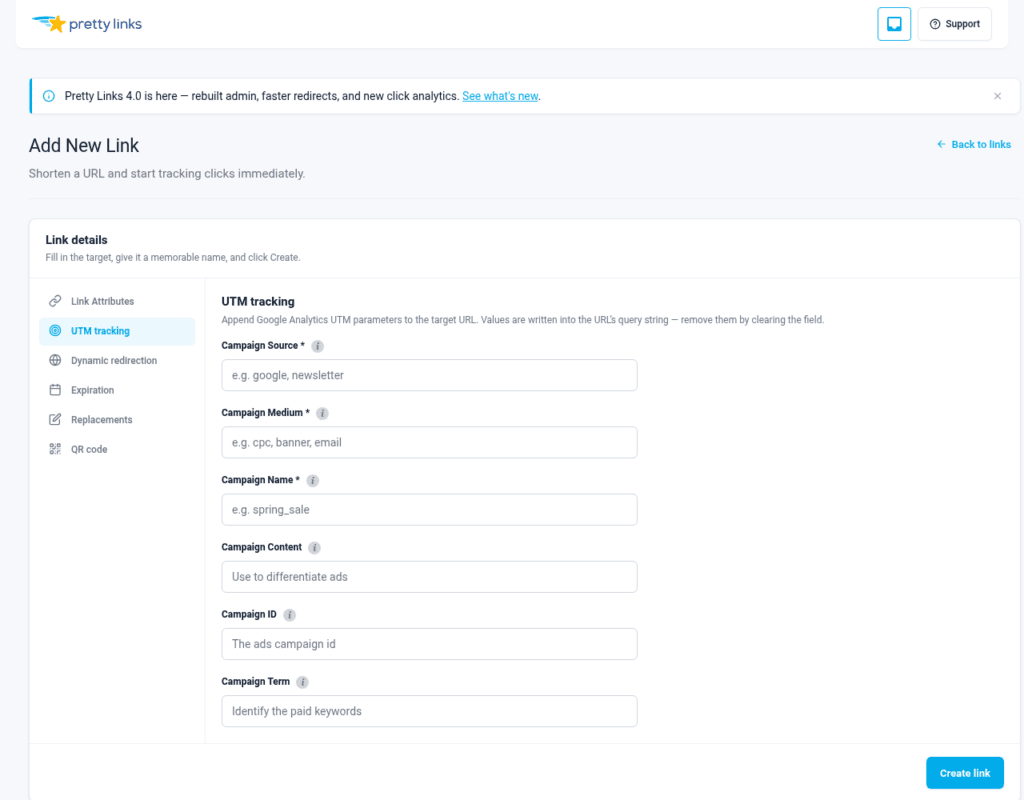
Fill in your campaign details, and PrettyLinks merges your UTM parameters onto the target URL automatically.
Say your campaign points to your yoursite.com/best-usb-hubs roundup post.
PrettyLinks can help you build out each tagged link you need — like this one, set up to track your email send:
yoursite.com/best-usb-hubs?utm_source=newsletter&utm_medium=email&utm_campaign=usb-hubs-roundup
Correctly formatted, every question mark and ampersand in its place, every single time.
Full Tracking on One End, a Clean Link on the Other
Here’s the part that makes it all distinctly PrettyLinks: all of that tracking lands on the target URL, not on the link you share.
Your pretty link stays short, branded, and clean enough to use anywhere — dropped in a social post or read aloud on a podcast.
When someone clicks, PrettyLinks forwards them to the fully tagged destination, while the analytics on that page is still able to read the parameters.
Give Every Clean Link a Name It Can Carry
Need several tracked links to the same page? Duplicate the link, swap in the new UTM parameters, and add a short label to each slug.
That way every link tells you what it is at a glance – out in a share and in your collection months later.
How PrettyLinks UTM Tracking Connects to Your Analytics Platform
The UTM tracking you add to a pretty link, doesn’t stop at PrettyLinks. It’s the starting point for everything your analytics reads next.
The two work hand in hand: PrettyLinks counts the click, and your analytics platform picks up from there to show you what it led to.
For most creators, that platform is Google Analytics, the most widely used reporting tool out there.
Once your tagged clicks land in GA, every visit stops being an anonymous arrival and starts showing you what the person did on your site:
- how long they stayed on the page they came for
- whether they read to the end or bounced in seconds
- whether they clicked deeper into your site or left right away
- which pages they viewed before and after
- whether they came back later
The same tags that surface those details are also the ones you can build customized reports around, shaping each one to whatever you’re trying to measure.
Tag your campaigns consistently, and each one turns into something you can single out and compare at the top level of your Traffic acquisition report.
Your promotions, roundups, and content pushes each get their own line, so a single glance tells you which ones are bringing people in and which are falling short.
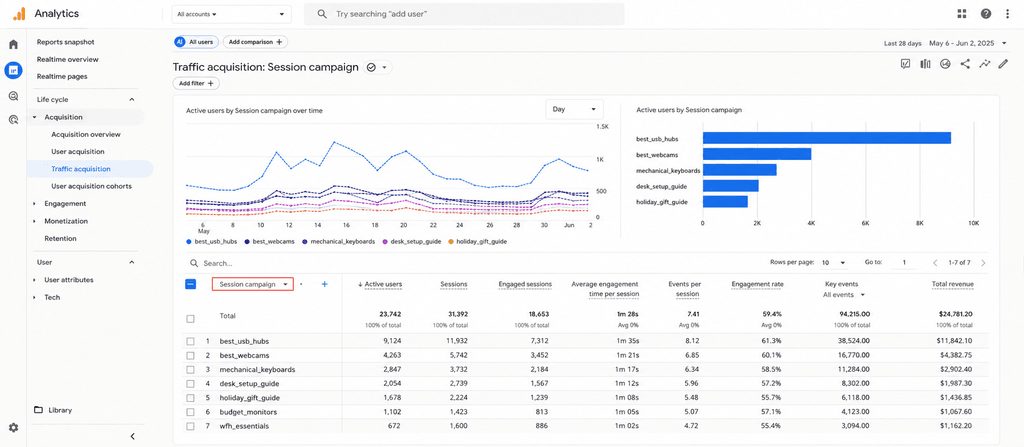
On its own, a campaign name gives you a single number for the whole push. Source and medium break that number apart, pinning each visit to the exact spot it came from and grouping those spots by the type of channel they belong to.
What you get is a clear view of how one campaign’s traffic broke down across every place you shared it, from a newsletter to a Pinterest pin to a YouTube description.
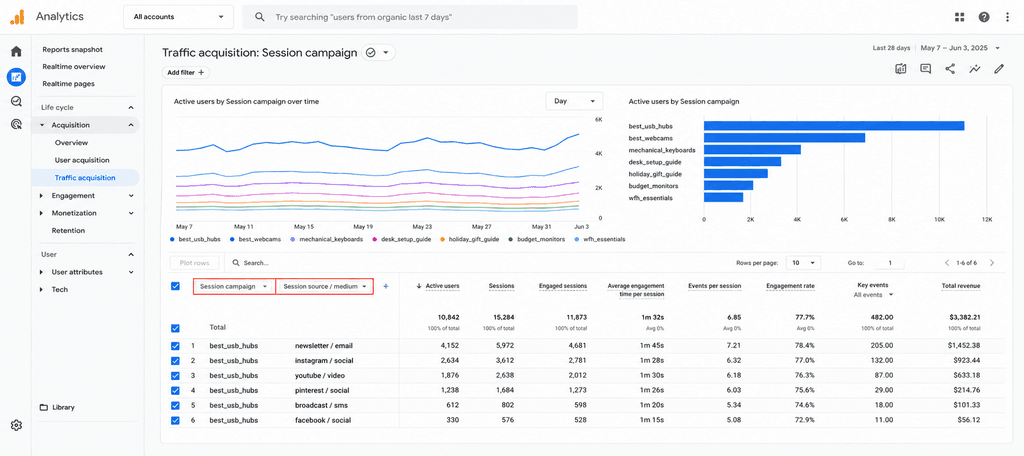
You decide how wide or tight each report runs, and every one you build is saved for you to open again, whether to track how a campaign performs over time or to base your next build.
Google Analytics Making Your Head Spin?
MonsterInsights takes that same reporting and lays it out in your WordPress dashboard, in a cleaner, much simpler view. You see how your campaign links are doing where you already work, without digging through Google Analytics to find it.
💡 Even better, our MonsterInsights integration pulls your affiliate link clicks into that same dashboard, reporting them right alongside your campaigns. Now every link you’re running, campaign and affiliate alike, adds up to one clear picture of your marketing.
Ready to Track Every Click Back to Its Source?
Right now, you’ve got campaign links working all over: the email you fired off Monday morning, the social posts that followed throughout the week, and the ads you’ve got scheduled to run all month.
Every one of them is earning clicks and sending visitors your way. The only thing missing is the ability to name where each of those visitors came from.
The PrettyLinks UTM Builder gives you exactly that. You set your source, medium, and campaign, and PrettyLinks attaches them to the link for you, so your tracking’s in place before the link ever goes out.
From there, every tagged click lands in your analytics, and all that traffic you couldn’t place before finally sorts itself out, grouped by where it came from, down to the link, the channel, and the campaign that sent it.
Get started with the PrettyLinks UTM Builder and run your next campaign knowing exactly where every click is coming from.







Leave a Reply