
Contents
Some of your best community-building assets are already sitting on your blog.
A tutorial that brings in steady search traffic. A product roundup readers keep clicking through. A comparison post that answers the exact question your audience keeps asking.
These posts are doing more than filling your content calendar – they’re pulling in people with shared problems, shared interests, and real buying intent.
The trouble is, most readers treat them like one-time stops. They land on the page, get the answer, click an affiliate link, and leave.
That earns you a commission, but it doesn’t give anyone a reason to come back, join your list, or see you as someone worth learning from again.
Building a community around that content doesn’t mean starting over or launching something new. It starts with noticing which posts already bring the right people in – then giving those readers a clear path to stay.
That’s what this article walks through, using the content you already have.
Why Your Existing Content Is Your Biggest Asset
Attention is the expensive part of building anything online. Ranking a post takes months. Earning a click takes trust.
If your content is already pulling in steady traffic, the hardest work is done – what’s missing isn’t visibility; it’s depth.
People find your post, read it, and leave, and nothing about that visit asks them to stick around.
That gap is the opportunity. A post that ranks has already proven demand for the topic, and the readers landing on it have qualified themselves three times over: they have the problem, they searched for it, and they trusted your answer enough to click.
So the move isn’t creating more. It’s taking the posts already converting attention and giving those readers somewhere to go besides the exit.
Identify the Content that Should Lead Your Community
Not every post needs to carry the weight of building your community – and trying to rework all of them at once is how this project stalls before it starts. A handful of your posts are already doing the recruiting for you. The job is finding them.
Start with posts that check at least one of these boxes:
- High traffic – they consistently bring people in
- High engagement – people spend time reading, commenting, or clicking around
- Strong affiliate intent – readers are already close to taking action
The first two signals come straight from your analytics. The third is where PrettyLinks becomes useful. Its click reports show which affiliate links people are actually clicking, so you’re not guessing which topics or products your audience cares about.
Turn High-Traffic Posts into Connection Points
Your top posts were built to do one job: answer a question. That’s exactly why they rank – and exactly why readers leave.
Once the question’s answered, the page has nothing left to offer, so the reader takes the answer (and maybe your affiliate link) and goes.
Turning that post into a connection point doesn’t mean restructuring it. It means adding an invitation – and putting it where interest actually peaks, which is almost never the end of the post.
Most readers won’t get there. Interest peaks right after you’ve delivered the thing they came for: the verdict in a comparison, the recommendation in a roundup, the working solution in a tutorial.
That’s the moment a reader is most convinced you know what you’re talking about – and the moment an invitation feels like a favor instead of a pitch.
So place it there. A line after your comparison verdict: “This is the kind of testing I share every month with subscribers – join here.” A note under the tutorial’s solution: “Stuck on this step? Ask in the community, and I’ll walk you through it.”
One invitation, in the reader’s moment of highest trust, beats three CTAs stacked at the bottom of a page nobody scrolls to.
Add Community Hooks Inside Your Content
If you want readers to engage with your content, don’t only send them somewhere else. Give them something to respond to while they’re still reading.
That’s what a community hook does. It’s a line, question, or opinion inside your content that makes the reader pause and think, “I agree,” “I disagree,” or “I have something to add.”
Hooks work especially well in affiliate content, because recommendations naturally invite opinions. People have strong feelings about the tools they use, the products they trust, and the advice they’ve already tried.
So instead of writing a completely neutral feature list, add a clear point of view: “This tool’s free plan is strong enough for most beginners. I wouldn’t upgrade until your traffic or sales justify the cost.”
That gives readers something to respond to. Some will agree, some will have had a different experience, and others will want to ask a follow-up. That’s the beginning of community.
You can also make the hook more direct:
- “If you’ve used this tool before, what worked better for you: the free plan or the paid?”
- “Have you tried this setup? I’d love to know what you changed.”
- “Would you still recommend this tool in 2026, or has something better replaced it?”
A hook won’t pull a comment out of every reader, and it doesn’t need to. When even one reader shares their setup, challenges your take, or asks a question, they’ve stopped just passing through – they’ve started participating.
Create a Simple Path from Reader → Member
By this point, your strongest posts should have two things: a reason for readers to engage and a clear invitation to stay connected.
The next step is making sure those invitations don’t send people in different directions.
That’s where many affiliate sites lose momentum. One tutorial offers a checklist. A comparison post asks readers to join an email list. A roundup points them to a community.
Each offer makes sense for that specific post, but if they all lead to disconnected places, the reader’s relationship with you stays scattered.
You don’t need fewer offers. You need a clearer path.
A checklist can lead to your email list. Your email list can introduce readers to your community. Your community can become the place where the relationship actually grows.
That way, each post can have its own entry point, but every entry point still moves readers toward the same place.
Before adding another signup form or download, map the journey once. After someone clicks, what happens next? Do they hear from you again? Do they get invited into a space where they can ask questions, share experiences, or keep learning from you?
When every offer supports the same path, your content stops creating separate one-off interactions and starts moving readers from casual visitors to people who recognize you, trust your recommendations, and join your community.
Build a Central Space for Your Community
Once readers start engaging with your content, they need somewhere to continue the conversation.
Social platforms can help with visibility, but they’re not the best place to build a community you fully own.
Your reach depends on the algorithm, your conversations compete with endless distractions, and your member relationships live on someone else’s platform.
That’s why your WordPress site is a better home base.
With MemberPress and the ClubSuite™ add-ons, you can turn a standard membership site into a private community where readers don’t just consume your content. They become members, meet each other, join discussions, and keep coming back to a space built around your brand.
Members can find each other and start conversations with ClubDirectory™ and ClubConnect™.
ClubDirectory™ gives your community a searchable member directory with profiles, photos, bios, social links, and filters by role, membership, or location.
When members find someone they want to connect with, ClubConnect™ lets them send a direct message inside your site, instead of moving the conversation to email, LinkedIn, or another platform.
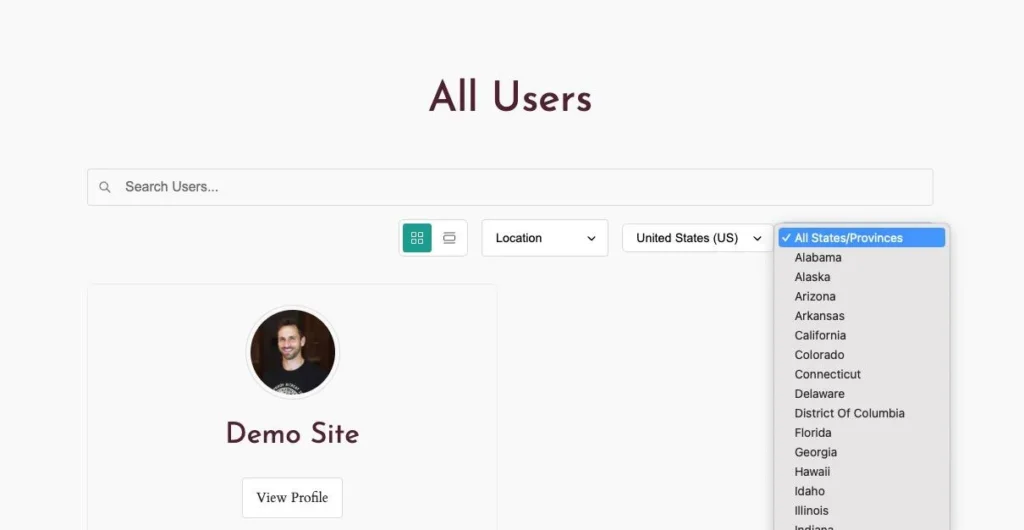
Conversations happen on your domain with ClubCircles™. Members can post updates, reply in threads, react, and follow the discussions that matter to them. It feels familiar to anyone coming from social – but without ads, public noise, or an algorithm deciding which conversations get seen.
The activity stays on your site, and so does the relationship you’re building with your audience.
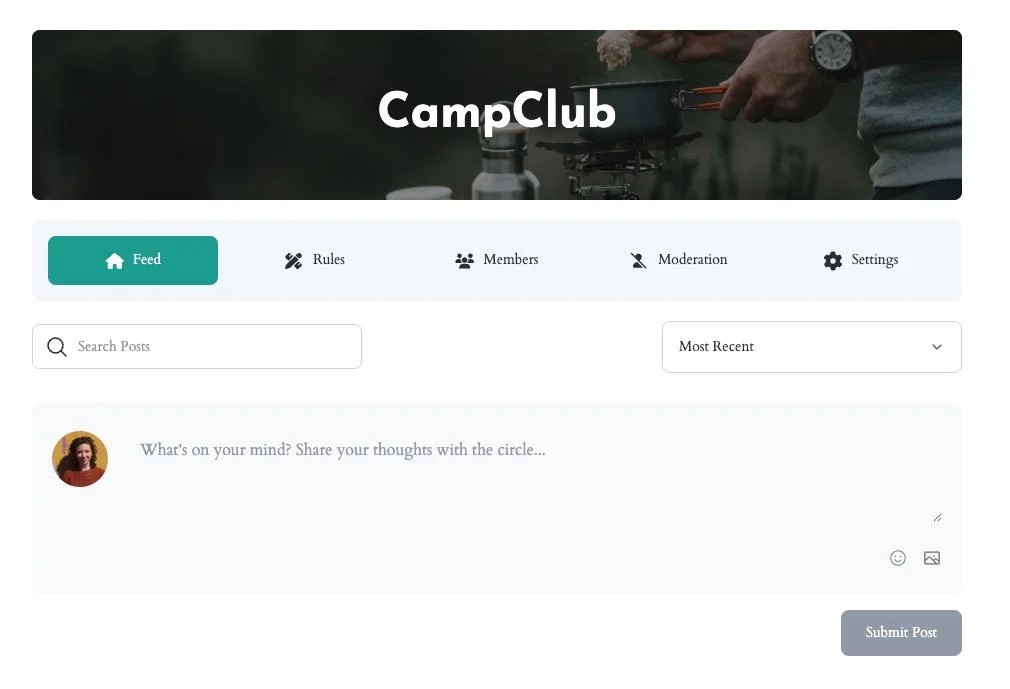
The space also stays easier to manage. ClubCircles™ includes community rules, member flagging, and a moderation queue, so you can review reports and handle issues before they take over a discussion.
Members get a focused place to ask questions, share ideas, and learn from each other.
And all of it – the profiles, the threads, the relationships – lives on a site you control. No platform rule change can take it away, and every conversation makes your site, not someone else’s feed, the place where your audience talks.
Use Your Existing Links to Strengthen the Relationship
Your affiliate links earn commissions, but that’s only half of what they do. Every click is also a signal. It tells you what your readers care about, what problems they’re trying to solve, and what they’re ready to spend money on.
Treat each click as the end of a transaction, and that information goes to waste. Treat it as input, and your links start telling you what your community needs next.
PrettyLinks gives you that input in its Reports dashboard. You’re not looking at a total click count – you’re seeing which specific topics and tools are pulling the most attention right now.
If clicks on an email automation tool are climbing, your readers are thinking about automation. You’re reading your audience’s intent in real time, without sending a single survey.
That intent should shape what happens inside your community. Instead of guessing what to post in your Circles, start the discussions your click data has already validated.
A spike on a WordPress plugin link becomes a thread asking members how they’re using it and what they’d change. A steadily popular comparison post becomes a recurring “what are you actually using?” conversation.
Members respond to these threads because the topic was never a guess – they told you they cared, one click at a time.
The same data also works in the other direction: it turns your posts into community recruiters.
When a link in your content gets consistent clicks, that’s the exact spot for a community invitation – a line near the link noting that members are discussing that tool inside your Circles.
The reader has just shown interest, and the invitation meets it. A click that used to end the relationship now starts one.
Keep People Coming Back
A community doesn’t run on the day you launch it. It runs on week six, when the welcome-thread energy has worn off, and members are deciding – without telling you – whether your site is still worth a regular visit.
What tips that decision is whether the place feels alive: whether something has changed, moved, or continued since the last time they looked.
You don’t need a new flagship post every week to create that feeling. Three habits do most of the work:
- Update your existing posts – and say so. When you refresh a recommendation or revise a tutorial, mention it in your Circles: “Just re-tested the tools in the comparison post – one of my picks changed.” The update keeps the post ranking; the announcement gives members a reason to come back to both the post and the discussion.
- Reference older content in new posts. Every internal link keeps a reader moving through your site instead of bouncing after one answer – and it signals that your content is a connected body of work, not a feed of one-offs.
- Run ongoing themes or series. A monthly tool-test, a recurring “what’s in my stack” thread, a quarterly re-ranking of your top recommendations. A series makes the next visit part of this one: members leave already knowing there’s a reason to return.
None of these requires more output than you’re already producing. They require connecting what you produce – so that to a member, your site reads less like an archive and more like something in motion.
Your Community is Already in Motion
You don’t need to start over to build a community. You need to connect what’s already running: the posts that rank, the links readers click, the interest your content has already earned.
And the pieces you’ve set up in this article don’t work in isolation – they feed each other. Your top posts carry invitations, and every invitation points down the same path.
That path ends in a space you own, where your click data tells you which conversations to start next. Those conversations give members a reason to return, and returning members click, comment, and signal what your content should do next.
Each loop through makes the next one stronger.
Start with one post. Pick the page your PrettyLinks reports already flag as your most-clicked, add one invitation where the interest peaks, and point it at the space where the conversation continues.
Your readers have been telling you what they want, one click at a time. The community starts when you answer.




Leave a Reply