
Available on the Super Affiliate plan.
If you create a lot of splash links, setting them up one at a time gets repetitive. Global defaults let you configure a default heading, subheading, media, CTAs, template, and behavior once — and every new splash link inherits those defaults automatically. You can still override any field on individual links.
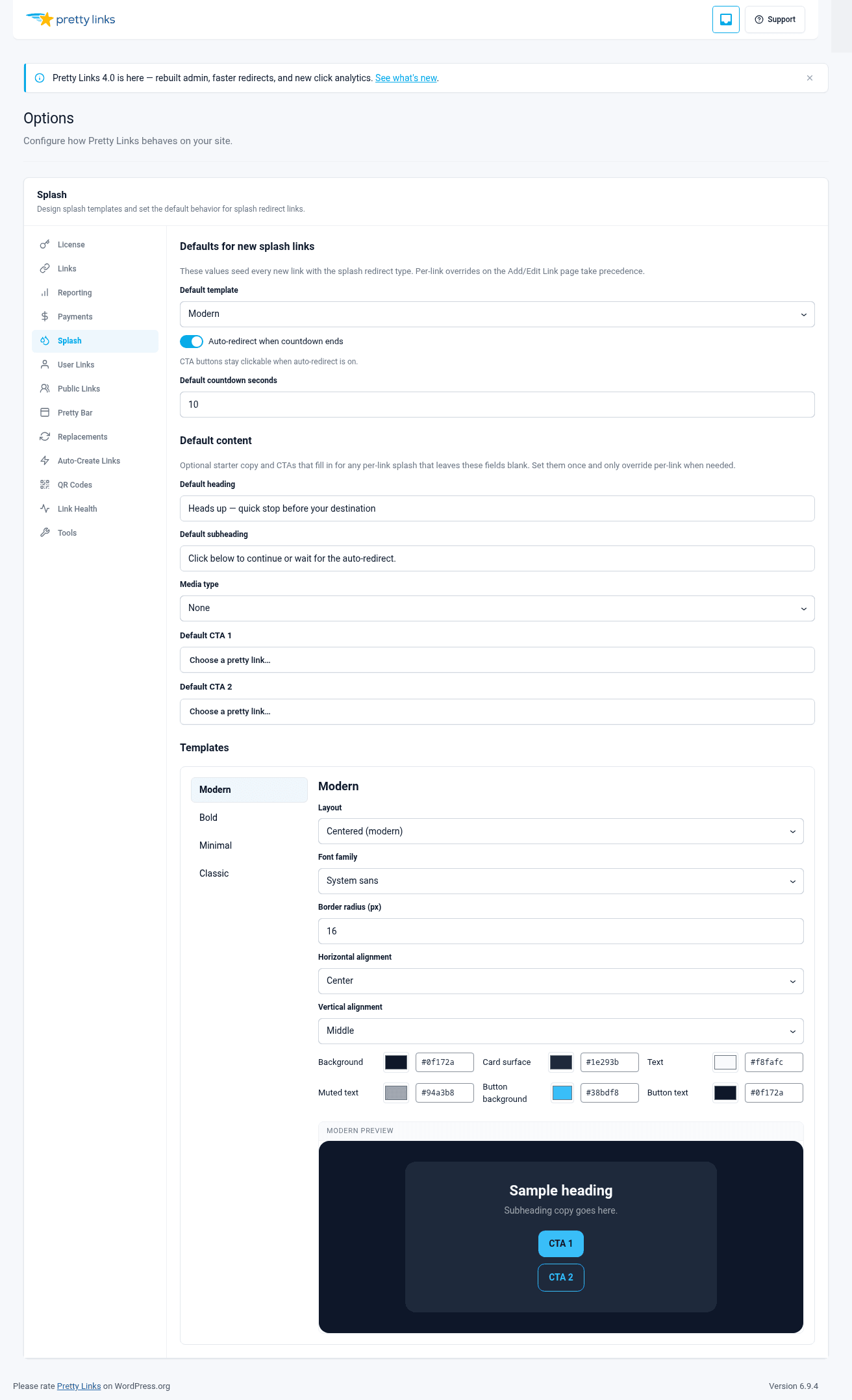
Where to Set Defaults
In the WordPress admin sidebar, go to Dashboard > Pretty Links > Options > Splash Pages.
This screen has the same fields as a single splash link’s Splash tab — heading, subheading, media, CTA1, CTA2, template, behavior — but everything you set here applies as the default for new splash links going forward.
What You Can Default
Default Template
The most common default to set. If you nearly always use Minimal for affiliate disclosure splashes, set Minimal as the default and you won’t have to pick it again.
Default Behavior
Auto-redirect with a 5-second delay is a common default for affiliate disclosure sites. Setting it once means every new splash starts with that behavior.
Default Heading and Subheading
Some sites use the exact same disclosure text on every affiliate splash. Setting it as the default means you don’t have to type it again — create the link, set the target URL, and ship.
Example default heading: “This is an affiliate link” Example default subheading: “I earn a small commission if you make a purchase. Your price stays the same.”
Default CTA Labels
If your CTA1 is always “Continue” and your CTA2 is always “Cancel,” set those as defaults. The URL field still gets filled in per link (since it depends on the target), but the labels are reusable.
Default Media
Less common, but useful if every splash uses the same brand image or logo. Set it once and it appears on every new splash by default.
How Inheritance Works
The defaults apply at the moment a new splash link is created. Every field on the new link starts pre-populated with the global default value. You can:
- Leave it as-is to use the default;
- Override it on this link to use a custom value for this link.
Per-link overrides don’t change the global default. You can have 50 splash links inheriting the default heading, plus 3 that override it with custom copy, and the global default is unchanged.
What Happens When You Change a Default
Changing a global default does not retroactively change existing splash links. If you change the default template from Modern to Minimal, every existing link keeps using whatever template it had at creation time — only links created after the change pick up the new default.
This is intentional. It means changing defaults is safe — you won’t accidentally break the look of every splash page you’ve built.
When to Use Defaults
Set up global defaults when:
- You’re standardizing splash pages across a content team. Pick the template, headline pattern, and behavior once; the team doesn’t need to make those choices on every link;
- You have a consistent disclosure or branded handoff message you use everywhere;
- You’ve A/B tested templates and behaviors and found a clear winner — set the winner as the default to lock it in.
Skip defaults when:
- Every splash you create is genuinely unique. There’s nothing to default to;
- You’re still experimenting and want each link to be a fresh decision.
Tips for Setting Good Defaults
- Default to your most common case. If 80% of your splashes are affiliate disclosure, set affiliate-disclosure values as defaults and override the other 20%;
- Default to safer behaviors. Auto-redirect with a 5-second delay is friendlier than gate-CTAs as a default. Visitors who don’t read won’t get stuck;
- Default to short copy. Short headings work for almost any context. Long copy fits fewer cases;
- Re-evaluate after a few months. Your defaults should reflect how you actually use splash pages. If you find yourself overriding the same fields on every link, that’s a sign the default is wrong — update it.