
Le Pretty Bar Il s'agit d'une barre d'outils personnalisée qui s'affiche en haut (ou en bas) de la page de destination lorsqu'un visiteur clique sur l'un de vos « pretty links ». Sous cette barre, la page de destination s'affiche dans son intégralité, mais les visiteurs voient votre image de marque, votre message et votre appel à l'action s'afficher en permanence.
C'est une alternative plus visible à Redirection Cloak et un outil permettant de maintenir le lien entre votre public et votre marque, même lorsqu'il consulte du contenu externe.
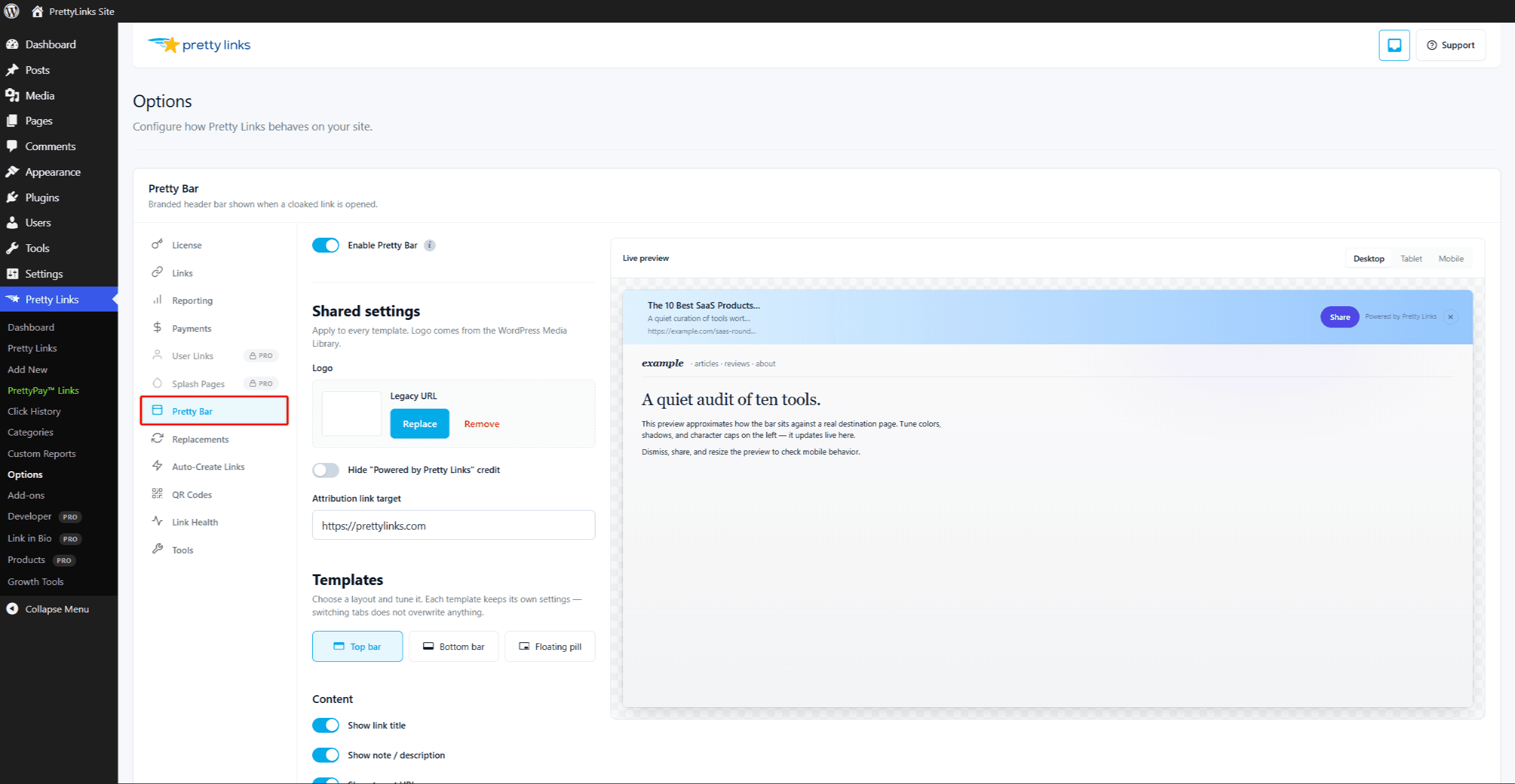
Ce que peut inclure le « Pretty Bar »
Vous pouvez configurer la Pretty Bar à l'aide des éléments suivants :
- Votre logo ou le titre de votre site — Ancré à gauche ;
- Un message personnalisé — Un titre, un slogan ou un appel à l'action ;
- Un bouton — Créer un lien vers votre page d'accueil, votre formulaire d'inscription ou toute autre URL ;
- Icônes de partage sur les réseaux sociaux — Encourager les visiteurs à partager ce qu’ils regardent ;
- Un bouton « Fermer » — Ainsi, les visiteurs qui souhaitent passer en plein écran peuvent masquer la barre.
Vous pouvez définir les couleurs, le texte et la mise en page depuis les paramètres généraux.
Configuration de Pretty Bar
Les paramètres globaux de Pretty Bar sont disponibles à l'adresse Tableau de bord > Pretty Links > Options > Pretty Bar. Vous pouvez y configurer :
- Position de la barre (en haut ou en bas de la page) ;
- Hauteur et couleurs du bar ;
- Téléchargement du logo ;
- Texte par défaut du titre et du bouton ;
- Options de partage sur les réseaux sociaux ;
- Comportement par défaut des nouveaux liens « pretty-bar ».
Une fois que vos paramètres généraux correspondent à vos attentes, définissez le type de redirection de chaque lien sur Pretty Bar pour utiliser ce style.
Quand utiliser Pretty Bar ?
- Liens d'affiliation — Maintenez la visibilité de votre marque tout en redirigeant les visiteurs vers la page d'un partenaire ;
- Partage de contenus sélectionnés — Lorsque vous partagez des articles provenant de sites tiers avec votre public, la barre leur rappelle d'où ils proviennent ;
- Collecte de prospects — Ajouter un bouton d'inscription ou “ S'abonner ” qui suive le visiteur jusqu'à la page externe ;
- Campagnes promotionnelles — Ajoutez une barre de code de réduction ou une bannière d'offre à durée limitée au-dessus de n'importe quelle page d'accueil.
Reprise automatique
Comme Redirection Cloak, Pretty Bar fonctionne en chargeant le site cible dans un cadre situé sous la barre. Certains sites refusent d'être affichés dans un cadre pour des raisons de sécurité.
Dans ce cas, Pretty Links bascule automatiquement vers une redirection 302 classique, ce qui permet au visiteur d'accéder tout de même à la page de destination, mais sans la barre. Vous n'avez rien à faire ; cette redirection est automatique.
Remplacement par lien
Bien que les paramètres généraux définissent l'apparence par défaut, vous pouvez également personnaliser la barre pour chaque lien depuis l'écran de modification de celui-ci. Par exemple, vous pouvez utiliser la barre standard pour les liens d'affiliation, mais personnaliser une barre spécifique avec un message adapté à une campagne pour une promotion de fin d'année.
Points à retenir
- Mobile — La barre « Pretty Bar » peut occuper une grande partie de l'écran sur les téléphones. Testez son rendu sur les petits écrans avant de vous lancer ;
- Règles du programme d'affiliation — Certains programmes d'affiliation interdisent l'utilisation de superpositions, de cadres ou toute modification de leurs pages de destination. Lisez les conditions générales de votre programme avant d'utiliser Pretty Bar sur vos liens d'affiliation ;
- Interactions avec la page — Les formulaires, les fenêtres modales et les affichages en plein écran sur la page de destination fonctionnent, mais peuvent paraître un peu à l'étroit à cause de la barre. Testez l'expérience telle qu'elle se présente réellement ;
- HTTPS — Pour que la page intégrée dans un cadre puisse s'afficher, votre site et la page cible doivent tous deux utiliser le protocole HTTPS.
Configuration d'un lien vers Pretty Bar
- Modifier le lien.
- Dans le cadre de la Type de redirection menu déroulant, sélectionnez Pretty Bar.
- (Facultatif) Personnalisez le titre, le bouton ou d'autres paramètres de la barre pour ce lien spécifique.
- Cliquez sur Mise à jour.
Testez le lien dans une session de navigateur où vous n'êtes pas connecté pour voir comment la barre s'affiche avec vos paramètres réels.
Combinaison avec d'autres fonctionnalités
Pretty Bar est compatible avec :
Il n'est pas compatible avec Redirection Cloak — Ces deux approches reposent sur la mise en scène, et vous ne pouvez en utiliser qu’une à la fois. Choisissez l’expérience de marque qui correspond le mieux à votre objectif.