
Ciblage permet à un seul et même lien élégant de rediriger différents visiteurs vers des destinations différentes en fonction des règles que vous définissez : pays, type d'appareil, navigateur, système d'exploitation, heure de la journée, jour de la semaine, etc.
Un seul lien, plusieurs destinations, sélectionnées automatiquement pour chaque visiteur.
Ce sur quoi vous pouvez vous concentrer
- Pays — Sélectionner un ou plusieurs pays, ou les exclure, afin que les visiteurs américains et européens puissent être redirigés vers des pages différentes ;
- Type d'appareil — Redirigez les visiteurs sur mobile vers votre page optimisée pour mobile ; redirigez les visiteurs sur ordinateur vers votre site complet ;
- Système d'exploitation — les utilisateurs iOS sur l'App Store ; les utilisateurs Android sur Google Play ;
- Navigateur — Proposer une expérience différente aux utilisateurs de Chrome et aux utilisateurs de Safari ;
- Heure de la journée / jour de la semaine — Rediriger vers une page “ Magasin fermé ” en dehors des horaires d'ouverture ;
- Période — Définir une destination pour une plage de dates précise, puis passer à une solution de secours par la suite ;
- Combinaisons — Enchaîner plusieurs conditions avec tout le: “ Les utilisateurs d'iPhone aux États-Unis après 21 h. ”
Comment les règles sont-elles évaluées ?
Utilisations du ciblage le-premier-match-est-décisif évaluation. Pretty Links analyse vos règles de haut en bas, et la première qui correspond au profil du visiteur est retenue. Le clic de ce dernier est alors redirigé vers la destination associée à cette règle.
Si aucune règle ne correspond, le visiteur est redirigé vers l'URL cible principale du lien — c'est votre destination par défaut pour “ tous les autres ”.”
Utilisez les boutons « haut » et « bas » situés à côté de chaque règle pour les réorganiser. Placez les règles les plus spécifiques en haut et les règles plus générales en dessous.
Configuration du ciblage
- Modifiez le lien vers lequel vous souhaitez rediriger.
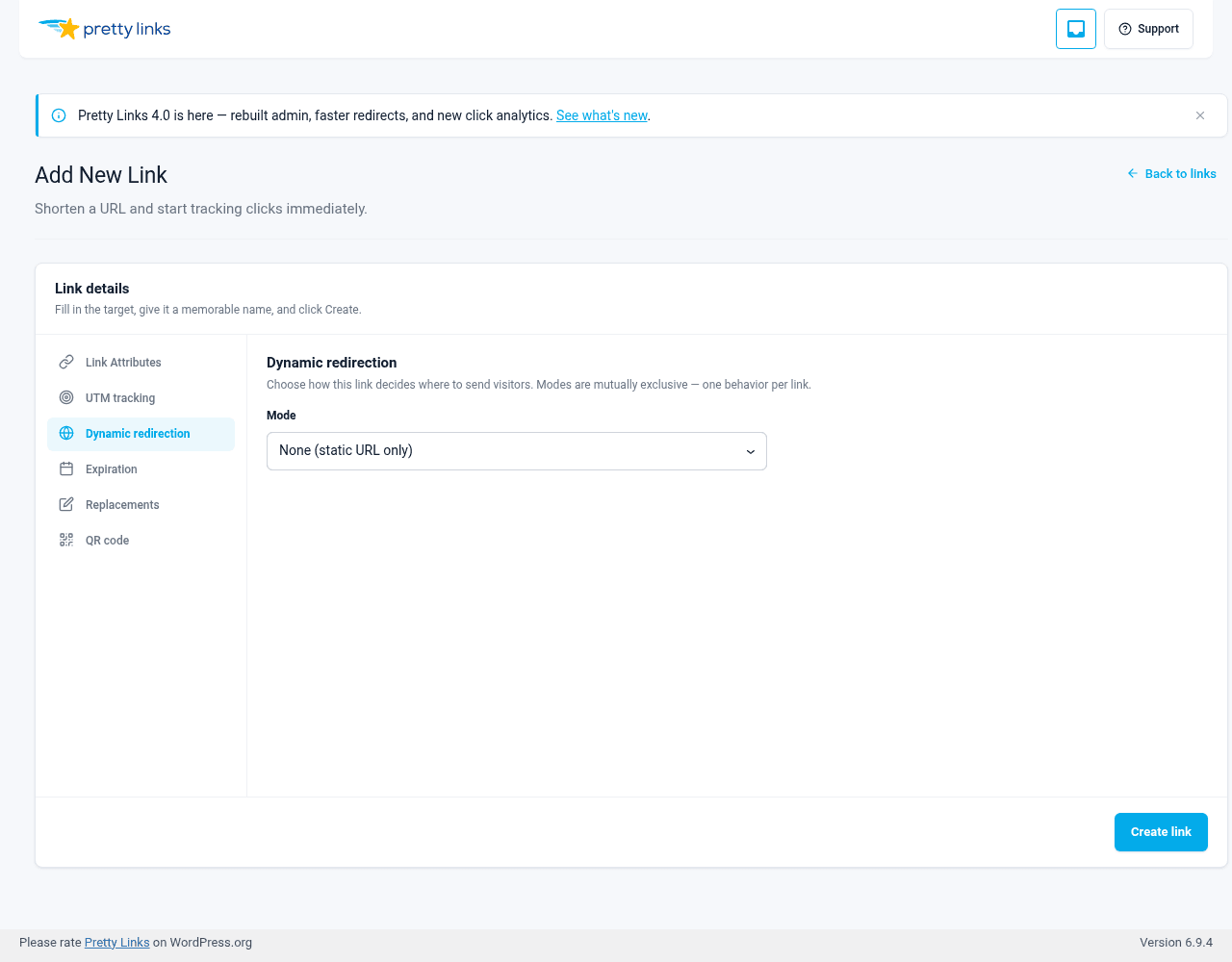
- Ouvrez le Redirection dynamique tabulation.
- Ensemble Mode à Ciblage géographique, Ciblage par appareil / navigateur / système d'exploitationou Ciblage en fonction de l'heure.
- Dans le cadre de la Règles de ciblage panneau, cliquez sur Ajouter une règle.
- Sélectionnez l'opérateur (par exemple “ Le pays est l'un des ”, “ Le type d'appareil est ”, “ L'heure se situe entre ”) et une valeur.
- Saisir le Rediriger vers URL correspondant à cette règle pour les visiteurs.
- Enregistrez le lien.
Ajoutez autant de règles que nécessaire. Réorganisez-les à l'aide des boutons « haut » et « bas » situés sur chaque ligne.
Exemples
Routage vers l'App Store / le Play Store
Une pratique courante chez les spécialistes du marketing d'applications :
- Règle n° 1 : Le système d'exploitation est iOS →
https://apps.apple.com/us/app/yourapp - Règle n° 2 : Le système d'exploitation est Android →
https://play.google.com/store/apps/details?id=com.yourapp - URL de destination par défaut :
https://yourapp.com/(pour les visiteurs utilisant un ordinateur de bureau)
Un lien court, trois destinations de choix.
Pages d'accueil géographiques
Organiser une promotion avec des tarifs ou des frais de livraison régionaux :
- Règle n° 1 : Pays : États-Unis →
/vente-us - Règle n° 2 : Pays : Canada →
/vente-ca - Règle n° 3 : Pays : Royaume-Uni →
/vente-royaume-uni - Par défaut :
/vente-internationale
Offres à durée limitée
Une vente flash disponible uniquement à certaines heures :
- Règle n° 1 : Heure comprise entre 9 et 17 (fuseau horaire du site) →
/vente-flash-en-direct - Par défaut :
/vente-flash-terminée
Redirection « Mobile-First »
Rediriger le trafic mobile vers un autre entonnoir de conversion :
- Règle n° 1 : L'appareil est mobile →
/m/page-d'accueil - Par défaut :
/page-d'accueil
Combiner le ciblage avec d'autres types de redirection
Le ciblage fonctionne avec tous les types de redirection : 301, 302, Redirection Cloak, Pretty Bar, etc. Le type de redirection détermine comment lorsque le visiteur arrive à destination ; le ciblage détermine quelle destination c'est-à-dire.
Par exemple, vous pouvez regrouper toutes vos variantes sous une même URL simplifiée, tout en redirigeant différents publics vers des destinations différentes.
Ciblage vs rotation et tests A/B
Ciblage et Rotation sont distincts Modes dans l'onglet « Redirection dynamique » ; un lien ne peut utiliser qu'un seul mode à la fois. Les règles de ciblage et la rotation ne peuvent pas s'appliquer simultanément à un même lien : choisissez le comportement qui convient le mieux à ce lien.
- Utilisation Géographique, Appareil / navigateur / système d'exploitationou En fonction du temps le ciblage lorsque la destination doit dépendre de l'identité du visiteur ou du moment où il clique ;
- Utilisation Rotation lorsque vous souhaitez répartir le trafic entre différentes variantes dans le cadre d'un test A/B ou même pour équilibrer la charge.
Pour combiner ces deux concepts, enchaînez deux maillons : un maillon de ciblage dont la destination correspondante est elle-même un maillon de rotation. Le premier maillon sélectionne l'entonnoir selon une règle ; le second effectue une rotation des variantes au sein de celui-ci.
Conseils
- Testez chaque règle. Utilisez un VPN ou l'émulateur d'appareil des outils de développement du navigateur pour vérifier que chaque chemin fonctionne comme prévu ;
- L'ordre a son importance. Privilégiez les règles spécifiques aux règles générales. “ iOS aux États-Unis ” doit être placé avant “ iOS partout ”. Les règles basées sur l'heure sont évaluées selon le fuseau horaire WordPress de votre site, et non selon l'heure locale du visiteur ;
- Veillez à toujours définir une URL de destination par défaut. Certains visiteurs ne respecteront inévitablement pas toutes vos règles. Veillez à ce qu’ils soient tout de même redirigés vers une page utile ;
- Évitez de segmenter à outrance. Trois ou quatre règles suffisent généralement amplement. À partir de vingt, cela devient difficile à respecter.