
En Pretty Bar Es una barra de herramientas con tu marca que aparece en la parte superior (o inferior) de la página de destino cuando un visitante hace clic en uno de tus enlaces personalizados. Debajo de la barra, la página de destino se carga por completo, pero los visitantes ven tu marca, tu mensaje y tu llamada a la acción mostrados de forma permanente.
Es una alternativa más visible a Redirección Cloak y una herramienta para mantener a tu público conectado con tu marca, incluso cuando está consumiendo contenido externo.
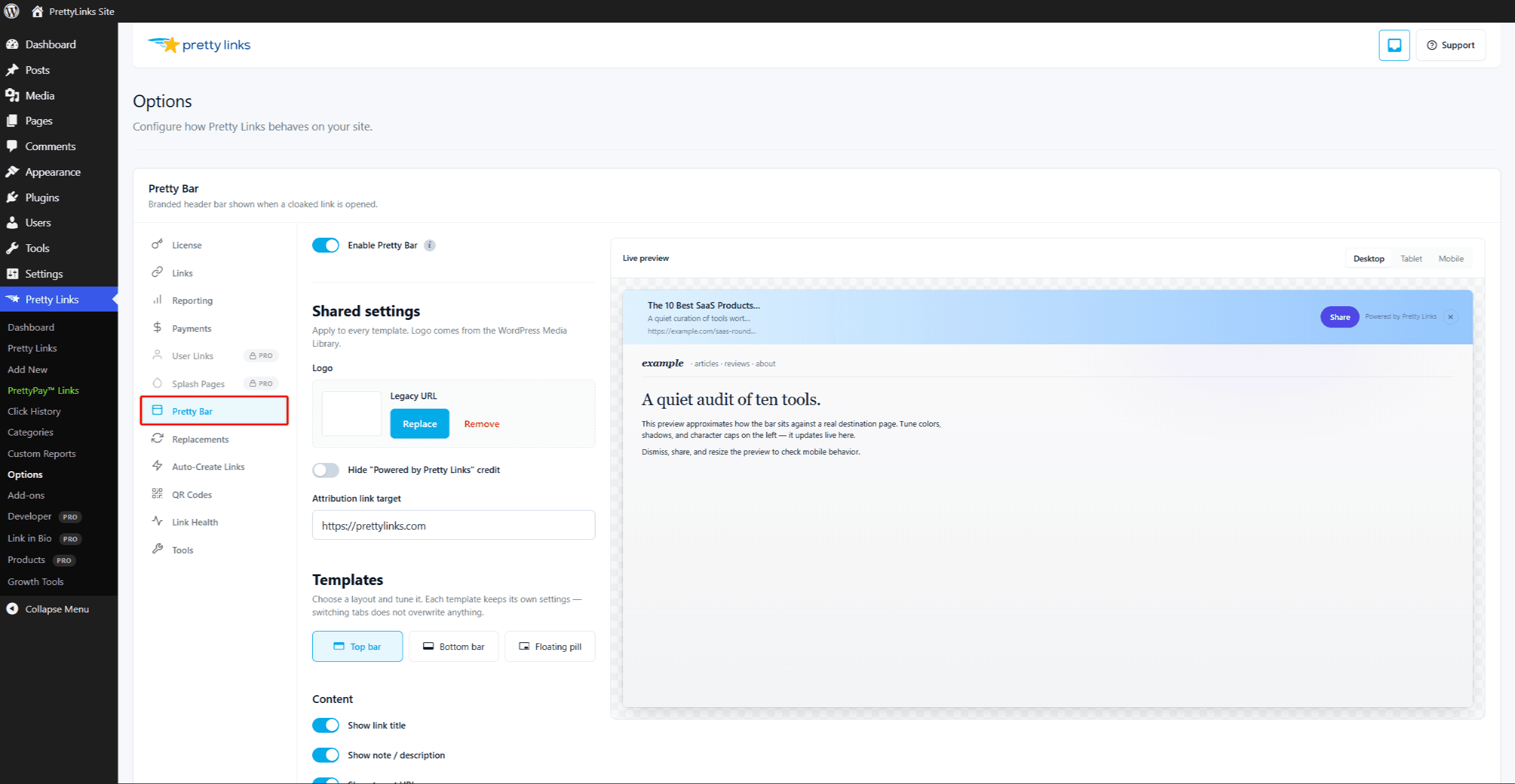
Qué puede incluir el «Pretty Bar»
Puedes configurar la barra «Pretty Bar» con:
- Tu logotipo o el título de tu página web — Anclado a la izquierda;
- Un mensaje personalizado — Un titular, un eslogan o una llamada a la acción;
- Un botón — Enlaces a tu página de inicio, al formulario de suscripción o a cualquier URL;
- Iconos para compartir en redes sociales — Animar a los visitantes a compartir lo que están viendo;
- Un botón de cierre — Así, los visitantes que quieran ver la página a pantalla completa pueden ocultar la barra.
Puedes controlar los colores, el texto y el diseño desde la configuración general.
Configuración de Pretty Bar
La configuración global de Pretty Bar está disponible en Panel de control > Pretty Links > Opciones > Pretty Bar. Allí puedes configurar:
- Posición de la barra (parte superior o inferior de la página);
- Altura y colores de la barra;
- Subir el logotipo;
- Texto predeterminado del título y del botón;
- Opciones para compartir en redes sociales;
- Comportamiento predeterminado para los nuevos enlaces «pretty-bar».
Una vez que la configuración general se ajuste a tus preferencias, configura el tipo de redireccionamiento de cualquier enlace a Pretty Bar utilizar ese estilo.
Cuándo utilizar Pretty Bar
- Enlaces de afiliados — Mantén la visibilidad de tu marca al redirigir a los visitantes a la página de un socio;
- Compartir contenido seleccionado — Cuando compartes artículos de terceros con tu público, la barra les recuerda de dónde proceden;
- Captación de clientes potenciales — Añade un botón de suscripción o “suscríbete” que acompañe al visitante hasta la página externa;
- Campañas promocionales — Añade una barra con un código de descuento o un banner con una oferta por tiempo limitado en la parte superior de cualquier página de destino.
Recurso automático
Me gusta Redirección Cloak, Pretty Bar funciona cargando la página de destino dentro de un marco situado debajo de la barra. Algunas páginas no permiten que se muestren en marcos por motivos de seguridad.
Cuando eso ocurre, Pretty Links recurre automáticamente a una redirección 302 normal, de modo que el visitante sigue llegando al destino, solo que sin la barra. No tienes que hacer nada; el cambio es automático.
Modificación por enlace
Aunque la configuración global define el aspecto predeterminado, también puedes personalizar la barra para cada enlace desde la pantalla de edición del enlace. Por ejemplo, podrías utilizar la barra estándar para los enlaces de afiliados, pero personalizar una barra concreta con un mensaje específico de la campaña para una promoción navideña.
Aspectos a tener en cuenta
- Móvil — La barra «Pretty Bar» puede ocupar bastante espacio en la pantalla de los móviles. Comprueba cómo queda en pantallas pequeñas antes de decidirte;
- Normas del programa de afiliados — Algunos programas de afiliados prohíben el uso de superposiciones, marcos o modificaciones en sus páginas de destino. Lee las condiciones de tu programa antes de utilizar Pretty Bar en los enlaces de afiliados;
- Interacciones con la página — Los formularios, las ventanas modales y las experiencias a pantalla completa en la página de destino funcionan, pero es posible que la barra las haga parecer algo apretadas visualmente. Prueba la experiencia real;
- HTTPS — Tanto tu sitio web como el de destino deben utilizar HTTPS para que se cargue la página en marco.
Configuración de un enlace a Pretty Bar
- Edita el enlace.
- En el Tipo de redirección menú desplegable, selecciona Pretty Bar.
- (Opcional) Personaliza el título de la barra, el botón u otros ajustes para este enlace concreto.
- Haga clic en Actualización.
Prueba el enlace en una sesión del navegador sin haber iniciado sesión para ver cómo aparece la barra con tu configuración real.
Combinación con otras funciones
Pretty Bar colabora con:
No se puede combinar con Redirección Cloak — Ambas se basan en el uso de marcos, y solo puedes utilizar una a la vez. Elige la experiencia de marca que mejor se adapte a tu objetivo.