
A píxel de seguimiento Es un tipo especial de redireccionamiento de Pretty Links que, en realidad, no redirige a nadie. En su lugar, muestra una imagen invisible de 1×1 y registra la solicitud como un clic.
Es un contador, no una herramienta de navegación, y eso es precisamente lo que lo hace eficaz para medir las impresiones.
Cómo funciona
Cuando configuras el tipo de redireccionamiento de un enlace como Píxel de seguimiento e incrusta la URL simplificada como un <img> etiqueta (o crear un enlace directo desde un correo electrónico o una página), Pretty Links:
- Recibe la solicitud.
- Lo registra como un clic en tus informes.
- Devuelve una imagen diminuta y transparente de 1×1 píxel.
El visitante nunca ve nada a simple vista. Nunca navega por ninguna parte. Pero se obtiene un recuento de cuántas veces se ha cargado el píxel.
Cuándo utilizar píxeles de seguimiento
- Seguimiento de la apertura de correos electrónicos — Incrusta el píxel en el código HTML de un correo electrónico. Cada vez que se abra el correo (y se carguen las imágenes), se registrará un “clic” en ese enlace;
- Análisis del boletín informativo — Añadir un píxel por boletín para contabilizar las aperturas de cada número;
- Recuento de visitas a la página — Coloca un píxel en una página de terceros a la que no puedas añadir un sistema de análisis completo. Cada carga cuenta;
- Seguimiento de la confirmación — Coloca un píxel en una página de agradecimiento o de confirmación para contabilizar las acciones realizadas con éxito;
- Seguimiento de impresiones entre sitios web — Incorpóralo en el contenido de tus socios para saber cuántas veces se ha visto tu mensaje.
Cómo integrar el píxel
En tu correo electrónico o código HTML, utiliza una etiqueta estándar <img> Añade una etiqueta con tu URL bonita como fuente:
<img src="https://yoursite.com/your-pixel-slug" width="1" height="1" alt="" />Cuando se carga el correo electrónico o la página y se recarga la imagen, se registra el clic.
Incrustación mediante el código corto o el bloque
Dentro del contenido de WordPress, dispones de otras dos formas de insertar un píxel. Utiliza el código corto del píxel en cualquier entrada, página o widget:
[pretty_link_pixel id=123]Sustituir 123 con el ID del enlace de píxel. Pretty Links inserta el píxel invisible en el lugar donde se encuentra el código corto.
El editor de bloques también incluye un Pixel de Pretty Links bloque (enlaces-bonitos/bloque-de-píxeles). Añádelo desde el insertador de bloques y selecciona tu enlace de píxeles.
Qué se graba
Un «pixel hit» aparece en tus informes igual que un clic normal:
- Marca de tiempo;
- Dirección IP del visitante (sujeta a Anonimización de direcciones IP);
- Referente (la página o el cliente de correo electrónico que cargó el píxel);
- Agente de usuario;
- País, dispositivo, navegador, etc. (en Modos de seguimiento de clics (Modo de seguimiento ampliado).
La norma Filtrado de bots y direcciones IP Se aplican filtros de bots y de direcciones IP, por lo que ni los bots habituales de precarga de imágenes ni tus propias direcciones IP influirán en el recuento.
Limitaciones y advertencias
- Clientes de correo electrónico que bloquean imágenes — Muchos clientes de correo electrónico (¡y mucha gente!) bloquean las imágenes de forma predeterminada. El seguimiento de aperturas basado en píxeles subestima sistemáticamente el número de aperturas en el caso de esos destinatarios;
- Almacenamiento en caché de imágenes — Algunos clientes de correo electrónico almacenan las imágenes en caché de forma intensiva, por lo que es posible que, si un mismo destinatario abre el correo dos veces, solo se cuente una vez. Los enlaces «Pretty Links» Explicación sobre las cookies
prli_dedupLa cookie también evita que se produzcan recuentos dobles rápidos; - Normativa sobre protección de datos — El seguimiento mediante píxeles en los correos electrónicos está cada vez más regulado. Consulta la normativa de tu jurisdicción en materia de seguimiento de correos electrónicos y consentimiento antes de implementarlo;
- Protección de la privacidad en Apple Mail — Apple carga las imágenes de forma proactiva en nombre del destinatario, lo que inflama las cifras de mensajes abiertos de los usuarios de Apple Mail.
Configuración
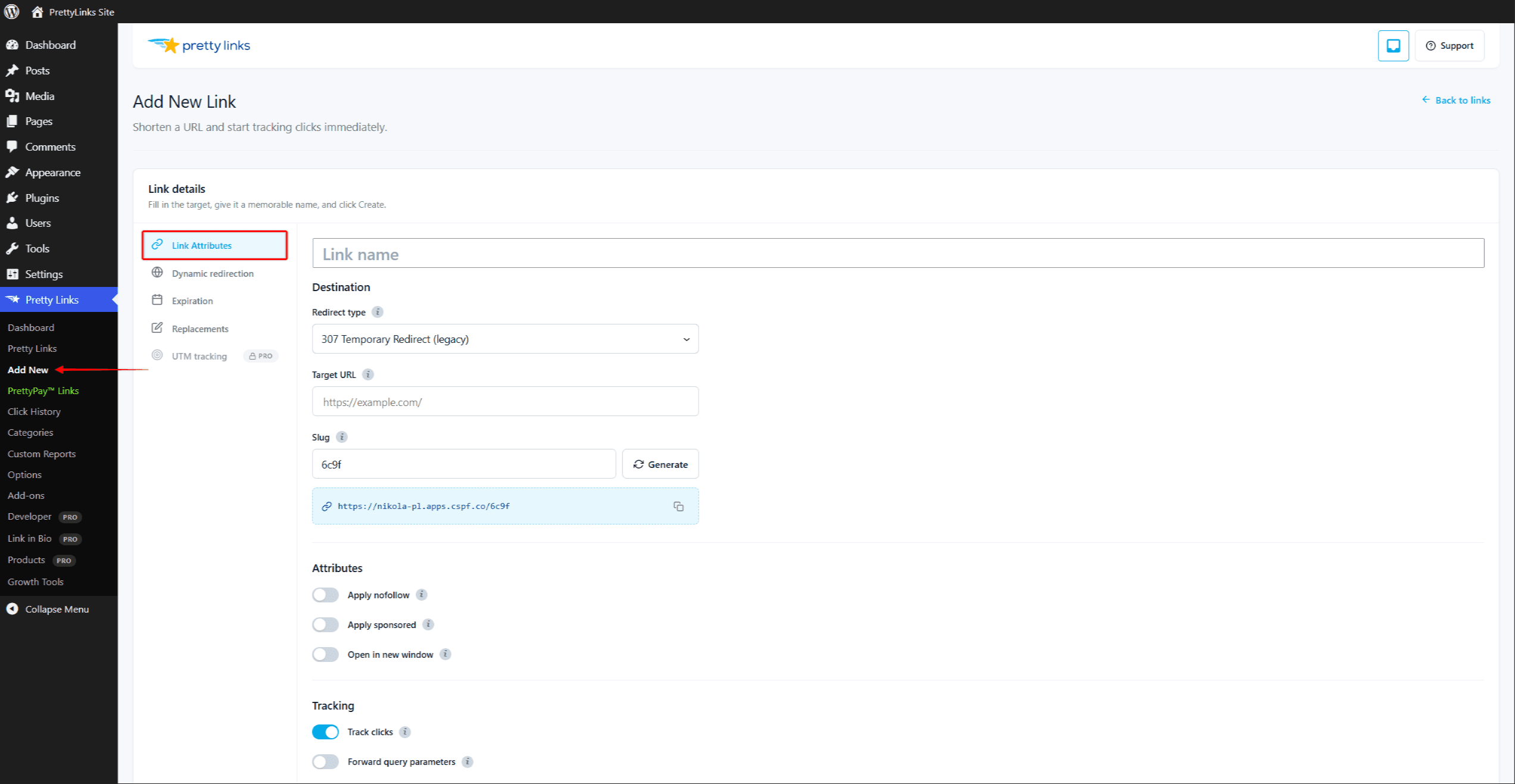
- Crea un nuevo enlace a través de Creación y edición de enlaces. La URL de destino no tiene mucha importancia para un píxel, pero es recomendable que apunte a algo lógico, como tu página de inicio, por si alguien visita la URL directamente.
- Conjunto Tipo de redirección a Píxel de seguimiento.
- Elige un nombre de archivo fácil de recordar, como
/noticias-número-42para que puedas identificarlo en los informes. - Guarda el enlace.
- Copia la URL simplificada y utilízala como
srcatributo en un<img>etiqueta en tu correo electrónico o en tu página.
Combinación con otras funciones
Los píxeles de seguimiento suelen utilizarse de forma independiente; no hay ningún destino al que dirigirlos, ni para el que realizar rotaciones o pruebas A/B. Sin embargo, sí que funcionan con:
- Modos de seguimiento de clics — Los «pixel hits» se registran con el mismo nivel de detalle que los clics normales;
- Filtrado de bots y direcciones IP — excluye las solicitudes automáticas de tus recuentos.
Los enlaces de píxeles no se combinan con Caducidad, Dirigiéndose a, Rotacióno Pruebas A/B — La respuesta del píxel no tiene ninguna URL de destino a la que redirigir, retirar o rotar.