
Available on the Super Affiliate plan.
This page describes exactly what your logged-in members see when they visit the User Links dashboard, what they can do, and what’s intentionally not available to them.
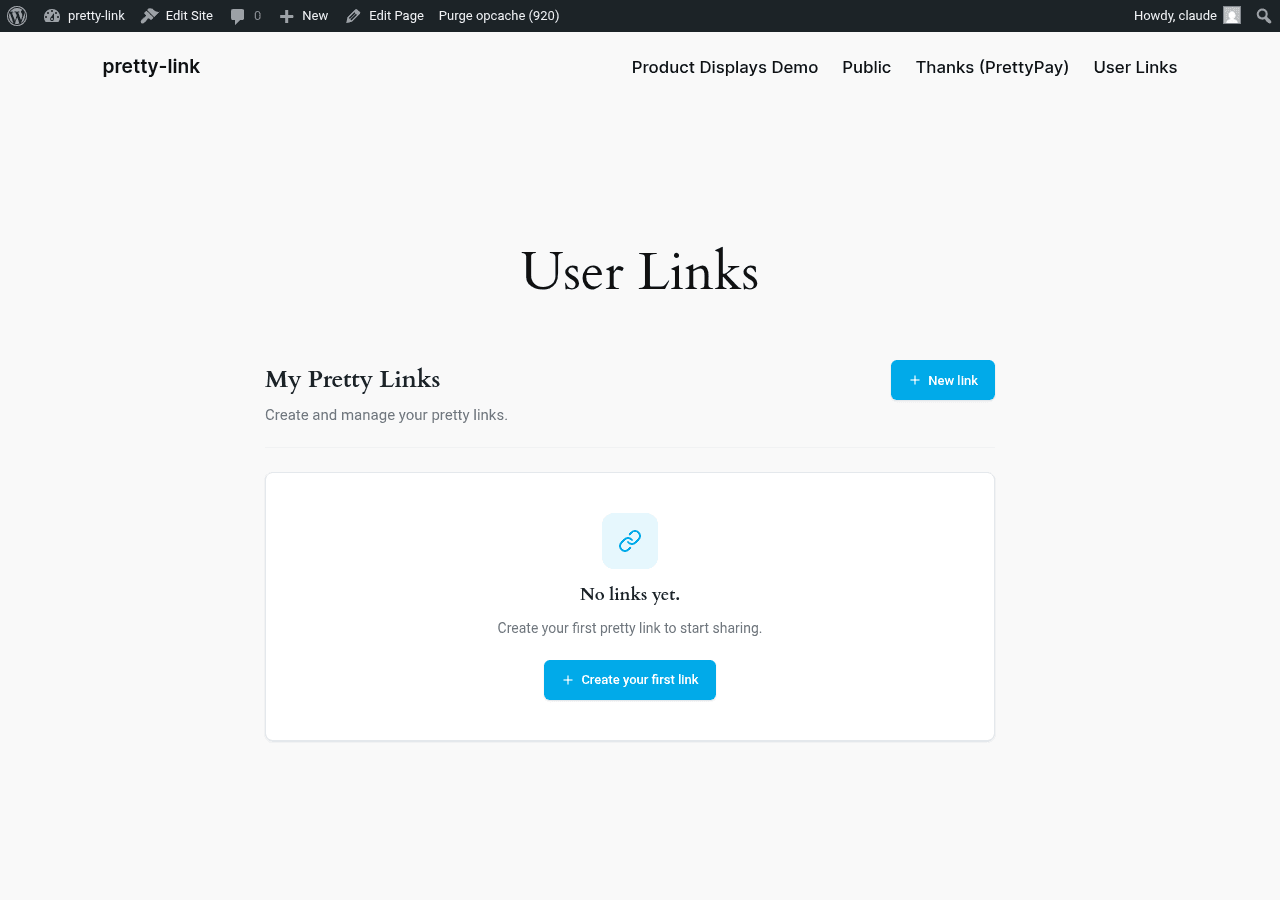
What the Dashboard Looks Like
When a logged-in user visits the dashboard page you’ve configured, they see:
- A heading or title (controlled by the page itself);
- A list of their Pretty Links — only the ones they personally created;
- A New link button at the top;
- Search and sort controls;
- Per-row actions: edit, delete.
The dashboard renders inside your normal site theme. Header, footer, sidebar — all the surrounding chrome looks like the rest of your site. Members aren’t pulled out of your branded experience.
What Members Can Do
See Their Own Links
Each row in the list shows:
- The pretty URL (e.g.
yoursite.com/u/their-slug); - The target URL the shortlink redirects to;
- Link name (the member’s optional internal name);
- Created date.
Importantly: members only see their own links. They can’t see other users’ links, your admin-created links, or any global site-wide links. The list is automatically filtered by the logged-in user’s account.
Add a New Link
Click New link and members get a form with:
- Target URL — Where the shortlink should redirect to;
- Name — Optional internal name for the member’s reference;
- Slug — The path after the prefix. Members can pick their own (e.g.
summer-promo) or leave it blank and a random slug is auto-generated on save; - Redirect type — 301 (permanent) or 302 (temporary). Default is 302.
Save and the link is live immediately.
Edit and Delete
Members can edit any link they created — change the target URL, rename it, or update the slug. They can also delete links.
They can’t edit links they didn’t create. The dashboard enforces ownership: a member’s actions only affect their own links.
Search and Sort
For members with lots of links, the dashboard supports:
- Search by name, slug, or target URL;
- Sort by newest, oldest, or name (A–Z).
This makes the dashboard usable for power users with hundreds of personal links — affiliate marketers and active content creators in particular.
What Members Can’t Do
The dashboard is a focused subset of Pretty Links’ admin features. Some things are deliberately not available to front-end users:
No Advanced Redirect Types
Members can choose 301 or 302 only. The following redirect types are admin-only:
- Pixel;
- Meta refresh;
- JavaScript;
- Cloak;
- Prettybar.
If a member needs one of these, they have to go through you.
No QR Codes
The QR code generator is an admin-only tool. Members don’t get QR code download links from their dashboard.
No Split Tests (A/B Testing)
Split tests are configured in admin only. Members can’t set up multi-target rotation links.
No Categories, Keyword Replacements, or Schedules
These admin features are not exposed to front-end users. A member’s link is a shortlink — slug, target, redirect type.
No Access to Other Users’ or Admin Links
Members can’t see or modify any link that isn’t theirs. The dashboard is strictly scoped to the logged-in user.
Why These Limits
User Links is designed to be:
- Easy to learn. A new member should understand the dashboard in 30 seconds;
- Safe. Members can’t break each other’s links, can’t modify your admin-created links, can’t accidentally enable features that confuse them;
- Predictable. What works in the dashboard always works. Members never hit “this advanced feature requires admin access” surprises.
If a member outgrows the dashboard, that’s a signal they should be a power user with admin access — not a signal to expose more advanced features in the user dashboard.
Tips for Member Onboarding
- Walk through it once in a help doc. Even though the dashboard is short to learn, a brief “here’s how to add your first link” section in your member docs reduces support tickets dramatically;
- Set expectations. If members ask for QR codes or split tests, you can either point them to upgrade paths (admin access, an alternative tool) or take the request as a feature signal for your own product roadmap;
- Watch for abuse. Front-end shortlink creation can attract spam if your membership signup is too open. Pair User Links with email verification, paid membership, or manual approval if abuse becomes an issue.