
Disponible en el plan «Super Affiliate».
Un «splash link» es un «Pretty Link» normal cuyo tipo de redirección está configurado en Splash. Una vez que elijas ese tipo, aparecerá un nuevo Splash Aparece una pestaña en el editor de enlaces donde se configura el contenido de la página.
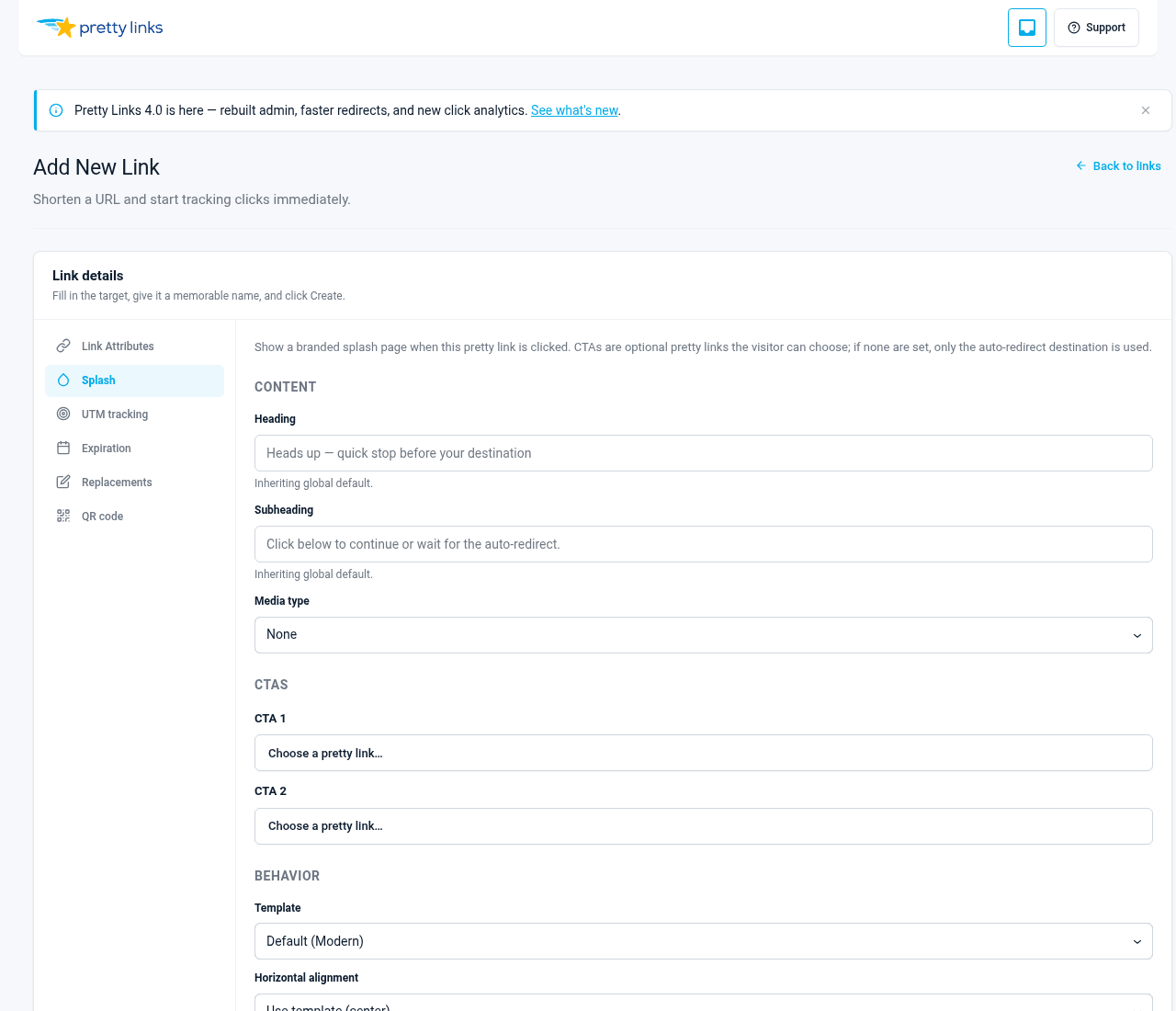
Paso 1: Añadir un nuevo enlace
En la barra lateral de administración de WordPress, ve a Panel de control > Pretty Links > Añadir nuevo.
Rellena los campos básicos igual que lo harías con cualquier otro enlace:
- URL de destino — Dónde acaba el visitante tras la página de bienvenida (o tras hacer clic en una llamada a la acción, dependiendo de su comportamiento);
- Babosa — La ruta del enlace corto (p. ej.,.
/oferta-especial); - Nombre — Etiqueta interna para tu referencia.
Paso 2: Establece el tipo de redirección en «Splash»
En el menú desplegable «Tipo de redireccionamiento», selecciona Splash. En cuanto lo hagas, un Splash La pestaña aparece junto al resto de pestañas del editor.
Paso 3: Abre la pestaña «Splash»
La pestaña «Splash» es donde se crea la página. Trabaja de arriba abajo.
Título
El texto grande que aparece en la parte superior de la página de bienvenida. Que sea breve: lo ideal es que tenga menos de 8 palabras. Ejemplos:
- “Atención: a continuación hay un enlace de afiliado”;
- “Mira esta introducción de 30 segundos”;
- “Elige tu guía”;
- “Vas a acceder a la página web de nuestro socio”.
Subtítulo
Una línea de apoyo debajo del título. Una frase es suficiente. Ejemplos:
- “Si compras algo, recibo una pequeña comisión. El precio no cambia para ti.”;
- “Entonces te redirigiremos directamente a la descarga.”;
- “Elige la versión que mejor se adapte a tu situación”.
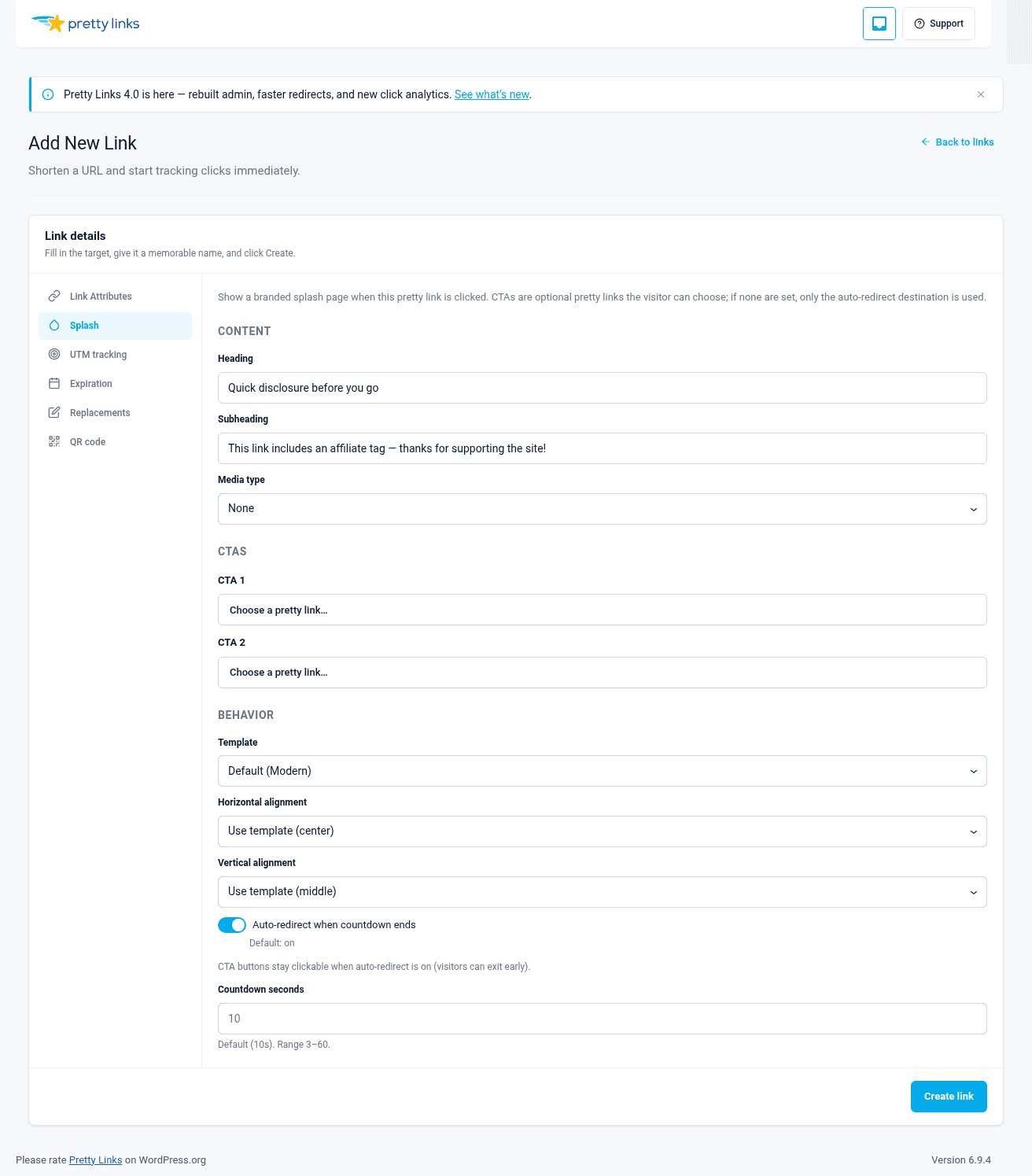
Medios de comunicación
Puedes mostrar una de las siguientes opciones:
- Una imagen — Sube una imagen desde tu biblioteca multimedia. Utiliza una imagen de alta calidad que se ajuste al tono del título (una foto del producto, una foto de la marca, una vista previa del curso);
- Un vídeo — Pega la URL de un vídeo. Funciona cualquier formato compatible con oEmbed de WordPress: YouTube, Vimeo, Wistia, etc. El vídeo se incrusta directamente en la página de bienvenida;
- Nada — Deja ambos campos en blanco para obtener una página de bienvenida solo con texto.
En el caso de las declaraciones de afiliados, a menudo no hace falta una imagen: el texto sin más transmite mayor honestidad. En el caso de las páginas de acceso a vídeos, el vídeo es la página.
CTA1 (botón principal)
La llamada a la acción principal. Tiene dos campos:
- Etiqueta — Texto breve en el botón: “Continuar”, “Ver ahora”, “Consigue la guía”, “Llévame allí”;
- URL — Dónde va el botón al hacer clic en él.
CTA2 (botón secundario)
Opcional. Los mismos campos que en CTA1. Úsalo para pantallas de bienvenida en las que el usuario elija su destino, opciones A/B o alternativas del tipo “omitir esto”.
Si no necesitas un segundo botón, deja ambos campos en blanco.
Plantilla
Elige una de las siguientes opciones: Moderno, Negrita, Mínimoo Clásico. Cada uno de ellos constituye un estilo visual completo. Véase Plantillas para ver una comparación lado a lado.
Comportamiento
Hay dos botones que controlan cómo gestiona la página la redirección:
- Redirección automática — Cuando está activada, el visitante ve la pantalla de bienvenida de la cuenta atrás configurada y, a continuación, se le redirige automáticamente a la URL de destino;
- CTA de Gate — Cuando está activada, no se produce ningún redireccionamiento automático. El visitante solo continúa si hace clic en CTA1 o CTA2. (El redireccionamiento automático y las CTA de acceso restringido son mutuamente excluyentes: al activar el redireccionamiento automático, se desactivan las CTA de acceso restringido.)
Cuenta atrás
Una duración en segundos, comprendida entre 3 y 60 (por defecto, 10). Cuando la redirección automática está activada, este es el tiempo de espera antes de que se active la redirección. Cuando la opción «gate-CTAs» está activada con una cuenta atrás, se muestra un temporizador visible junto a las llamadas a la acción (CTA). Establece la cuenta atrás en 0 para ocultar el temporizador por completo en una pantalla de bienvenida de «gate-CTAs».
En cuanto a la información sobre programas de afiliados, redirección automática Lo habitual es una cuenta atrás de entre 3 y 5 segundos. En el caso de las puertas de vídeo y la opción de elegir destino, CTA de puerta.
Cómo se gestionan los bots
Los bots que acceden a un enlace de página de bienvenida se desvían automáticamente: reciben una redirección 302 normal directamente a la URL de destino, en lugar de a la página de bienvenida. Esto evita que los rastreadores, los verificadores de enlaces y los programas de vista previa contaminen tu informe de embudo o se queden atascados en una página de bienvenida basada en JavaScript que no pueden cargar.
Paso 4: Guardar
Haga clic en Guardar. El enlace de la página de inicio ya está activo. Visítalo tu-sitio.com/tu-url para verlo en acción.
Para editarlo más tarde, vuelve a Panel de control > Enlaces bonitos > Todos los enlaces, busca el enlace y ábrelo. La pestaña «Splash» está justo donde la dejaste.
Consejos para crear páginas de bienvenida eficaces
- Haz que la promesa de la página de inicio se corresponda con el destino. “Ver el vídeo” debería dirigir a los visitantes a un lugar en el que el vídeo sea lo importante. Las expectativas no cumplidas provocan rebotes;
- No te compliques demasiado con el diseño. Una página de bienvenida es un punto de parada, no una carta de ventas. Un título, una línea de texto, uno o dos botones. Ese es el formato;
- Utilizar la redirección automática de forma predeterminada. A los visitantes no les gustan los clics de más. A menos que tengas una razón concreta para restringir el acceso, déjales pasar tras una breve espera;
- Prueba en el móvil. La mayor parte del tráfico de afiliados procede de dispositivos móviles. Asegúrate de que el título no aparezca cortado, de que el vídeo se reproduzca correctamente y de que los botones sean fáciles de pulsar.