
Pretty Links transforme les URL longues et peu esthétiques en URL courtes et personnalisées que vous pouvez partager partout.
Ajouter un nouveau lien
Depuis votre interface d'administration WordPress, rendez-vous dans Tableau de bord > Pretty Links > Ajouter un nouveau lien.
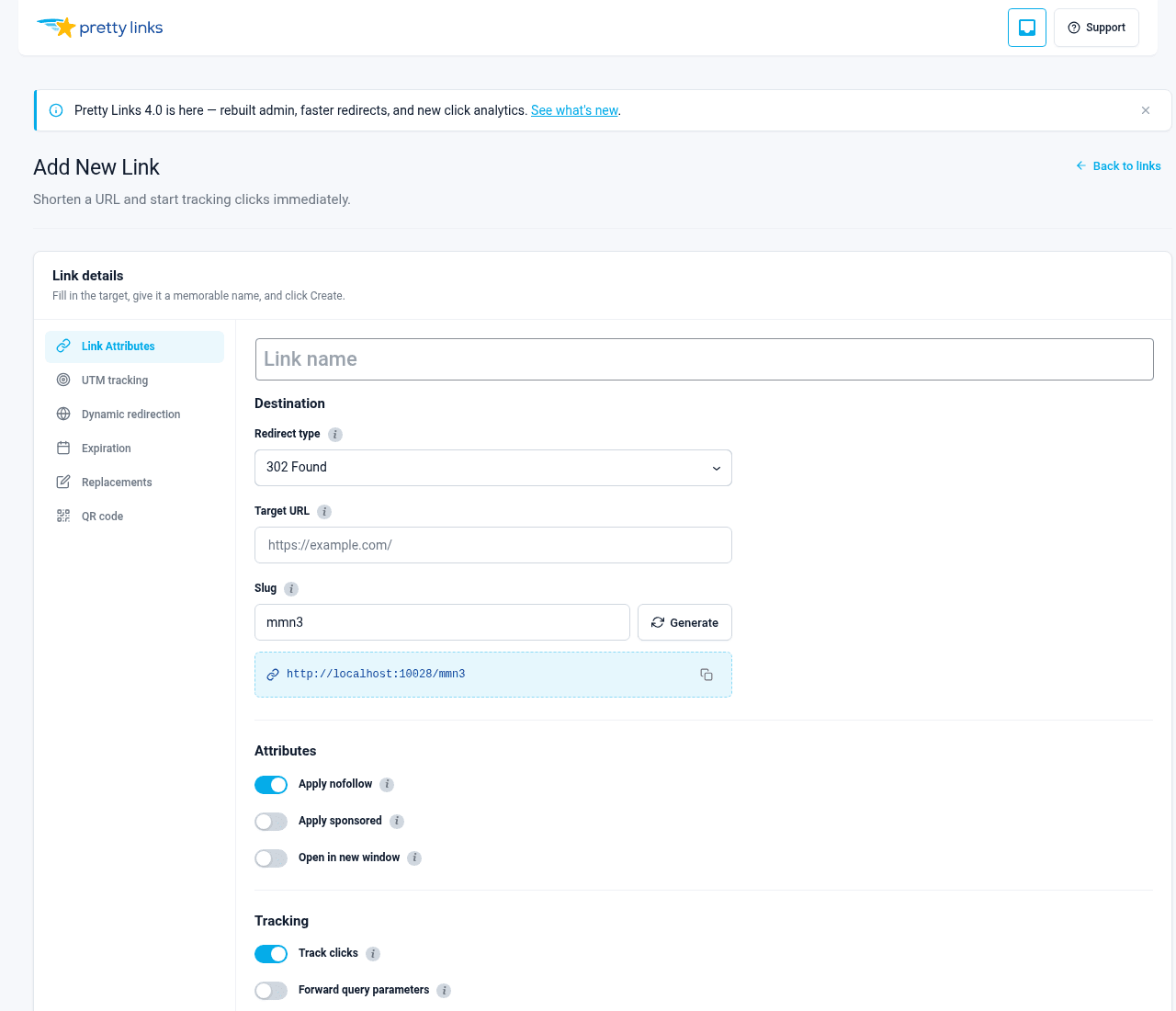
Vous verrez apparaître un formulaire comportant trois champs obligatoires :
- URL cible — La page vers laquelle vous souhaitez rediriger les visiteurs (par exemple, un lien d'affiliation ou l'URL d'une longue page de destination) ;
- Joli lien — Le petit nom de raccourci qui suit votre nom de domaine. Vous pouvez laisser Pretty Links en générer un automatiquement ou en saisir un vous-même ;
- Nom — Un nom évocateur qui vous permettra de reconnaître ce lien plus tard dans votre tableau de bord.
Cliquez sur Créer un lien Et voilà, votre nouveau lien est prêt à être partagé.
Conventions relatives aux slugs
Par défaut, Pretty Links génère automatiquement un slug aléatoire (du genre xY7q2). Si vous préférez utiliser un mot facile à retenir comme /soldes ou /newsletter, saisissez-le dans le Joli lien champ.
Par défaut, les slugs générés automatiquement comportent 4 caractères. Vous pouvez modifier ce paramètre dans Tableau de bord > Pretty Links > Options > Liens (cherchez Nombre de caractères du titre; le nombre minimum est de 2). Les slugs plus courts sont plus faciles à mémoriser ; les slugs plus longs sont plus difficiles à deviner.
Si vous saisissez un slug déjà utilisé, Pretty Links vous en informera afin que vous puissiez en choisir un autre.
Modifier un lien
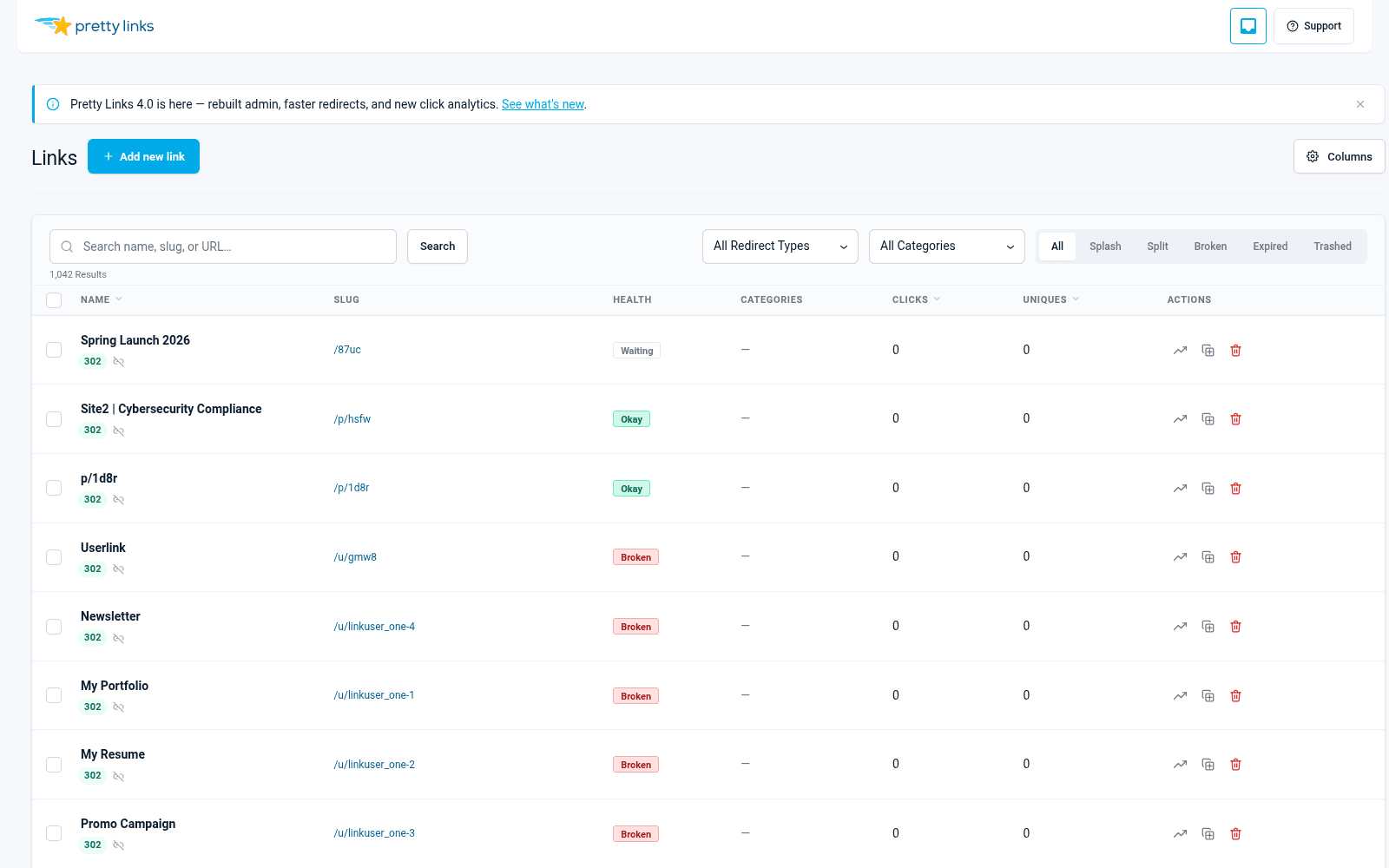
Aller à Tableau de bord > Pretty Links > Pretty Links pour consulter la liste complète. Passez la souris sur n'importe quel lien et cliquez dessus Editer, ou cliquez sur le titre du lien.
Vous pouvez modifier l'URL de destination, le slug, le nom, le type de redirection et n'importe lequel des options de lien à tout moment. Les modifications prennent effet immédiatement : les visiteurs qui cliqueront sur votre lien à partir de ce moment-là seront redirigés vers la nouvelle destination.
Suppression et restauration
Pour supprimer un lien, passez la souris dessus dans la liste, puis cliquez dessus. Corbeille. Les liens invalides cessent immédiatement de rediriger les visiteurs.
Pour obtenir un lien en retour, cliquez sur le Corbeille utilisez le filtre situé en haut de la liste des liens, passez la souris sur le lien, puis cliquez Restaurer. Pour supprimer définitivement un lien, cliquez sur Supprimer définitivement à partir de la vue « Corbeille ».
Opérations en masse
Vous avez besoin de modifier plusieurs liens à la fois ? Cochez les cases situées à côté des liens que vous souhaitez mettre à jour (ou la case en haut de la page pour tout sélectionner), puis choisissez une action parmi les Actions groupées liste déroulante :
- Déplacer vers la corbeille — Supprimer plusieurs liens à la fois ;
- Restaurer — Restaurer les liens supprimés ;
- Supprimer définitivement — Suppression définitive depuis la corbeille ;
- Activer / Désactiver l'attribut « nofollow » — Activer ou désactiver l'attribut « nofollow » en masse ;
- Activer / Désactiver les contenus sponsorisés — Activer ou désactiver en masse le drapeau « sponsorisé » ;
- Activer / Désactiver le suivi — Activer ou désactiver le suivi des clics de manière groupée.
Validez l'action dans la boîte de dialogue pour l'exécuter.
Recherche et filtrage
Utilisez le champ de recherche situé en haut de la liste des liens pour rechercher des liens par nom, slug ou URL de destination. Vous pouvez également filtrer les résultats par type de redirection ou par statut à l'aide des menus déroulants situés au-dessus du tableau.
Les filtres s'empilent, ce qui vous permet d'affiner votre recherche pour n'afficher que les liens qui vous intéressent.