
Verfügbar im „Super Affiliate“-Tarif.
Der UTM-Builder befindet sich in einem UTM Registerkarte auf dem Bearbeitungsbildschirm jedes Pretty Links. Auf dieser Seite werden die einzelnen Felder, ihre Funktion und einige Beispielwerte erläutert, um Ihnen den Einstieg zu erleichtern.
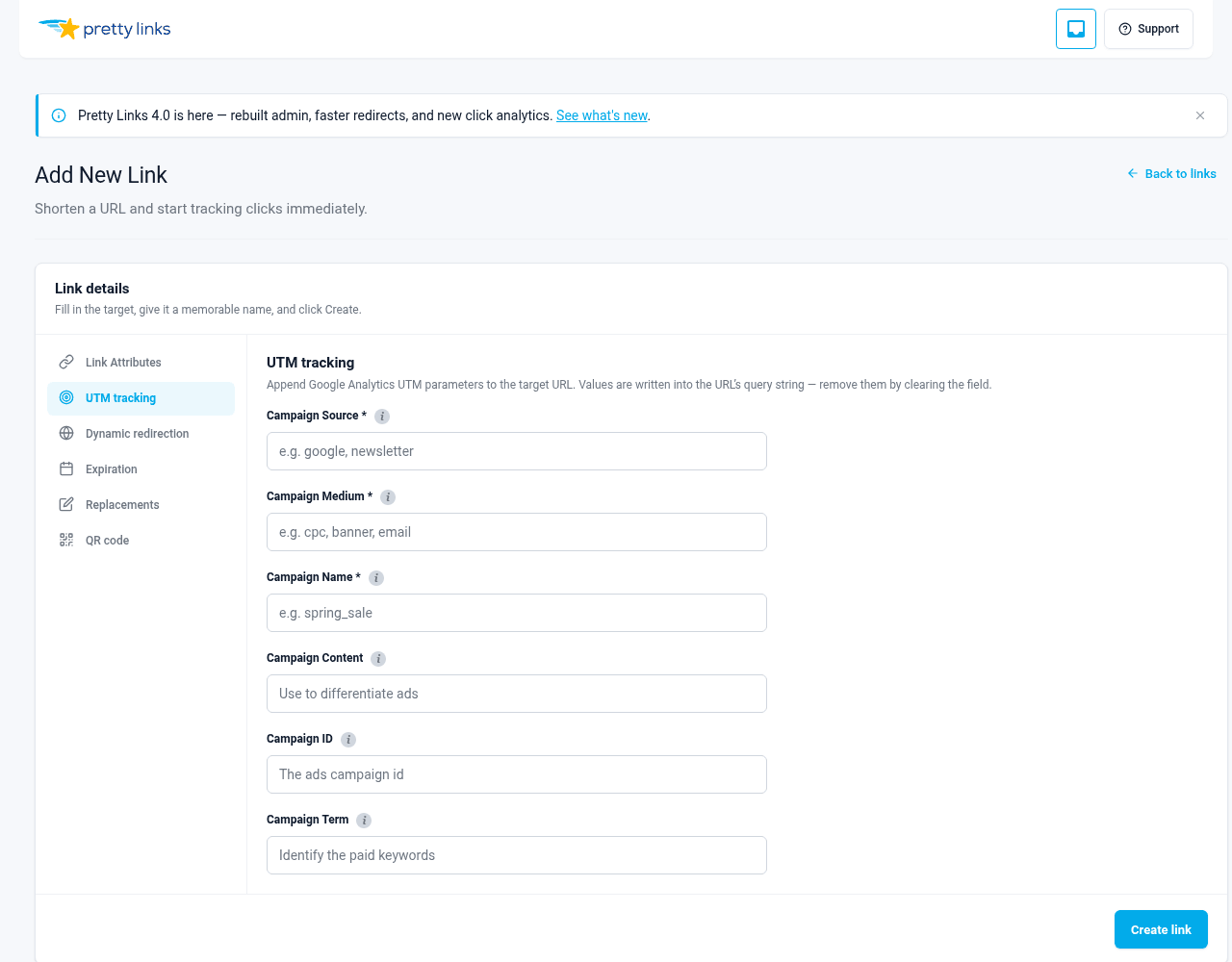
Die Registerkarte „UTM“ öffnen
- Gehe zu Armaturenbrett > Pretty Links > Pretty Links.
- Öffnen Sie einen beliebigen Link (oder erstellen Sie einen neuen).
- Klicken Sie auf die UTM Registerkarte im Editor.
Bei Pixel-Links wird die Registerkarte ausgeblendet, da Pixel keine Ziel-URL haben, die markiert werden könnte. Bei allen anderen Umleitungstypen – 301, 302, 307, Splash usw. – ist die Registerkarte verfügbar.
Die Felder
Quelle (erforderlich)
utm_source — woher der Datenverkehr kommt.
Verwenden Sie einen kurzen, einheitlich geschriebenen Wert in Kleinbuchstaben. Die Website oder Plattform, von der der Besucher kommt.
Beispiele:
Newsletter;Twitter;instagram;LinkedIn;Partner-Blog;youtube.
Mittel (erforderlich)
utm_medium — die Art des Kanals.
Dies ist die Art der Quelle, nicht die konkrete Quelle selbst.
Beispiele:
E-Mail;sozial;cpc(bezahlte Suche);Anzeige(Bannerwerbung);Empfehlung;Tochtergesellschaft.
Eine typische Zuordnung: Quelle = Newsletter, medium = E-Mail. Oder source = Twitter, medium = sozial.
Name (erforderlich)
utm_campaign — die konkrete Kampagne, zu der dieser Link gehört.
Beispiele:
Frühjahrsausverkauf 2026;Kursstart-Mai;Black Friday;Partnerprogramm-Übersicht – Kameras.
Legen Sie eine Namenskonvention fest und halten Sie sich daran. Bindestriche zwischen den Wörtern, Kleinbuchstaben, Jahresangabe, falls relevant. Diese Einheitlichkeit zahlt sich aus, wenn Sie in sechs Monaten die Kampagnenberichte durchsehen.
Inhalt (optional)
utm_content — unterscheidet zwischen ähnlichen Links, die auf dasselbe Ziel verweisen.
Besonders nützlich, wenn Sie mehrere Links innerhalb derselben Kampagne haben und wissen möchten, welcher davon angeklickt wurde. Beispiele:
- Zwei Handlungsaufforderungen in derselben E-Mail:
Kopfzeilen-SchaltflächevsFußzeilen-Schaltfläche; - Zwei Anzeigen mit derselben Ziel-URL:
Ad-Bluevsad-red; - Bildlink vs. Textlink in einem Beitrag:
BildvsText.
Überspringen Sie dieses Feld, wenn Sie pro Kampagne nur einen Link pro Ziel haben – es liefert keine zusätzlichen Informationen.
ID (optional)
utm_id — eine numerische oder Zeichenfolgen-ID für die Kampagne.
Bei einigen fortgeschrittenen GA4-Konfigurationen und einigen Werbeplattformen wird neben dem Kampagnennamen auch eine Kampagnen-ID erwartet. Wenn Ihr System eine solche verwendet, geben Sie diese ein. Ist dies nicht der Fall (was bei den meisten Nutzern zutrifft), lassen Sie das Feld leer.
Begriff (optional)
utm_term — wurde in der Vergangenheit für Keywords in der bezahlten Suche verwendet.
Wenn Sie eine bezahlte Suchanzeige mit einem Tag versehen und das Keyword hinzufügen möchten, das den Klick ausgelöst hat, geben Sie es hier ein. Beispiel: Begriff=Laufschuhe. In den meisten anderen Anwendungsfällen bleibt dieses Feld leer.
Speichern und was danach passiert
Klicken Sie auf Speichern Sie. Pretty Links fügt die UTM-Parameter in Ihre Ziel-URL ein. Wenn die Ziel-URL wie folgt lautete:
https://yoursite.com/landing-page…und du setzt source = Newsletter, medium = E-Mail, name = Frühjahrsausverkauf 2026, lautet die URL dann:
https://yoursite.com/landing-page?utm_source=newsletter&utm_medium=email&utm_campaign=spring-sale-2026Wenn ein Besucher auf Ihren Kurzlink klickt, wird er zu der zusammengeführten URL weitergeleitet, an die alle UTM-Parameter angehängt sind. Ihr Analysetool erfasst diese Parameter und ordnet den Besuch korrekt zu.
Vorhandene UTMs bearbeiten
Wenn Sie einen Link öffnen, für den bereits UTM-Parameter gespeichert sind, werden im Formular automatisch die aktuell eingestellten Werte angezeigt. Sie können jedes Feld bearbeiten und erneut speichern – „Pretty Links“ schreibt die zusammengeführte URL jedes Mal neu.
URLs, die bereits UTM-Parameter enthalten
Wenn Ihre Ziel-URL bereits UTM-Parameter enthält (vielleicht haben Sie eine mit Tags versehene URL von irgendwoher kopiert und eingefügt), erkennt Pretty Links diese, sobald Sie die Registerkarte „UTM“ des Links öffnen, und übernimmt sie in das Formular. Sie sehen genau, was mit Tags versehen ist, können die Angaben bei Bedarf anpassen und speichern, ohne dass doppelte oder widersprüchliche Parameter entstehen.
Tipps für saubere UTM-Daten
- Alles in Kleinbuchstaben schreiben. Analysetools unterscheiden zwischen Groß- und Kleinschreibung:
NewsletterundNewslettersind verschiedene Quellen; - Verwenden Sie Bindestriche, keine Leerzeichen oder Unterstriche.
Frühjahrsausverkauf 2026ist übersichtlicher alsFrühjahrsausverkauf 2026(was bei der URL-Kodierung unschön aussieht) oderFrühjahrsausverkauf_2026(uneinheitliche Schreibweisen auf der gesamten Website); - Legen Sie von Anfang an eine Namenskonvention fest und dokumentieren Sie diese. Schon eine einzige gemeinsame Notiz mit dem Wortlaut “Kampagnen sind Kebab-Schachtel-mit-Jahr” verhindert Abweichungen zwischen den Teammitgliedern;
- Versehe nicht alles mit Tags. Direkter organischer Traffic sollte keine UTMs enthalten. Das Hinzufügen von UTMs zu Ihren eigenen internen Links kann die Attribution beeinträchtigen. Verwenden Sie UTMs für ausgehend die Werbung für Ihre Inhalte, nicht die Verlinkung zwischen Seiten Ihrer eigenen Website;
- Regelmäßige Überprüfung. Sehen Sie sich einmal pro Quartal Ihren Google-Analytics-Kampagnenbericht an. Wenn Sie Tippfehler oder inkonsistente Werte entdecken, suchen Sie den entsprechenden Link und korrigieren Sie den Fehler.