
Cada Pretty Link possui um conjunto de opções específicas para cada link, que você pode ativar ou desativar na tela de edição do link. Elas permitem ajustar o comportamento de links individuais sem alterar suas configurações globais.
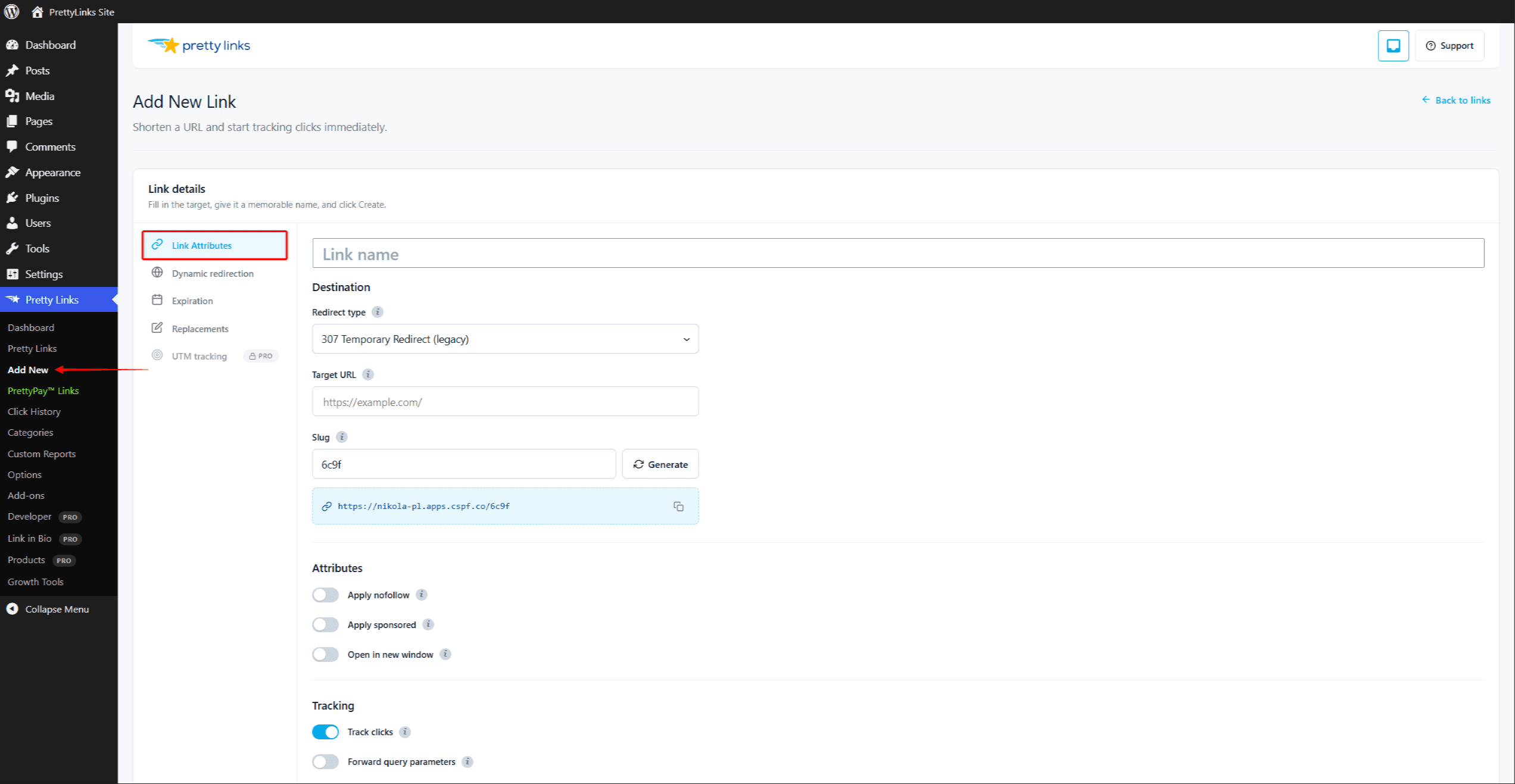
Acesse este link
Ative ou desative o rastreamento de cliques para um link específico. Quando ativado, cada visita é registrada em seus relatórios, juntamente com a data e hora, o endereço IP (sujeito às suas configurações de privacidade) e outros detalhes.
Você pode desativar o rastreamento de links internos que não sejam de seu interesse ou de links que deseje manter especialmente privados. A maioria dos usuários mantém essa função ativada para poder acompanhar o desempenho de seus links.
Para saber mais sobre o que é monitorado e como, consulte Modos de rastreamento de cliques.
Nofollow
Adiciona um rel="nofollow" atributo quando o link for exibido no seu conteúdo (por exemplo, por meio de substituições de palavras-chave ou códigos de atalho).
O atributo `nofollow` indica aos mecanismos de busca: “Não repasse autoridade de SEO por meio deste link”. É a configuração padrão recomendada para links de afiliados, conteúdo patrocinado e qualquer URL pela qual você não queira se responsabilizar.
Patrocinado
Adiciona rel="patrocinado" para links renderizados. Esse é o indicador preferencial do Google para links pagos, links de afiliados e qualquer link que exista em virtude de uma relação comercial.
Você pode usar Nofollow e Patrocinado juntos — muitos proprietários de sites fazem isso, especialmente em links de afiliados, para deixar as coisas bem claras para os mecanismos de busca.
Abrir em uma nova janela
Quando o link exibido é clicado, o destino é aberto em uma nova aba ou janela, em vez de substituir a página atual. Isso é útil para links externos, nos casos em que você deseja que os visitantes permaneçam no seu site.
Essa opção apenas adiciona target="_blank" para links inseridos em seu conteúdo. Isso inclui substituições de palavras-chave ou URLs, códigos de atalho e inserções feitas pelo editor de blocos e pelo editor clássico. Isso não alterar o próprio redirecionamento HTTP, de modo que acessar a URL simplificada diretamente siga o comportamento normal do navegador.
Encaminhar parâmetros de consulta
Quando ativada, qualquer coisa acrescentada ao final da sua URL bonita é repassada para a URL de destino.
Por exemplo, se o seu link formatado for yoursite.com/sale apontando para partner.com/produtos, e depois uma visita a yoursite.com/sale?coupon=SUMMER irá redirecionar para partner.com/products?coupon=SUMMER.
Isso é essencial para:
- Parâmetros de rastreamento UTM (
?utm_source=newsletter); - Sub-IDs de afiliados (
?subid=blogpost42); - Códigos promocionais e outros dados dinâmicos.
Se o redirecionamento estiver desativado, o visitante acessa partner.com/produtos sem parâmetros adicionais.
Nome e descrição
O Nome O campo “field” é o título descritivo que você vê na sua lista de links e nos relatórios. Escolha algo que você reconheça rapidamente — “Promoção de afiliados do verão de 2026” é melhor do que “Link 47”.”
O Descrição O campo é uma área de notas privadas, visível apenas para você e outros administradores do WordPress. Use-o para se lembrar de:
- Para quem você enviou o link;
- A que campanha ela pertence;
- Quando deveria ser aposentado;
- Qualquer contexto específico pelo qual o seu “eu do futuro” vai te agradecer.
Nenhum dos dois campos é exibido aos visitantes que clicam no link.
Definindo suas configurações padrão
A maioria dessas opções possui configurações padrão globais que você pode definir em Painel > Pretty Links > Opções > Links. Os novos links herdam suas configurações padrão; você pode alterá-las individualmente a qualquer momento. Consulte Configurações padrão de links para mais detalhes.