
Les robots des moteurs de recherche, les outils de vérification des liens, le réseau de votre entreprise, voire votre propre navigateur, peuvent fausser vos rapports de clics en y incluant des visites qui ne reflètent pas un véritable engagement de votre audience. Pretty Links vous propose plusieurs moyens de filtrer ces données parasites.
Vous trouverez ces paramètres à l'adresse suivante : Tableau de bord > Pretty Links > Options > Rapports.
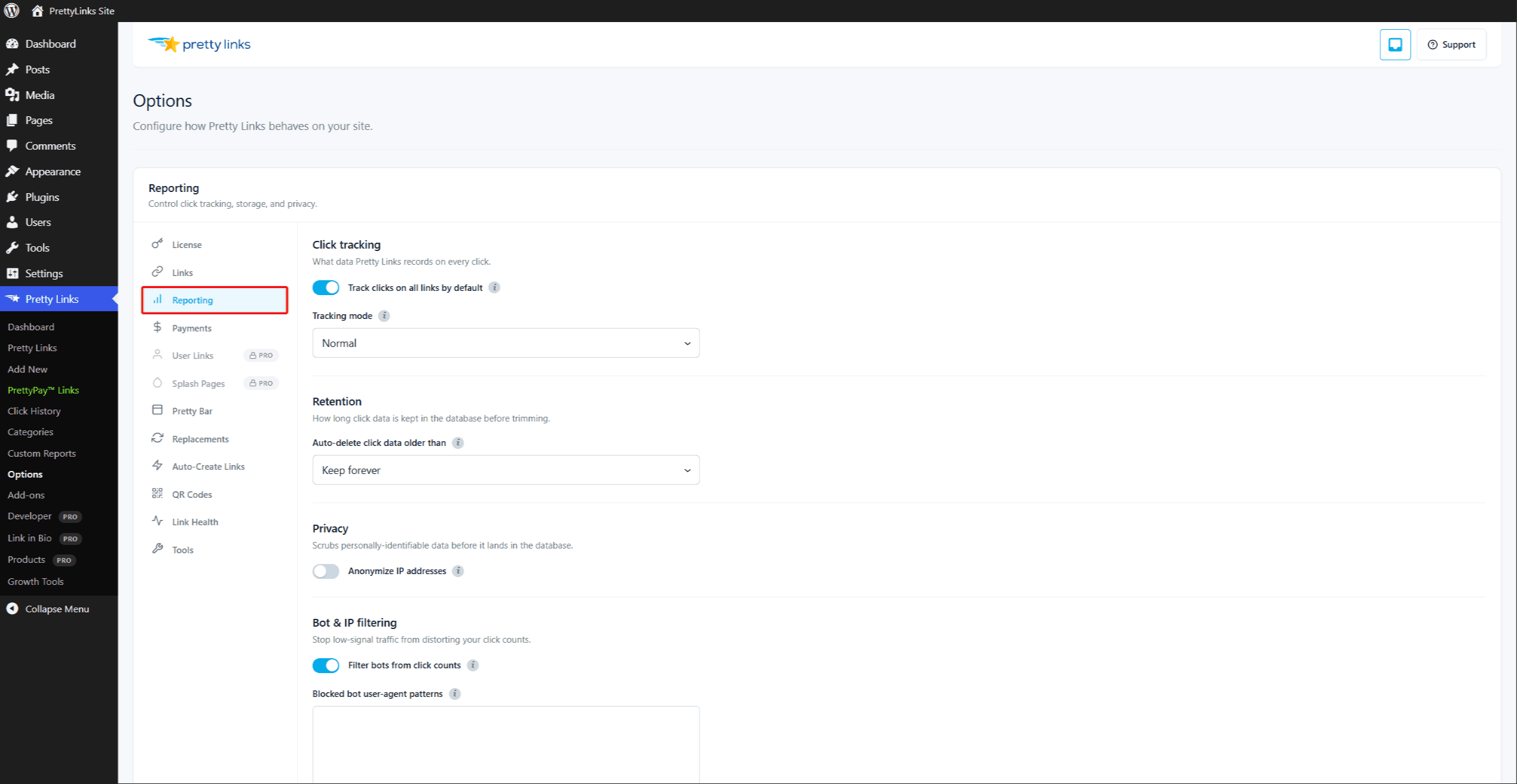
Filtrage intégré des bots
Pretty Links intègre une expression régulière permettant de détecter environ 70 robots connus : Googlebot, Bingbot, les outils de vérification de liens, les robots d’exploration des réseaux sociaux et les robots d’exploration basés sur l’IA moderne tels que GPTBot, ClaudeBot et PerplexityBot. Les clics provenant d'agents utilisateurs correspondant à ce modèle sont ignorés en arrière-plan et n'apparaissent jamais dans vos rapports.
Outre l'expression régulière relative à l'agent utilisateur, Pretty Links applique plusieurs autres indicateurs simples au chemin de redirection :
- Vide
Accepterhoneypot d'en-tête — les vrais navigateurs en envoient toujours un ; les scripts etboucle/wgetce n'est souvent pas le cas ; - Méthodes autres que GET — les clics sur les liens sont des requêtes GET ; par conséquent, les requêtes HEAD, POST, etc. sur l'URL de redirection sont considérées comme des tentatives de scan ou d'aperçu ;
- Incompatibilité entre plateformes — lorsque le navigateur envoie une
Sec-CH-UA-Plateformeune indication qui ne correspond pas au système d'exploitation indiqué dans la chaîne « user-agent ».
Le Filtrer les bots à partir du nombre de clics Ce paramètre est activé par défaut et couvre la majeure partie du trafic automatisé sans que vous ayez à effectuer aucune configuration.
Modèles d'User-Agent des bots bloqués
Si vous remarquez qu'un bot ou un scraper spécifique accède à vos liens, vous pouvez ajouter votre propre modèle au Modèles d'agent utilisateur de bots bloqués champ. Saisissez les fragments d'agent utilisateur, à raison d'un par ligne — par exemple :
MyScraper;moniteur interne;pingdom.
Tout élément correspondant à l'un de vos modèles personnalisés est filtré en même temps que la liste intégrée. Les modèles ne tiennent pas compte de la casse et la correspondance s'effectue au niveau des sous-chaînes, donc pingdom rencontres Pingdom.com_bot/3.2.
Adresses IP bloquées
Le Adresses IP bloquées Cette liste regroupe les adresses IP dont vous souhaitez ignorer les clics : votre bureau, votre domicile, votre VPN, un serveur de test, ou tout autre endroit où vous pourriez cliquer sur un lien sans que cela soit comptabilisé comme du trafic réel.
Saisissez une adresse IP par ligne. Vous pouvez utiliser :
- Adresses IP uniques —
203.0.113.42; - Caractères génériques —
203.0.113.*correspond à n'importe quelle adresse IP de ce bloc ; - Plages CIDR —
203.0.113.0/24correspond au même bloc en notation CIDR ; - IPv6 — Les adresses individuelles et les plages CIDR sont toutes deux prises en charge.
Adresses IP autorisées
Le Adresses IP autorisées La liste « Autorisés » est l'opposé de la liste « Bloqués » : elle concerne les adresses IP que vous souhaitez spécifiquement toujours compter, même s’ils auraient autrement été filtrés comme des bots.
Cela s'avère utile si un collègue effectue des tests à partir d'une adresse IP qui se trouve dans la même plage qu'un bot connu, ou si vous souhaitez vous assurer que votre trafic de contrôle qualité est bien enregistré.
La liste blanche prend le pas sur le filtre anti-bot : une adresse IP figurant dans cette liste est prise en compte même si son agent utilisateur ressemble à celui d'un bot. Elle permet pas Cela ne remplace toutefois pas la liste des adresses bloquées : une adresse IP figurant sur les deux listes reste bloquée. N'ajoutez pas la même adresse IP sur les deux listes.
Gestion des bots par Cloudflare
Si votre site est hébergé derrière Cloudflare et que Bot Management transmet des signaux à votre serveur d'origine, Pretty Links les détecte automatiquement — aucun paramètre à activer. Deux en-têtes sont pris en charge :
CF-Bot-Score— lorsqu’il est présent et inférieur à 30 (seuil fixé par Cloudflare pour un “ bot très probable ”), le clic est filtré ;CF-Bot vérifié— lorsqu’elle est définie sur une valeur vraie (Googlebot, Bingbot et autres robots d’exploration vérifiés par Cloudflare), le clic est filtré.
Cela permet de détecter de nombreux robots qui falsifient leur chaîne d'agent utilisateur pour se faire passer pour de vrais navigateurs, une pratique de plus en plus courante.
Vous devrez disposer d'un forfait Cloudflare qui expose les en-têtes de gestion des bots à l'origine (cette fonctionnalité n'est pas disponible dans le forfait de base).
Comment trouver l'adresse IP de votre bureau
Pour exclure vos propres clics des rapports, vous devez savoir quelle adresse IP est attribuée à votre réseau professionnel ou domestique sur l'Internet public.
La méthode la plus rapide :
- Depuis le réseau que vous souhaitez exclure, rendez-vous sur n'importe quel site web proposant de connaître votre adresse IP.
- Copiez l'adresse IP indiquée.
- Collez-le dans le Adresses IP bloquées champ dans Tableau de bord > Pretty Links > Options > Rapports.
Si votre entreprise utilise une adresse IP dynamique (ce qui est le cas de la plupart des connexions Internet à domicile), vous devrez peut-être utiliser un caractère générique tel que 203.0.113.* pour couvrir toute la plage d'adresses IP utilisées par votre FAI, ou de revenir régulièrement sur cette page pour mettre à jour l'adresse IP.
Si vous disposez d'une équipe travaillant à distance, rassemblez les adresses IP de chacun et ajoutez-les toutes à la liste des adresses IP bloquées.
Le filtrage prend effet immédiatement
Les modifications apportées à vos modèles de bots et à vos listes d'adresses IP s'appliquent à nouveaux clics à l'avenir. Les clics déjà enregistrés ne sont pas supprimés rétroactivement. Si vous souhaitez repartir de zéro après avoir affiné vos filtres, vous pouvez supprimer manuellement les lignes indésirables de la Historique des clics rapport.