
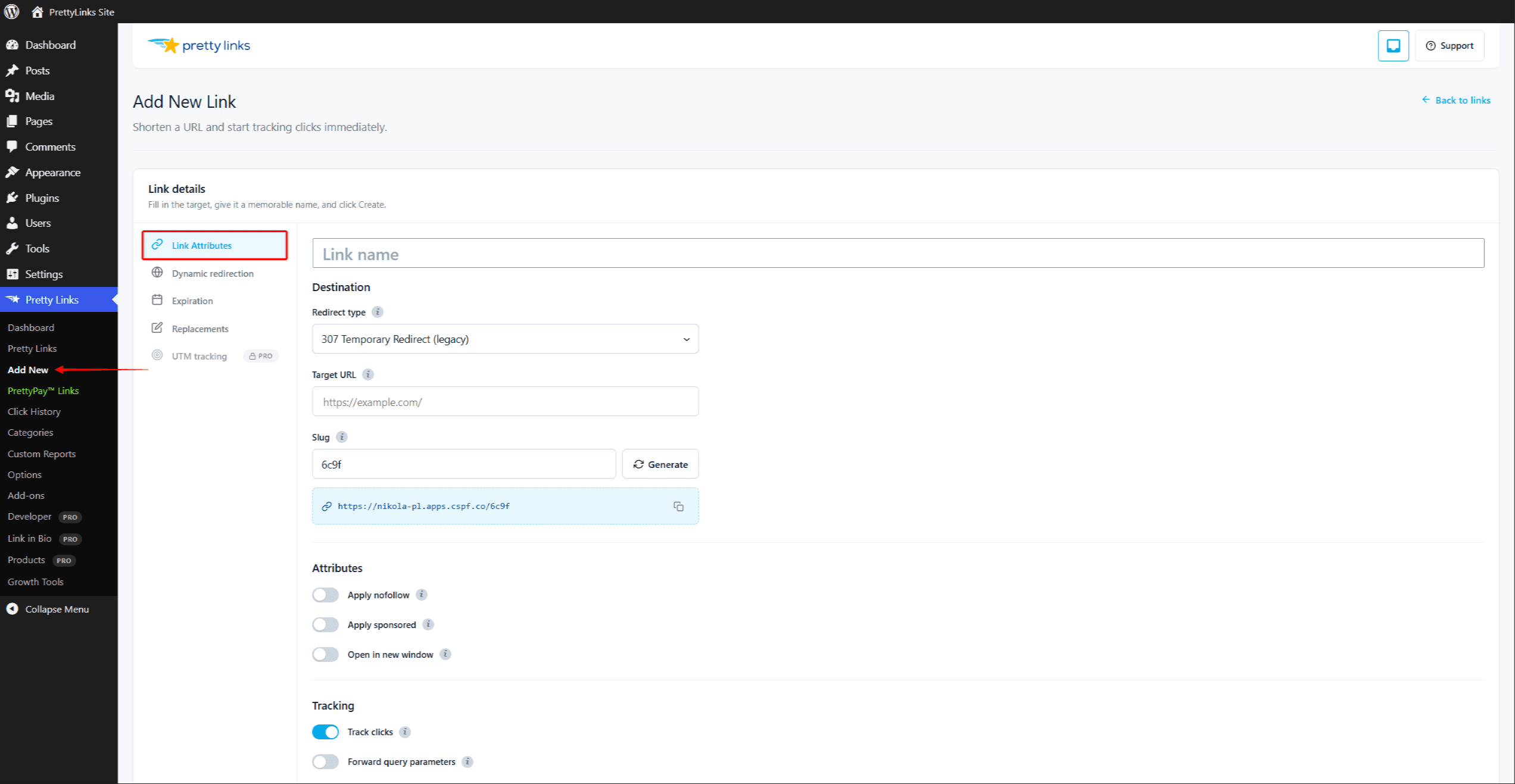
Cada «Pretty Link» cuenta con un conjunto de opciones específicas para cada enlace que puedes activar o desactivar desde la pantalla de edición del enlace. Estas opciones te permiten ajustar con precisión el comportamiento de cada enlace sin modificar la configuración general.
Sigue este enlace
Activa o desactiva el seguimiento de clics para un enlace concreto. Cuando está activado, cada visita se registra en tus informes junto con la fecha y hora, la dirección IP (según tu configuración de privacidad) y otros detalles.
Puedes desactivar el seguimiento de los enlaces internos que no te interesen o de aquellos que quieras mantener especialmente privados. La mayoría de los usuarios lo dejan activado para poder ver el rendimiento de sus enlaces.
Para obtener más información sobre qué datos se recopilan y cómo, consulta Modos de seguimiento de clics.
Nofollow
Añade un rel="nofollow" atributo cuando el enlace se muestre en tu contenido (por ejemplo, mediante sustituciones de palabras clave o códigos cortos).
La etiqueta “nofollow” indica a los motores de búsqueda: «No transfiráis autoridad SEO a través de este enlace». Es la opción predeterminada más adecuada para los enlaces de afiliados, el contenido patrocinado y cualquier URL de la que no quieras responsabilizarte.
Patrocinado
Añade rel="patrocinado" a los enlaces generados. Esta es la señal que Google tiene en mayor consideración para detectar enlaces de pago, enlaces de afiliados y cualquier enlace que exista debido a una relación comercial.
Puede utilizar Nofollow y Patrocinado juntos — muchos propietarios de sitios web lo hacen, sobre todo en los enlaces de afiliados, para que quede muy claro a los motores de búsqueda.
Abrir en una ventana nueva
Al hacer clic en el enlace generado, el destino se abre en una nueva pestaña o ventana, en lugar de sustituir la página actual. Esto resulta útil para los enlaces externos, en los que se desea que los visitantes permanezcan en tu sitio web.
Esta opción solo añade target="_blank" a los enlaces que aparecen en tu contenido. Esto incluye la sustitución de palabras clave o URL, los códigos cortos y las inserciones realizadas con el editor de bloques y el editor clásico. Lo hace no modificar la redirección HTTP en sí, de modo que al acceder directamente a la URL simplificada se siga el comportamiento habitual del navegador.
Reenviar parámetros de consulta
Cuando está activada, cualquier cosa que se añada al final de tu URL bonita se transmite a la URL de destino.
Por ejemplo, si tu enlace optimizado es yoursite.com/rebajas señalando hacia partner.com/products, y después una visita a yoursite.com/sale?coupon=SUMMER te redirigirá a partner.com/products?coupon=SUMMER.
Esto es fundamental para:
- Parámetros de seguimiento UTM (
?utm_source=boletín informativo); - Sub-ID de afiliados (
?subid=blogpost42); - Códigos promocionales y otros datos dinámicos.
Si la redirección está desactivada, el visitante accede a partner.com/products sin parámetros adicionales.
Nombre y descripción
En Nombre El campo “Título descriptivo” es el nombre que aparece en tu lista de enlaces y en los informes. Elige algo que puedas reconocer de un vistazo: “Promoción de afiliados de verano de 2026” es mejor que «Enlace 47».”
En Descripción El campo «field» es un área de notas privadas, visible únicamente para ti y para el resto de administradores de WordPress. Úsalo para recordarte:
- A quién le has enviado el enlace;
- A qué campaña pertenece;
- Cuándo debería retirarse;
- Cualquier situación especial por la que tu yo del futuro te lo agradecerá.
Ninguno de los dos campos se muestra a los visitantes que hacen clic en el enlace.
Configuración de los valores predeterminados
La mayoría de estas opciones tienen valores predeterminados globales que puedes configurar en Panel de control > Pretty Links > Opciones > Enlaces. Los nuevos enlaces heredan tus ajustes predeterminados; puedes modificarlos individualmente en cualquier momento. Consulta Configuración predeterminada de los enlaces Para más información.