
Verfügbar im „Super Affiliate“-Tarif.
Mit „User Links“ können Ihre Mitglieder ihre eigenen Pretty Links über ein Frontend-Dashboard auf Ihrer Website verwalten. Sie sehen niemals den WordPress-Adminbereich, sondern lediglich eine übersichtliche Seite, auf der sie ihre persönlichen Links hinzufügen, bearbeiten und verwalten können.
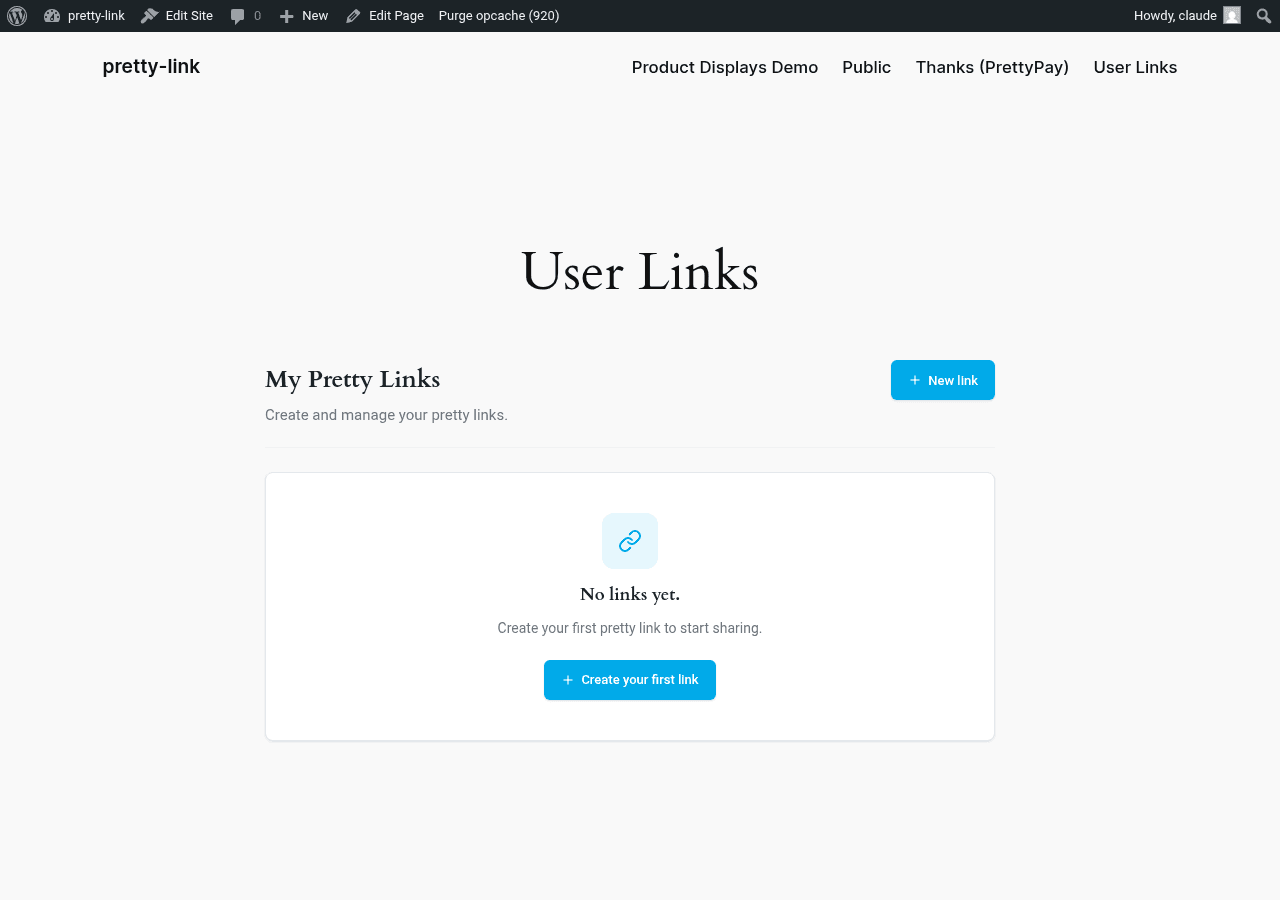
Funktionsweise
Sie legen eine Seite Ihrer Website als Dashboard für Benutzerlinks fest. Wenn ein angemeldeter Benutzer diese Seite aufruft, sieht er eine Liste mit ihre eigenen Kurzlinks – weder deine noch die von jemand anderem. Sie können:
- Alle vorhandenen Links anzeigen;
- Neue Links hinzufügen;
- die von ihnen erstellten Links bearbeiten oder löschen;
- Die Liste durchsuchen und sortieren.
Ihre Mitglieder profitieren von einer persönlichen, an Ihre Marke angepassten Link-Verwaltung. Sie behalten die Kontrolle darüber, wer Zugriff hat und wie das Dashboard aussieht, da es sich auf Ihrer eigenen Website befindet – auf einer Seite, deren Eigentümer Sie sind.
Für wen ist es gedacht?
SaaS-Plattformen
Sie betreiben ein Tool, bei dem Kunden im Rahmen ihres Arbeitsablaufs Kurzlinks benötigen – eine Marketingplattform, ein Sales-Engagement-Tool oder einen Kampagnenmanager. Durch die direkte Integration der Linkverwaltung in das Dashboard Ihrer Kunden müssen diese Ihr Produkt nicht verlassen, um einen Kurzlink zu erhalten.
Mitgliederseiten
Ihre Mitglieder profitieren davon, dass sie nachverfolgbare Links teilen können – Affiliate-Vermarkter, Kursanbieter, die Ressourcen teilen, oder Community-Organisatoren, die die Anmeldungen für Veranstaltungen nachverfolgen. Indem Sie jedem Mitglied ein eigenes Link-Dashboard zur Verfügung stellen, wird aus der Möglichkeit, “Pretty Links zu nutzen”, ein greifbarer Vorteil.
Partnerplattformen
Sie betreiben ein Partnerprogramm. Jeder Partner erhält ein eigenes Dashboard, in das er sich einloggen kann, um dort nachverfolgbare Links für beliebige Landingpages zu erstellen, seine Klickzahlen einzusehen und die Slugs an seinen Kanal anzupassen.
Interne Team-Tools
Ein größeres Marketingteam, in dem jeder Autor, Social-Media-Manager oder Kampagnenverantwortliche Kurzlinks erstellen muss, ohne über Administratorrechte zu verfügen – mit „User Links“ entfällt die Notwendigkeit eines Administrators als Gatekeeper.
Was Sie beeinflussen können
Als Betreiber der Website entscheiden Sie:
- Auf welcher Seite befindet sich das Dashboard?. Such dir eine beliebige Seite aus – eine spezielle
/DashboardSeite, ein Bereich Ihres Mitgliederportals, eine Registerkarte in Ihrem bestehenden Kundenbereich; - Welches URL-Präfix wird für Benutzerlinks verwendet?. Standardmäßig verwenden die Kurzlinks der Mitglieder das Präfix
u/(ein Benutzerlink sieht also so aus:yoursite.com/u/their-slug), aber du kannst dies auf einen beliebigen Wert ändern, der zu deinem URL-Schema passt; - Wer hat Zugriff?. Kombinieren Sie „User Links“ mit einem beliebigen Mitgliedschafts-Plugin, um den Zugriff auf die Dashboard-Seite hinter einer Bezahlschranke, einer Rollenprüfung oder einer bestimmten Mitgliedschaftsstufe zu regeln.
Was der Benutzer sieht
Ein angemeldeter Benutzer sieht auf der Dashboard-Seite Folgendes:
- Eine Liste ihrer Links (und ausschließlich ihrer Links) – URL-Anzeige, Ziel-URL, Name, Erstellungsdatum;
- Eine Schaltfläche zum Hinzufügen eines neuen Links;
- Ein Suchfeld und Sortierfunktionen;
- Schaltflächen zum Bearbeiten und Löschen bei jedem Link.
Sie sehen weder Ihr „wp-admin“-Bereich noch die übrigen Einstellungen Ihrer Website. Sie sehen lediglich ihre Links auf einer Seite, die so aussieht, als wäre sie Teil Ihrer Marken-Website.
Was bewusst vereinfacht wurde
„User Links“ ist eine speziell auf Mitglieder ausgerichtete Oberfläche – kein vollständiger Klon der „Pretty Links“-Admin-Oberfläche. Einige erweiterte Funktionen werden den Frontend-Benutzern bewusst nicht zur Verfügung gestellt:
- Nur die Umleitungstypen 301 und 302. Keine Weiterleitungen über Pixel, Metarefresh, JavaScript, Cloak oder Prettybar vom Benutzer-Dashboard;
- Keine QR-Codes. Der QR-Generator ist nur für Administratoren zugänglich;
- Keine Split-Tests. A/B-Tests sind nur für Administratoren zugänglich;
- Keine erweiterten Funktionen wie Kategorien, Schlüsselwortersetzungen oder Ablaufdaten.
Das Ergebnis ist ein übersichtliches, leicht zu erlernendes Dashboard, mit dem Ihre Mitglieder innerhalb von 30 Sekunden zurechtkommen. Wenn ein Mitglied mehr als nur Hinzufügen, Bearbeiten oder Löschen benötigt, wendet es sich ohnehin an Sie – und Sie können das über den Admin-Bereich regeln.
Eine vollständige Übersicht darüber, was Nutzer tun dürfen und was nicht, finden Sie unter Benutzererfahrung.
Wo soll man anfangen?
Die Einrichtung dauert zwei Minuten:
- Erstellen Sie eine Seite auf Ihrer Website (oder wählen Sie eine bereits vorhandene aus), auf der das Dashboard angezeigt werden soll.
- Unter Dashboard > Pretty Links > Optionen > Benutzerlinks, richten Sie die Einstellung auf diese Seite aus.
- Ändern Sie gegebenenfalls das URL-Präfix.
Gehen Sie Schritt für Schritt vor in Einrichtung von Benutzerlinks.