
Disponível no plano Super Affiliate.
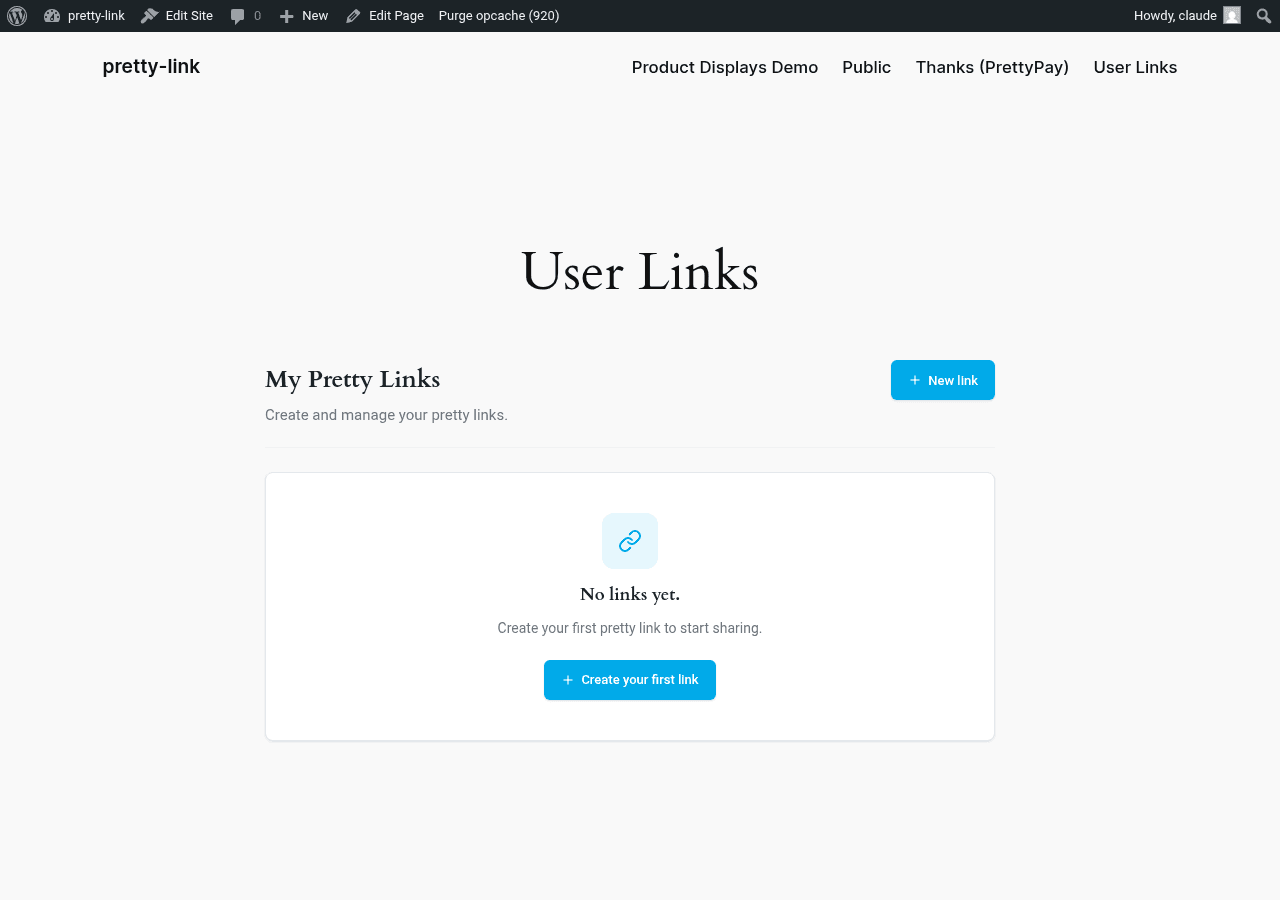
O “User Links” permite que seus membros gerenciem seus próprios “Pretty Links” a partir de um painel de controle no front-end do seu site. Eles nunca têm acesso ao painel de administração do WordPress; veem apenas uma página simples, onde podem adicionar, editar e gerenciar seus links pessoais.
O que ele faz
Você define uma página do seu site como o painel de Links do usuário. Quando um usuário conectado acessa essa página, ele vê uma lista de próprios links curtos — nem os seus, nem os de ninguém. Eles podem:
- Veja todos os links existentes;
- Adicionar novos links;
- Editar ou excluir os links que eles criaram;
- Pesquise e classifique a lista deles.
Seus membros têm uma experiência personalizada e com a identidade visual da sua marca no gerenciamento de links. Você mantém o controle sobre quem tem acesso e como fica o painel, pois ele fica hospedado no seu próprio site, em uma página de sua propriedade.
Para quem é destinado
Plataformas SaaS
Você administra uma ferramenta em que os clientes precisam de links encurtados como parte de seu fluxo de trabalho — uma plataforma de marketing, uma ferramenta de engajamento de vendas, um gerenciador de campanhas. Incorporar o gerenciamento de links diretamente no painel do cliente significa que eles não precisam sair do seu produto para obter um link encurtado.
Sites de assinatura
Seus membros se beneficiam da possibilidade de compartilhar links rastreáveis — profissionais de marketing de afiliados, criadores de cursos que compartilham recursos, organizadores de comunidades que acompanham as confirmações de presença em eventos. Oferecer a cada membro seu próprio painel de links transforma a frase “você pode usar o Pretty Links” em um benefício concreto.
Plataformas de afiliados
Você administra um programa de afiliados. Cada afiliado tem seu próprio painel de controle, no qual pode gerar links rastreáveis para qualquer página de destino, verificar o número de cliques e ajustar os slugs para se adequarem ao seu canal.
Ferramentas internas da equipe
Em uma equipe de marketing maior, na qual cada redator, gerente de redes sociais ou responsável por campanhas precisa criar links curtos sem acesso de administrador — o User Links torna desnecessária a função do administrador como controlador de acesso.
O que você controla
Como proprietário do site, você decide:
- Qual é a página que hospeda o painel de controle?. Escolha qualquer página que quiser — uma página dedicada
/painelpágina, uma seção do seu portal de membros, uma aba dentro da sua área de clientes já existente; - Qual prefixo de URL os links dos usuários utilizam. Por padrão, os links curtos dos membros usam o prefixo
u/(portanto, um link de usuário fica assim:yoursite.com/u/their-slug), mas você pode alterá-lo para qualquer coisa que se adapte ao seu esquema de URL; - Quem tem acesso. Combine o User Links com qualquer plugin de assinatura para restringir o acesso à página do painel de controle por meio de um sistema de acesso pago, verificação de função ou nível específico de assinatura.
O que o usuário vê
Um usuário conectado na página do painel vê:
- Uma lista dos links deles (e apenas dos links deles) — URL de exibição, URL de destino, nome, data de criação;
- Um botão para adicionar um novo link;
- Uma caixa de pesquisa e controles de classificação;
- Botões “Editar” e “Excluir” em cada link.
Eles não veem o seu wp-admin. Eles não veem o restante das configurações do seu site. Eles só veem seus links, em uma página que parece fazer parte do site da sua marca.
O que foi simplificado intencionalmente
O “Links do usuário” é uma interface direcionada aos membros — não um clone completo da interface administrativa do “Pretty Links”. Alguns recursos avançados foram deliberadamente ocultados dos usuários do front-end:
- Apenas os tipos de redirecionamento 301 e 302. Sem redirecionamentos por pixel, metarefresh, JavaScript, cloak ou prettybar a partir do painel do usuário;
- Sem códigos QR. O gerador de QR é exclusivo para administradores;
- Sem testes A/B. Os testes A/B são exclusivos para administradores;
- Sem recursos avançados como categorias, substituições de palavras-chave ou datas de validade.
O resultado é um painel de controle simples e intuitivo, que seus membros conseguem aprender a usar em 30 segundos. Se um membro precisar de algo além de adicionar, editar ou excluir, ele entrará em contato com você de qualquer maneira — e você poderá resolver isso pelo painel de administração.
Para obter uma lista completa do que os usuários podem e não podem fazer, consulte Experiência do usuário.
Por onde começar
A configuração leva dois minutos:
- Crie uma página no seu site (ou escolha uma já existente) para hospedar o painel.
- Em Painel > Pretty Links > Opções > Links do usuário, defina essa configuração para essa página.
- Se desejar, altere o prefixo da URL.
Siga passo a passo em Configuração de links do usuário.