
Every time someone clicks one of your pretty links, PrettyLinks tucks a tiny cookie into their browser.
It’s how your reports know the difference between a brand-new visitor and someone coming back for a second look at that affiliate product you recommended.
Privacy laws like GDPR, CCPA, and LGPD say those cookies need to be disclosed to visitors up front, alongside a clear description and an easy way for them to opt out of being tracked.
If you haven’t set up a cookie banner yet, or you’re still deciding which tool to use, we’ve made that decision a lot easier.
PrettyLinks has a built-in integration with CookieYes, one of the most popular cookie consent management platforms out there.
All it takes is adding CookieYes to your WordPress site and one switch in PrettyLinks. From there, your banner tells visitors what your links are up to, without you typing in a single cookie yourself.
So let’s break it down: three cookies, one banner, and the single toggle that brings them together.
What's Baked Into This Article:
What does the PrettyLinks CookieYes integration do?
En PrettyLinks CookieYes integration automatically registers PrettyLinks’ tracking cookies in CookieYes.
Once it’s on, all three cookies land in your banner with everything your visitors need to know about them, including:
- What it is
- Para qué sirve
- How long it lasts
From there, each tool handles its own part. PrettyLinks keeps tracking your clicks, and CookieYes shows your banner, saves each visitor’s choice, and blocks any cookies they say no to.
Which cookies does PrettyLinks add to your CookieYes banner?
PrettyLinks uses three cookies: prli_visitor, prli_click_*y prli_dedup_*. (The “prli” is short for PrettyLinks, in case you were wondering.)
All three belong to your site, and each one helps keep your click reports accurate.
| Cookie | How long it lasts | Para qué sirve |
|---|---|---|
prli_visitor |
1 año | Recognizes returning visitors so your reports can show unique vs. repeat clicks |
prli_click_* |
30 días | Remembers which of your links a visitor has clicked, so every click gets credited correctly |
prli_dedup_* |
10 segundos | Stops a double-tap from counting as two clicks |
prli_visitor: Recognizes returning visitors
The first time someone clicks any of your pretty links, PrettyLinks gives them a random ID and saves it in this cookie for a year.
That way, when that same person comes back the next day, next week, or anytime within the year and clicks a different link, PrettyLinks knows it’s them, and your reports count them as a returning visitor instead of a new one.
prli_click_*: Remembers which links a visitor has clicked
That asterisk is a placeholder for a link’s ID, so every link a visitor clicks gets its own small cookie that lasts 30 days. It’s how PrettyLinks knows this visitor has already clicked that specific link.
It also makes sure a click that takes a detour along the way, like stopping at one of your Splash Pages first, still counts toward the right link.
prli_dedup_*: Stops a double-tap from counting as two clicks
This is the shortest-lived cookie of the three, lasting just 10 seconds. That’s long enough to catch a double-tap.
Maybe someone tapped a link twice by accident, or their browser sent the same click twice on its own. Either way, it only counts once.
🍪 Want the full cookie breakdown? Nuestra Cookies Explained guide digs into each PrettyLinks cookie in more detail — plus sample wording you can borrow for your privacy policy.
What do visitors see in the CookieYes banner?
Most cookie consent banners follow the familiar setup, with three buttons: one to accept cookies, one to reject them, and one to open the banner’s settings, usually labeled “Customize” or “Preferences.”
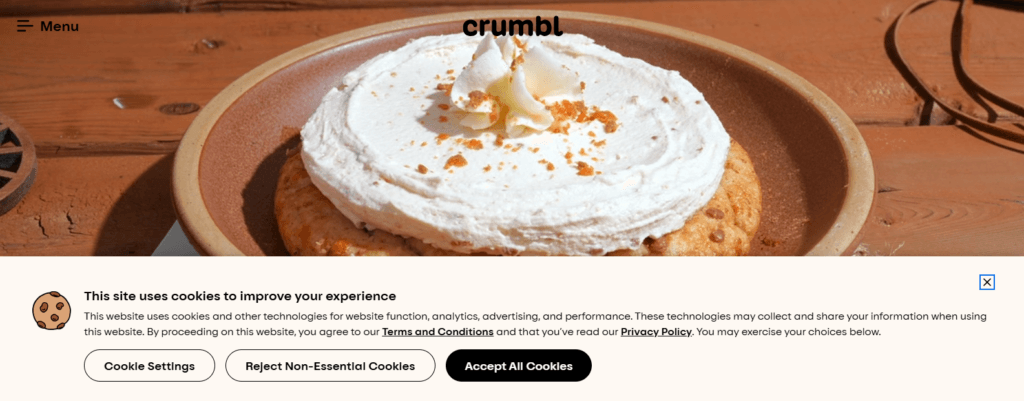
Behind that third button, visitors find the cookies on your site grouped by type and listed one by one, including your PrettyLinks cookies:
- Analítica:
prli_visitoryprli_click_* - Functional:
prli_dedup_*
Each one comes with a straightforward description, so anyone who opens that view knows what they’re agreeing to.
That’s what privacy laws like GDPR and CCPA are really asking for: a clear look at every cookie on your site before visitors decide.
What happens when a visitor accepts or declines PrettyLinks cookies?
If a visitor accepts, PrettyLinks tracks their clicks like it always has. If they decline analytics cookies, by rejecting everything or switching off that group, CookieYes blocks those cookies in their browser.
Either way, your links still work.
A visitor who declines still lands exactly where your pretty link was supposed to send them. PrettyLinks simply skips the click tracking that depends on the cookies they turned down, which is what consent compliance requires.
Who is the PrettyLinks CookieYes integration for?
If you use PrettyLinks and want a quick, hands-off way to cover your link tracking in your cookie banner, this one’s for you.
It doesn’t matter how you use your pretty links, either. They all rely on the same three cookies, so the integration covers every one, from affiliate link promotions to your own offers to your Link in Bio page.
And if you’re not using PrettyLinks yet, keep reading, because you’re missing out on more than just an easy cookie setup.
Affiliate bloggers
Your blog is where your affiliate recommendations live, woven into product reviews, roundups, comparisons, and gift guides.
PrettyLinks is the affiliate link management tool that brands, cloaks, and tracks every click on those links.
That click data guides your next move, whether it’s giving a top-performing product more of the spotlight, swapping out a link that isn’t bringing in the commissions it used to, or testing a new way to promote it.
With your PrettyLinks cookies listed in your banner, you’re upfront about the tracking behind every recommendation you make on your site.
Creators monetizing their own content
If your content goes beyond affiliate promotions, your pretty links probably do too.
They’re across your membership community, inside your course lessons, and, with Enlaces PrettyPay, they can even sell your own ebooks, templates, and digital downloads for you.
PrettyLinks tracks each of those links, showing you which programs and products are drawing the most interest.
The people clicking them are your customers, and since your banner lists the cookies behind those links, they get a clear, honest look at what’s being tracked.
Social media influencers
A PrettyLinks Link in Bio page gives your followers one branded place to find everything you’re promoting, from affiliate picks and product displays to your own PrettyPay™ offers and latest content.
Every link on the page is a pretty link, tracked the same way as the rest. And since you build it with PrettyLinks, the page lives right on your WordPress site, under the same cookie disclosure as everything else.
CookieYes treats it like any other page, so your cookie banner greets followers there too, giving them the same clear choice as everyone else.
¿Eres nuevo en PrettyLinks?
If you’re sharing affiliate links without PrettyLinks, your click data probably isn’t telling you much.
Maybe your links run through a basic link shortener that barely shows you who’s clicking, or your numbers are split across a separate dashboard for every network you work with, and none of them give you the full picture.
You’re putting real work into every recommendation, but without proper click tracking, it’s hard to tell which of those efforts are actually paying off.
PrettyLinks brings all of it onto your own site. Each link gets a short, branded address on your own domain, and all your clicks are tracked in one place where you can finally see which recommendations your audience acts on.
Add the CookieYes integration, and the cookies behind that tracking are covered in your banner from day one.
How do you turn on the CookieYes integration in PrettyLinks?
Turning on the CookieYes integration is just as simple as what it does: one switch, and you’re done!
Once CookieYes is installed on your site, it only takes a moment, and most of that is finding the right screen.
Here’s how to get there:
- En el panel de control de WordPress, vaya a PrettyLinks → Options.
- Abre el Herramientas ficha.
- Encuentra el CookieSí tarjeta.
- Activar Register PrettyLinks cookies with CookieYes.
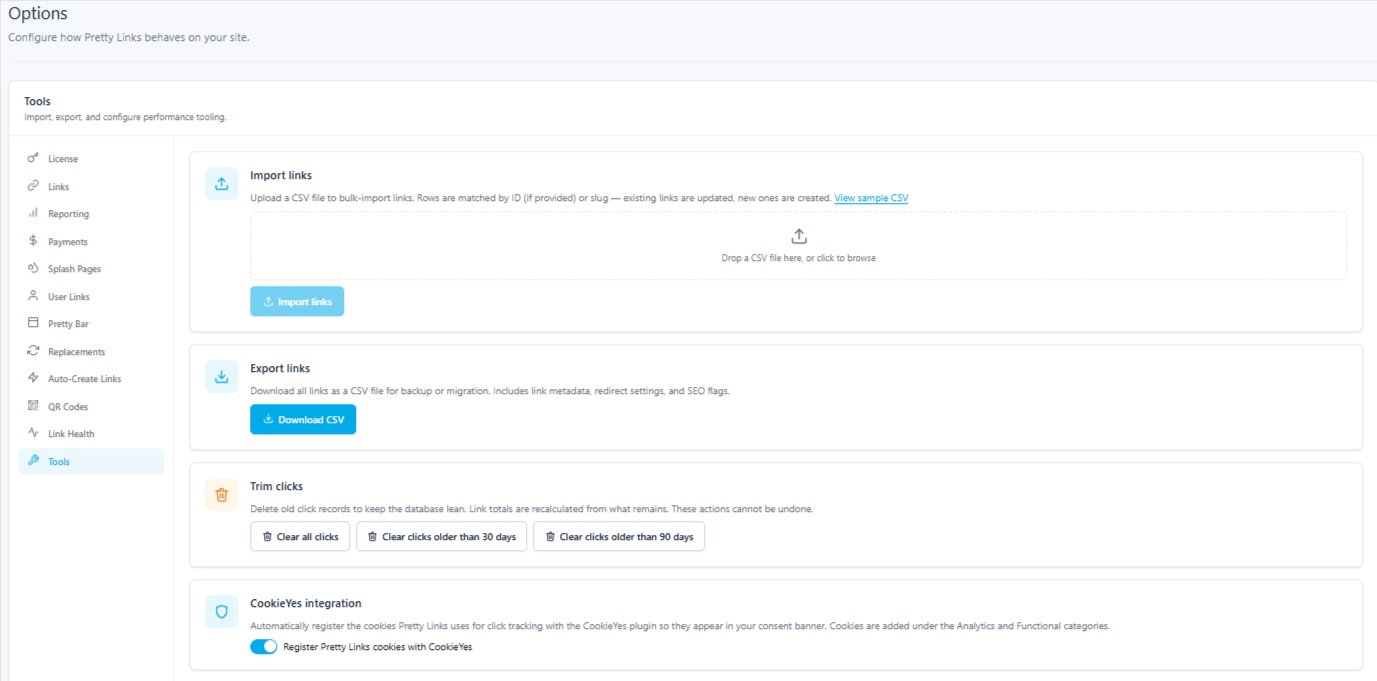
And that’s it!
📘 Want the technical details? Nuestra CookieYes Integration Support Doc goes deeper into what changes for your visitors, why the integration is safe to toggle on and off, and why cookie disclosure matters for your site.
Best of all, the CookieYes integration is included on every PrettyLinks plan, even our free PrettyLinks Lite plugin!
So whichever version you’re running, it’s already there waiting for you.
Don’t have PrettyLinks yet? Try PrettyLinks for free, and your first affiliate link will be listed in your cookie consent banner from the moment you create it.
When you’re ready for more, see everything Pro adds on top.
PrettyLinks CookieYes
Integration FAQs
Still have a question or two? Here are some quick answers.
Does the integration cover every link on my site?
It covers your pretty links, meaning any link you’ve created in PrettyLinks. The rest of your site is a different story.
If you use a tool like Google Analytics or MonsterInsights, it’s likely tracking activity across the rest of your site, like clicks on your social media buttons, downloads of your freebies, and views of the YouTube videos you embed.
That’s where CookieYes has your back: its advanced cookie scanner finds cookies set by your other plugins and tools, so they can be listed in your banner too.
I use a different cookie consent tool. Will this affect it?
Not at all. The integration only works with CookieYes, so your current setup keeps working just as it is. And if you ever decide to make the switch to CookieYes, the integration will be ready when you are.
Can I turn the integration off later?
Yes, anytime. Turning it off removes the PrettyLinks cookies from CookieYes, and your banner goes right back to how it was.
Changed your mind? Turn it back on, and they’re added again without doubling anything up. That comes in handy if you’re testing your banner setup or switching tools down the road.







Deja una respuesta