
📌 TL;DR: Um link de alta conversão na bio se resume a apresentar o conteúdo certo, e não apenas adicionar mais links. Veja como eu escolho o que adicionar à minha página de links na biografia com base em como cada um deles ajuda a gerar cliques, engajamento e receita.
O desdobramento:
A parte mais difícil de configurar meu link na bio não é a parte técnica - é decidir qual conteúdo realmente merece um lugar.
Durante muito tempo, eu não tinha uma específico link na estratégia de conteúdo da biografia. Eu simplesmente continuava adicionando coisas. Recomendação de novo produto? Adicione-o. Nova oferta digital? Adicione-o. Novo vídeo? Adicione-o.
Foi só quando comecei a me preocupar com o que conteúdo que eu estava incluindo em meu link na biografia, comecei a ver um melhor engajamento em todos os aspectos.
De repente, as pessoas estavam clicando nas publicações do meu blog, assistindo aos meus vídeos e se inscrevendo na minha lista de e-mails. Meu link na bio deixou de ser uma lista aleatória de links e passou a ser uma experiência estratégica de compartilhamento de conteúdo que funcionava com minha estratégia social.
Neste artigo, mostrarei os diferentes tipos de conteúdo que apresento em meu link na biografia, além de algumas estratégias extras de marketing por trás de cada um deles.
Eu começo com uma pergunta: O que eu quero que meu tráfego social faça?
Quando eu tinha quinze links diferentes competindo por atenção, as pessoas chegavam à página do meu link na bio, ficavam sobrecarregadas com todas as opções e saltar sem clicar em nada.
Hoje em dia, sou muito mais seletivo com relação ao que pode ser cortado. Todo link precisa ter um propósito, e esse propósito está relacionado ao que eu quero que meu tráfego social faça quando ele clicar e chegar à minha página.
Minhas metas de conversão do link na bio geralmente são assim:
- Impulsionar as vendas de afiliados
- Aumentar minha lista de e-mails
- Criar reconhecimento para meu canal no YouTube
- Trazer pessoas para minha comunidade de membros
Se um link não estiver vinculado a uma dessas metas ou não apoiar qualquer campanha que eu esteja realizando no momento, ele não pertence à minha página de links na biografia. Simples assim.
Isso garante que minha página permaneça focada e que os cliques que recebo estejam vinculados a conversões, e não apenas à curiosidade.
O que eu coloco em meu link na bio (e por quê)
Esses são os tipos de conteúdo que têm um desempenho consistentemente bom em meu link na bio. Lembre-se de que não apresento todos eles de uma só vez - isso anularia o objetivo do “manter o foco” abordagem que acabei de explicar.
Normalmente, mantenho cerca de 5 links por página; no entanto, dependendo do modelo PrettyLinks Link In Bio que estou usando, posso incluir mais sem sobrecarregar a página.
▶️ Visualizar os modelos do PrettyLinks Link In Bio
Com o tempo, observo as análises para ver o que está funcionando. Quando um link específico começa a perder força, esse é o meu sinal para gire-o para fora e troque por algo novo.
Artigo do blog Links para apoiar a visibilidade na pesquisa
I publicar conteúdo de blog com bastante regularidade, e meu link na biografia é um dos lugares mais inteligentes que encontrei para manter minhas postagens detectáveis nas mídias sociais.
Por que incluo publicações de blog em meu link na biografia:
- Mantém o conteúdo visível depois que os algoritmos sociais o enterram - As publicações desaparecem dos feeds rapidamente; seu link na biografia dá a elas uma vida útil mais longa.
- Direciona o tráfego para o conteúdo que beneficia seu SEO - Facilitar o acesso das pessoas ao seu blog significa mais engajamento em seu site, o que sinais para os mecanismos de busca que seu conteúdo vale a pena ser classificado.
- Posiciona você como uma autoridade - Há uma diferença entre um comentário de 280 caracteres e um guia detalhado. Os posts de blog mostram que você realmente sabe o que está falando.
Gosto de exibir artigos de blog em meu link na página de biografia usando o PrettyLinks Modelo híbrido, que ativa esse carrossel rolável:
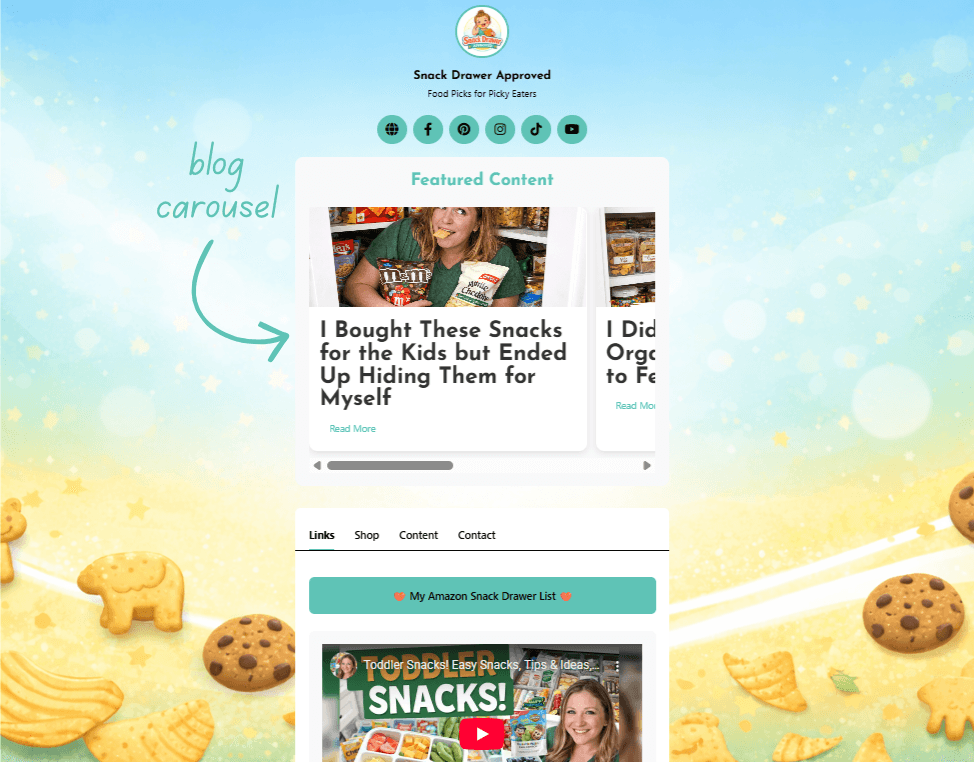
Posso adicionar quantas postagens quiser, e o PrettyLinks as exibe na parte superior da página sem ocupar muito espaço vertical.
Melhor ainda? Quando seleciono “WordPress Posts” nas configurações de conteúdo, o PrettyLinks extrai automaticamente minhas cinco postagens mais recentes e as adiciona à pasta Conteúdo também:
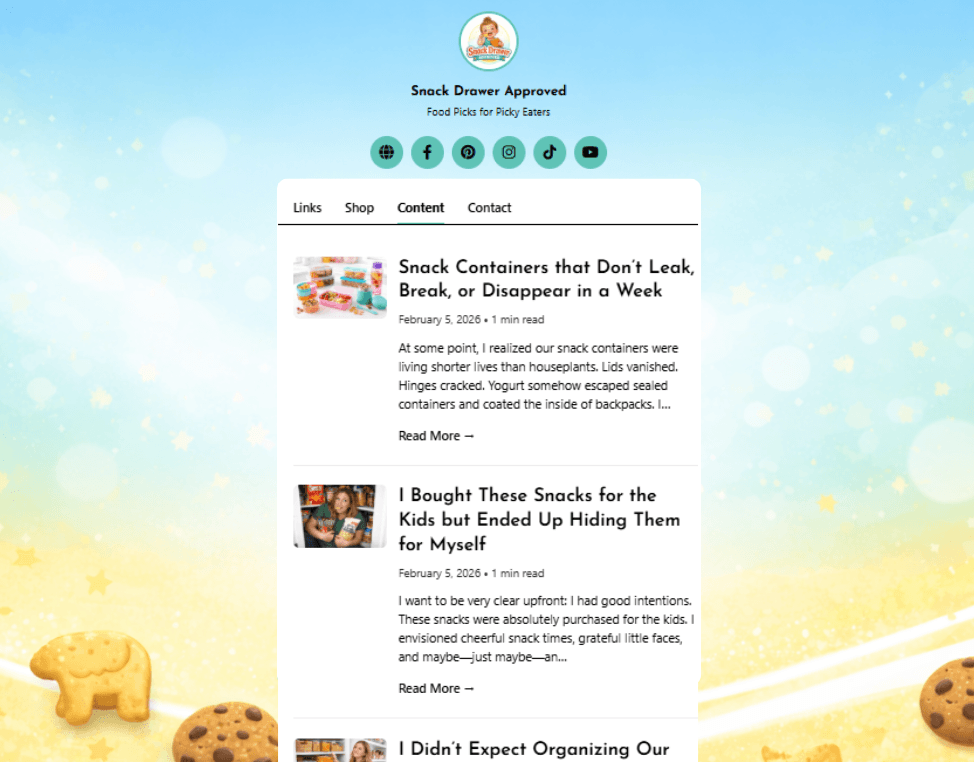
Um local mais fácil de clicar para que os leitores acessem o conteúdo do meu blog sem precisar procurar por ele.
Expositores de produtos que facilitam as decisões de compra
Expositores de produtos PrettyLinks mudaram completamente a forma como apresento as ofertas em meu link na página da biografia. Em vez de apenas outro botão, posso exibir a imagem de um produto, o preço e uma clara chamada para ação.
Que displays de produtos devo incluir em meu link na bio:
- Meus produtos de afiliados com melhor desempenho
- Minhas próprias ofertas de download digital
Quando se trata de displays de produtos de afiliados, Se eu tiver um link na bio, ocasionalmente adicionarei uma ou duas de minhas ofertas de maior conversão por página. Não quero que meu link padrão na biografia seja uma parede de fotos de produtos.que grita “captura de dinheiro” e mata a confiança.
Por outro lado, se eu estiver criando um link separado na página da bio especificamente para plataformas orientadas por imagens, como Pinterest ou Instagram, usarei o Modelo minimalista para listar produtos de forma bonita em um layout amigável para o comprador:
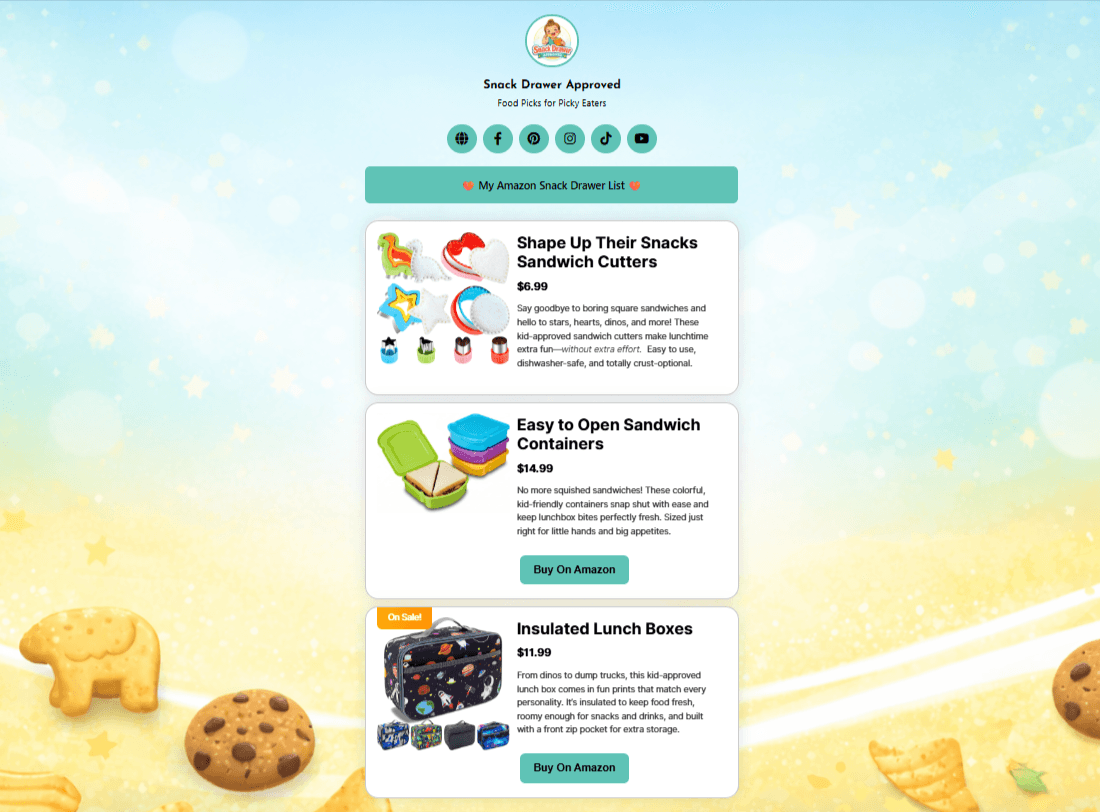
Na maioria das vezes, você verá pelo menos um de meus próprios produtos digitais no mix também (porque a adição desses recursos aumentou as conversões em 35%).
Quando volto a usar minha opção favorita Modelo híbrido, ele separa automaticamente meus links PrettyPay™ em seus próprios Loja em meu link na biografia:
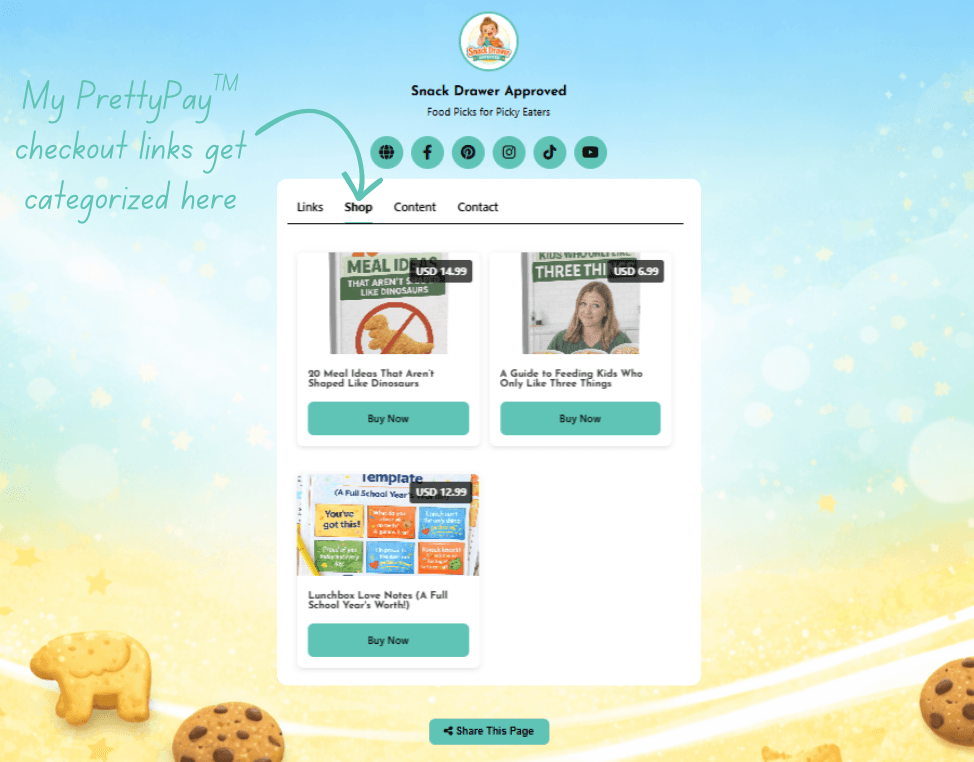
Isso mantém minhas ofertas de afiliados e meus próprios produtos organizados para que os visitantes saibam quando estou recomendando algo e quando estou vendendo meus próprios produtos.
É mais limpo, mais transparente e faz mais sentido do ponto de vista da experiência do usuário.
Meu link para a Amazon Storefront com todas as minhas escolhas de produtos
Quando a Amazon lançou o Programa Influenciador como um ramo secundário de seu programa de afiliados tradicional, foi uma grande vitória para os profissionais de marketing de afiliados como eu. A maior inovação resultante disso foi a capacidade de criar uma Amazon Storefront.
Agora, em vez de alternar constantemente os links individuais da Amazon dentro e fora da minha página de links na biografia, incluo um único link para minha vitrine totalmente selecionada, onde tenho centenas de produtos organizados e disponíveis para compra:
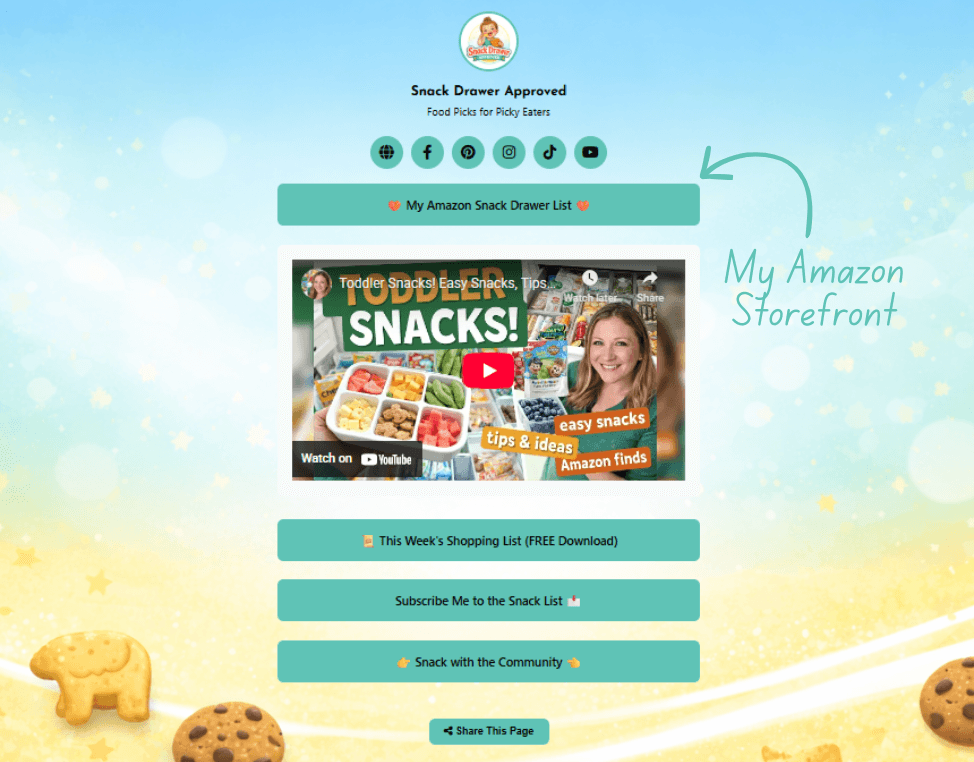
Como isso se parece em ação: alguém assiste a um vídeo em que compartilho um resumo de ofertas de afiliados, toca na minha biografia, navega na minha loja e acaba comprando tudo o que viu - além de alguns extras.
Eu recebo comissões sobre tudo isso. O marketing de afiliados em sua melhor forma.
É por isso que meu link da Amazon Storefront tem um lugar permanente em meu link na biografia, porque ele sempre transforma um clique em dezenas de conversões.
Email Opt-In e iscas digitais para crescimento a longo prazo
Meus assinantes de e-mail são mais valiosos do que meus seguidores nas redes sociais, portanto, facilito para as pessoas participar de minha lista em meu link na biografia.
Quando eles estão em minha lista, é quando começa o verdadeiro relacionamento. Eu posso cuidar deles, educá-los e eventualmente vender para eles.
No entanto, a realidade é a seguinte: a maioria das pessoas não se inscreverá em um boletim informativo só porque você pediu gentilmente. Elas precisam de um incentivo.
É aí que minha ímã de chumbo entra em cena. A O ímã de leads é um recurso gratuito que você oferece em troca de um endereço de e-mail.
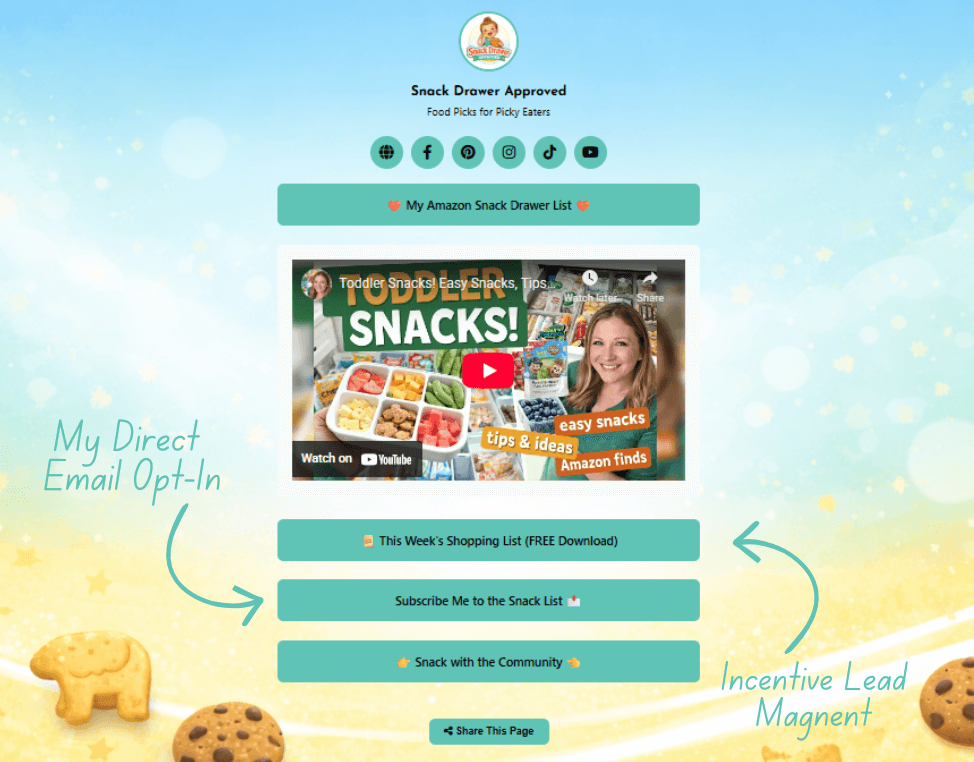
Entre a assinatura do meu boletim informativo e meu ímã de leads da semana, esses são os dois links que fazem o trabalho mais duradouro em minha página de links na biografia - porque cada assinante que ganho é um cliente em potencial.
Vídeo que leva as pessoas da minha página para o YouTube
O vídeo é uma coisa completamente diferente quando se trata do meu link na biografia estratégia de conteúdo.
Quando escrevo uma postagem no blog, as pessoas precisam confiar em minhas palavras. Mas quando eu criar um vídeo mostrar um produto em ação, demonstrar como eu realmente o uso e apresentar os resultados? Isso gera confiança mais rapidamente e converte mais.
Por que apresento conteúdo de vídeo em meu link na biografia:
- Ele se destaca em uma página cheia de links de texto e botões - Uma miniatura de vídeo chama a atenção antes de qualquer outra coisa na página.
- Transfere as pessoas para uma plataforma onde elas podem consumir meu conteúdo - Usa meu link na biografia como um handoff, movendo os visitantes interessados para o YouTube, onde o tempo de exibição mais longo e as listas de reprodução os guiam naturalmente para o próximo vídeo.
- Classificação dos vídeos do YouTube na pesquisa do Google - Meus vídeos podem aparecer nos resultados de pesquisa junto com as publicações do blog, o que significa o dobro de chances de alguém me encontrar por meio de uma única pesquisa.
- O vídeo continua funcionando sem esforço extra - Um tutorial de produto que gravei há um ano é tão relevante hoje quanto era quando o publiquei, e ainda está atraindo visualizações, criando confiança e gerando conversões.
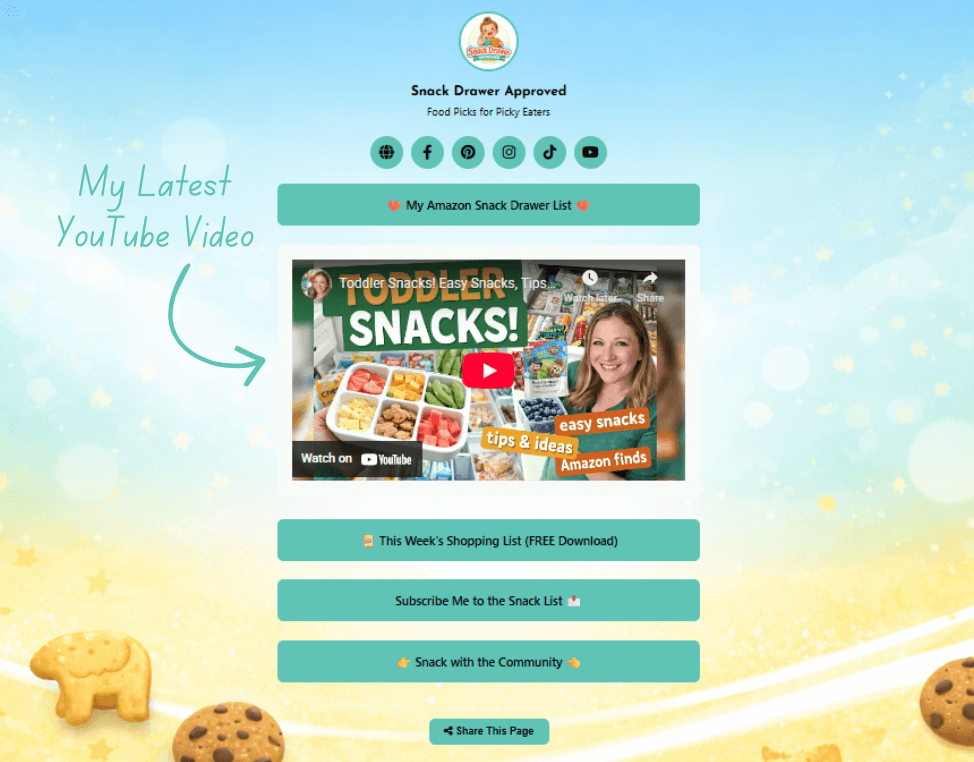
Nada mais em minha página de link na biografia permite que alguém veja um produto em ação, ouça minha opinião sobre ele e decida se confia em mim - tudo em um clique.
Links de episódios de podcast projetados para serem ouvidos no feed
Eu não tenho um podcast (ainda - talvez um dia), mas tenho prestado atenção em como os profissionais de marketing digital Pat Flynn usa seu link na biografia para promover o dele - e isso me deu algumas ideias para quando eu estiver pronto para lançar um.
Na verdade, descobri o podcast do Pat no Spotify por meio do link da biografia em seu perfil do Instagram. Cliquei no link da biografia dele, vi o último episódio e comecei a ouvir imediatamente. Um clique. É isso aí.
E é exatamente assim que a descoberta de podcasts funciona hoje em dia.
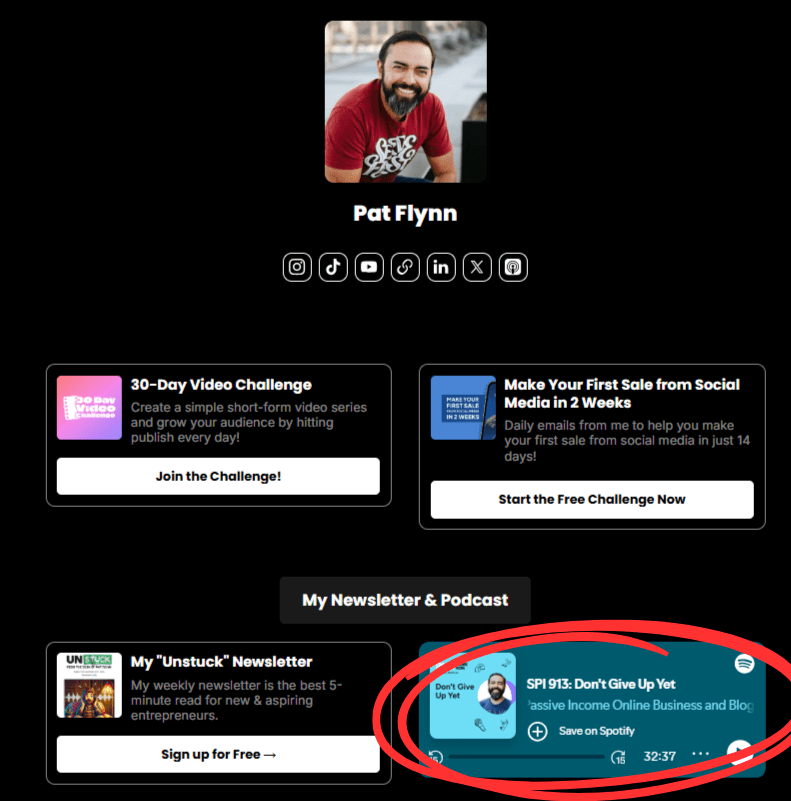
As pessoas que não estão regularmente em plataformas de podcast (como eu) ficam expostas aos seus programas por meio da mídia social. E as pessoas que são, Se o usuário não quiser saber seu nome, não precisará procurar seu último episódio - você o colocou bem na frente dele.
Assinatura de associação que gera receita recorrente
Se há um link que nunca é rotacionado, é este. Minha comunidade de membros acrescenta uma segunda camada à forma como monetizo o conteúdo, além dos links de afiliados.
É aí que eu oferecer conteúdo premium para membros pagantes e gerar receita recorrente nos bastidores. ▶️ Assista: Sites de associação 101
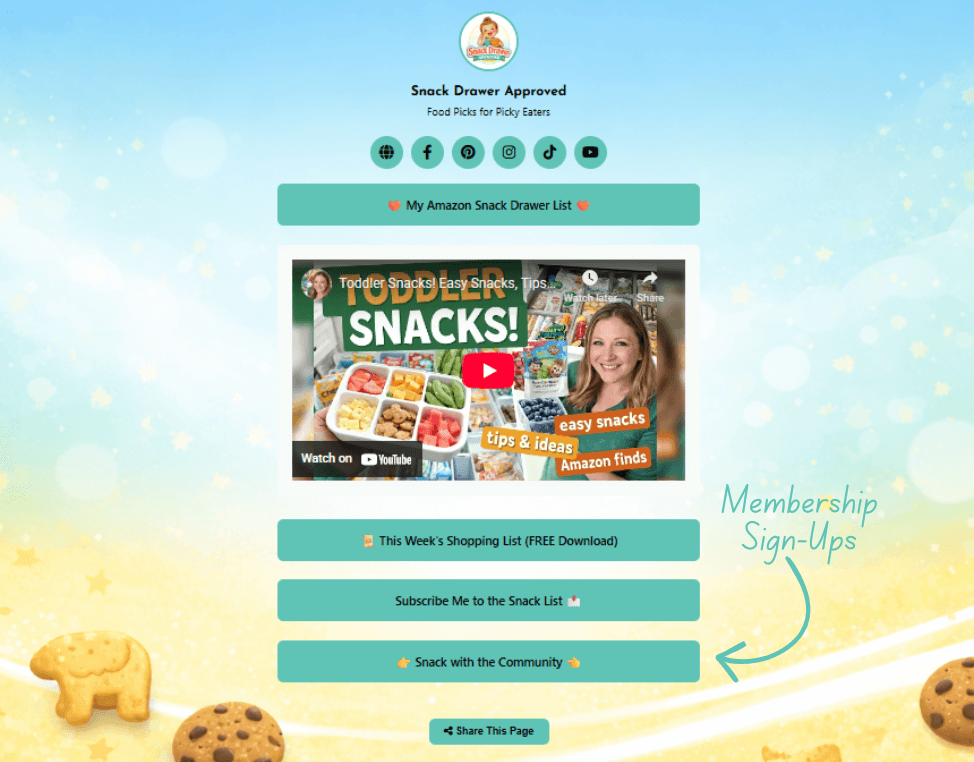
Se alguém já estiver interagindo com minha presença nas mídias sociais, clicar no “Lanche com a comunidade” é um forte sinal de que eles querem mais.
E é exatamente isso que eles encontram em minha página de registro de associação.
Eu uso MemberPress para alimentar a parte de associação do meu site, o que torna a criação de páginas de inscrição, juntamente com o gerenciamento do acesso ao conteúdo e a administração de pagamentos extremamente simples.
Às vezes, os visitantes compram um dos meus planos de assinatura de conteúdo na hora. Outras vezes, eles dão uma olhada primeiro. De qualquer forma, já fiz a parte mais difícil - tê-los tirado da plataforma social e levado para o meu site.
Uma vez lá, minha plataforma de associação faz o que foi criada para fazer: converter seguidores curiosos em assinantes pagantes.
💡Considerações finais sobre o que colocar em seu link na bio
Sempre haverá a tentação de tratar seu link na bio como se ele precisasse ganhar seu sustento adicionando o máximo possível.
Mas as pessoas não clicam em sua biografia para navegar em um catálogo. Elas clicam porque algo chamou a atenção delas e querem saber mais. Não perca esse momento dando a elas muitas opções ou fazendo-as adivinhar em que devem clicar.
O objetivo não é sobrecarregar - é orientar.
Cada link deve estar lá por um motivo. Eu alterno os meus com base no que estou promovendo, no que está funcionando e no que tem mais probabilidade de levar a uma conversão. Se um link não estiver ajudando alguém a realizar uma ação - seja uma venda, uma assinatura ou um conteúdo mais aprofundado - ele não faz parte do site.
Portanto, seja flexível. Atualize com frequência. E lembre-se: o objetivo não é mostrar tudo - é mostrar o direito coisas. As que importam. As que convertem.
💬Vamos ouvir—Qual é o link que tem um lugar permanente em seu link na biografia? Aquele que nunca é rotacionado? Compartilhe suas respostas na seção de comentários abaixo!

Deixe um comentário