
Contenido
Sólo tienes un enlace en tu bio...y ese es el problema.
Tienes toda una serie de ofertas de afiliación que promocionar, nuevos contenidos que se publican constantemente y tráfico social que dirigir a tu sitio. Dar prioridad a un único enlace significa dejar de lado todo lo demás.
Decidir cada día cuál se lleva el protagonismo es un dilema costoso. Por eso hemos creado una herramienta que elimina la necesidad de elegir y amplía lo que puede hacer un solo enlace.
⭐ Presentación del NUEVO PrettyLinks Complemento Enlace en Biografía ⭐
Creado para vendedores afiliados, creadores de contenido y, especialmente, personas influyentes en las redes sociales, hemos hecho posible la creación de un único enlace de marca que lleva a una página de enlace en biografía totalmente personalizable y repleta de todos los enlaces que su público necesita.
En este post, estamos encantados de mostrar nuestra nueva herramienta PrettyLinks Link In Bio. Vamos a caminar a través de los conceptos básicos y demostrar cómo su enlace bio se convierte en una base flexible, rastreable, totalmente de marca para todo lo que usted promueve.
Presentación de PrettyLinks Enlace en la biografía
Hemos observado el auge de las páginas de enlace en la biografía y cómo los creadores las utilizan para compartir más contenido de sus perfiles sociales. A estas alturas, es un flujo familiar con el que los consumidores también se sienten cómodos.
⚡5 Datos básicos sobre las páginas de enlace en la biografía⚡
Consulte estas estadísticas descubiertas por Influencers.Club que ponen de relieve cómo se utilizan hoy en día los enlaces en las biopáginas:
- Más de 31 millones de usuarios de Instagram utilizan una herramienta de enlace en la biografía para compartir más de un destino.
- Al menos 62 herramientas diferentes de enlace en la biografía en la actualidad, lo que indica la demanda real de este espacio.
- Las mujeres abren camino, que representan 64% de los usuarios de link in bio, frente a 36% de los hombres.
- No hace falta tener muchos seguidores para utilizarlo. Las cuentas con menos de 1.000 seguidores representan más del 40% de todos los usuarios de enlaces en la biografía.
- Los creadores superan ligeramente a las marcas, 53% utilizan herramientas de enlace en la biografía para contenidos y monetización, frente a 46% que las utilizan con fines comerciales.
Pero para nuestros usuarios de PrettyLinks, sabíamos que había margen para mejorarlo, algo que no requiriera hacer malabarismos con una herramienta más ni pagar otra suscripción.
En Complemento PrettyLinks Link In Bio le permite crear una página de aterrizaje de marca con posibilidad de compra directamente en su sitio de WordPress, lo que elimina la necesidad de utilizar plataformas de terceros (como Linktree) que quedan fuera de su marca y de su control.
De este modo, cuando alguien pulsa tu enlace en Instagram, TikTok, Pinterest o cualquier otro sitio, aterriza inmediatamente en tu sitio web, donde tus enlaces están dispuestos en un formato familiar, con rutas intencionadas a un producto afiliado, una entrada de blog, un clip de YouTube o algo que vendas directamente.
Independientemente de lo que los visitantes decidan hacer clic, PrettyLinks realiza un seguimiento de cada interacción para una página de enlace en la biografía que es finalmente creado para usted, que muestra exactamente con qué está interactuando su público, qué enlaces están generando resultados y canaliza todos esos datos a su panel de control de WordPress, desde donde gestiona el resto de su negocio.
Cómo crear un enlace PrettyLinks en la biografía (con vídeo)
Como he mencionado anteriormente, las páginas PrettyLinks Link In Bio son simples páginas de WordPress que usted puede crear cómodamente a través del complemento PrettyLinks Link In Bio, en lugar de tener que crear algo desde cero.
Para empezar, diríjase a PrettyLinks → Complementos, a continuación, localice Enlace en la biografía. Alternar Activar para instalar, y verá un nuevo Enlace en la biografía Páginas en el plugin PrettyLinks:
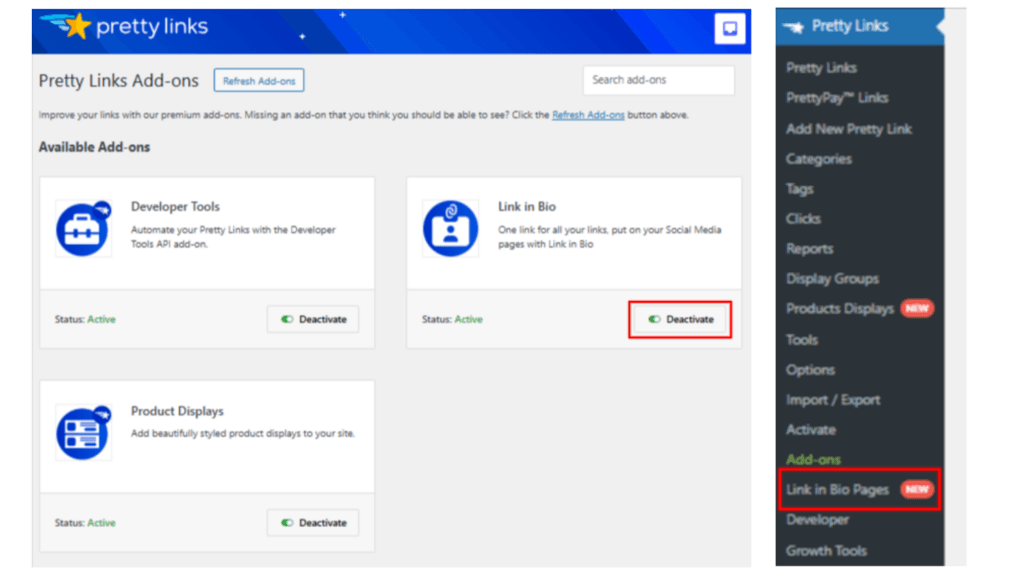
Cuando estés listo para construir el verdadero negocio, entra en PrettyLinks → Enlace en Bio Páginas y haga clic en el botón Añadir nuevo enlace en la página Bio botón.
Ponga un título a su página (normalmente su nombre o marca), añada una descripción opcional y, a continuación, desplácese hacia abajo en la sección Configuración del enlace en la biografía. Aquí es donde las cosas realmente empiezan a encajar.
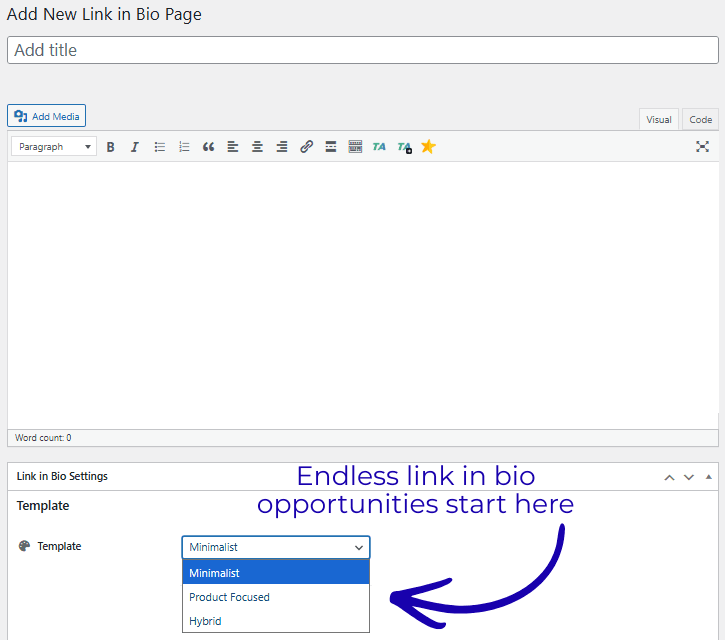
Empieza por elegir entre 3 opciones de plantillaMinimalista, Centrado en el productoo Híbrido-cada uno está diseñado para mostrar sus enlaces de forma un poco diferente.
La plantilla que elijas afecta al diseño y a los bloques de contenido disponibles, así que merece la pena experimentar para ver cuál se adapta mejor a tu estilo y a tus objetivos de marketing.
Si prefieres ver cómo funciona todo antes de construirlo tú mismo, nuestro vídeo tutorial a continuación te guía a través del proceso y muestra las plantillas en acción.
👉 Si quieres el walkthrough escrito para seguir a lo largo, consulte nuestro documento de asistencia aquí para conocer todos los detalles de la configuración.
Qué podrías estar promocionando en tu página de enlace en la biografía ahora mismo (ejemplos)
Eche un vistazo a estos ejemplos de página de enlace en la biografía de PrettyLinks’ para ver cómo se combinan diferentes diseños, tipos de enlace y combinaciones de contenido.
Ofrezca a los visitantes múltiples formas de explorar sus contenidos y ofertas
A continuación se muestra un ejemplo de un sencillo diseño de enlace en la biografía creado con la herramienta Minimalista plantilla. En lugar de intentar hacer demasiado, Kayla utiliza esta página para ofrecer a los visitantes un puñado de lugares a los que ir, dependiendo de lo que les interese.
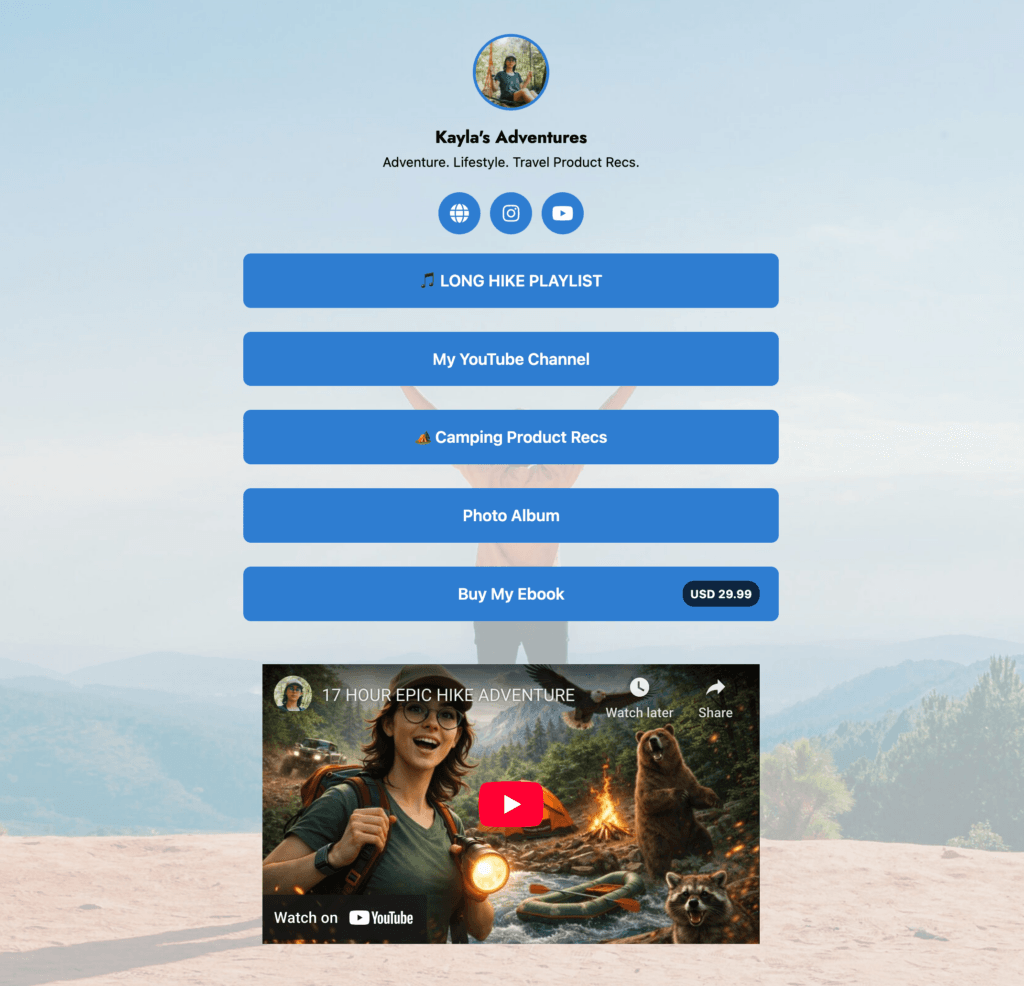
Desde esta única página, es capaz de:
- Envía a la gente a una lista de reproducción que puedan escuchar en sus propias excursiones.
- Enlace a su canal de YouTube, donde los espectadores pueden ver sus vídeos de aventuras más largos.
- Dirige a los visitantes a un post de recomendaciones de material de acampada que reúne los productos que ella utiliza, monetizado por enlaces de afiliados, por supuesto.
- Comparte un álbum de fotos para que las instantáneas de sus viajes sean fáciles de encontrar mucho después de que hayan desaparecido de las redes sociales.
- Vende su ebook directamente usando un enlace PrettyPay™. para compras rápidas in situ.
- Inserte un vídeo en la página para que la gente tenga algo que ver y permanezca interesada más tiempo.
En general, se trata de una página básica y fácil de configurar. Es limpia, familiar y flexible, perfecta si quieres una forma rápida de compartir varios tipos de contenido desde un solo lugar sin complicar demasiado el diseño.
Añada estructura a su enlace en la biografía a medida que crece su marca
He aquí otra marca de entusiastas de las actividades al aire libre que utiliza el Híbrido para estructurar mejor la página "Enlace en la biografía" y alcanzar varios objetivos a la vez.
Lo más destacado es la navegación integrada. PrettyLinks reconoce automáticamente los distintos tipos de enlaces y los agrupa en un menú en la parte superior de la página:
- En el Enlaces los visitantes pueden ver una mezcla curada de enlaces bonitos—enlaces cortos y ocultos utilizado para apuntar a [en este caso] los recursos como un imán de plomo ebook gratuito, un vídeo fuera de la página, y una guía de vídeo más en profundidad.
- En Ficha Tienda agrupa los enlaces PrettyPay™ del Colectivo Campfire (presentados adicionalmente como Expositores de productos), para que los visitantes puedan explorar los productos digitales con precios y llamadas a la acción ya integrados.
- En Ficha de contacto ofrece un formulario integrado que facilita a los visitantes la tarea de ponerse en contacto directamente desde la página Link In Bio.
Una vez más, este diseño híbrido funciona bien para las marcas que necesitan más organización sin perder la sensación familiar del enlace en la biografía. El contenido, los productos y las vías de contacto están claramente separados, pero todos viven dentro de la misma página de marca.
Convierta un enlace biográfico en varias vías de monetización
Este ejemplo procede de un creador del sector de los videojuegos que utiliza su página Enlace en la biografía como eje central de contenidos, productos y comunidad.
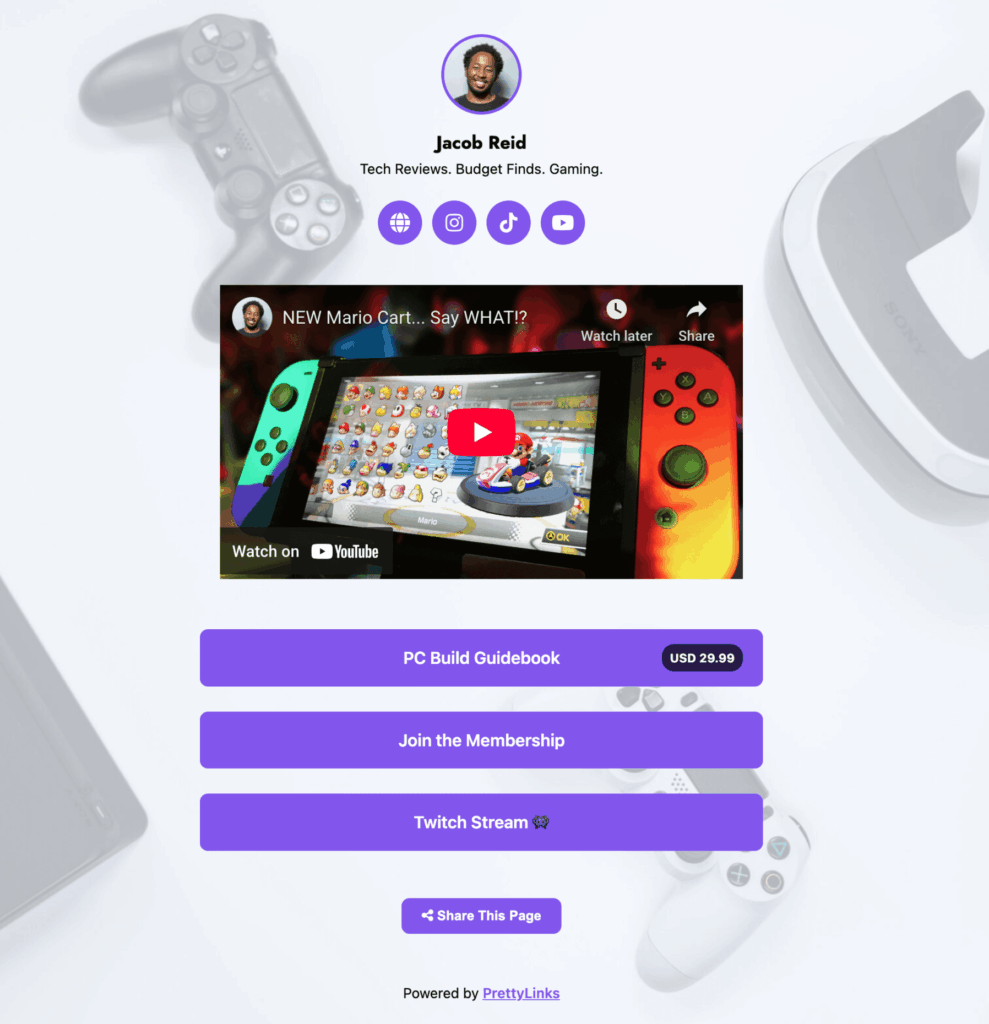
Utilizando el sencillo Minimalista plantilla, la página de Jacob reúne varias vías de monetización:
- Un vídeo de YouTube que atrae a los visitantes hacia un contenido centrado en el juego y, al mismo tiempo, genera ingresos de afiliación a través de los productos y equipos. vinculado en la revisión.
- Promueve su Guía de construcción de PC utilizando un enlace PrettyPay™, creando un pago con un solo clic para los seguidores interesados en construir o actualizar su configuración.
- Ofrece una afiliación de pago para los seguidores que deseen tener acceso permanente a contenidos exclusivos y una conexión más profunda a través de su comunidad en línea.
- Envía a la gente a su stream de Twitch, donde el juego en directo impulsa la participación en tiempo real y apoya la monetización a través de suscripciones, bits y donaciones.
Lo que hace que esta configuración sea especialmente eficaz es cómo Jacob utiliza el seguimiento de PrettyLinks’ para medir el rendimiento en todas estas vías.
Desde esta página puede ver con qué frecuencia los visitantes ven el vídeo, compran la guía, se suscriben a la membresía o hacen clic en Twitch, lo que le da una visión clara de cómo su negocio se está desarrollando. el tráfico social es atractivo a través de contenidos, productos y plataformas.
Inspirado por los vendedores que viven en las redes sociales
A finales de 2025, el comercio social se había convertido en una de las fuerzas de más rápido crecimiento en el comercio electrónico, con unas ventas mundiales estimadas en 1.000 millones de euros. más de $1,2 billones.
Este crecimiento fue impulsado en gran medida por los vendedores afiliados y las personas influyentes que utilizan plataformas sociales como TikTok e Instagram para compartir recomendaciones de productos y contenidos de vídeo de corta duración que convierten.
Pero aquí está la ironía: estas plataformas de alto rendimiento sólo te permiten un enlace en tu biografía. Esto significa que tu tráfico se canaliza a través de un único enlace, lo que te obliga a elegir qué oferta, entrada de blog, promoción o producto obtiene visibilidad.
PrettyLinks Link In Bio se creó para cambiar esa situación y apoyar estrategias reales de marketing en redes sociales, como:
- Ejecute varias promociones de afiliación con un solo enlace. Ya no tiene que elegir entre campañas. Comparta productos destacados, ofertas de temporada, productos perennes e imanes de clientes potenciales, ¡todo desde una sola página y al mismo tiempo!
- Cree caminos directos a las conversiones. En lugar de enviar a la gente a una página y esperar a que encuentren el enlace correcto, su enlace en la biografía ofrece la oferta, el producto o el contenido exacto que está presentando, sin necesidad de ir de caza.
- CTA accionables adaptados a cada publicación. Tanto si compartes un tutorial de un producto, una actualización de tu estilo de vida o un vídeo de unboxing, tu enlace en la biografía funciona con cualquier tipo de contenido y siempre conduce a algo relevante sobre lo que su audiencia puede actuar.
- Cree páginas específicas de cada plataforma para cada público. Crear varias páginas de enlace en la biografía para diferentes canales-como TikTok, Instagram, YouTube, tu boletín de noticias o incluso tu blog- para que cada audiencia aterrice en una versión de tu embudo que se ajuste a su procedencia.
- Relaciones más sólidas con su público. Cuanto más valor ofrezca a través de su enlace en la biografía, más confiarán en él sus seguidores. Se convierte en el lugar al que acuden para recibir ofertas, actualizaciones y recomendaciones con las que realmente quieren comprometerse.
Tu biografía es uno de los pocos espacios en los que se puede hacer clic en las redes sociales, y PrettyLinks Link In Bio hace que ese clic cuente.
Convierte un enlace estático en una experiencia de marca completa, que cuenta la historia de quién es usted, qué ofrece y comparte más del contenido que su público realmente vino a buscar.
Actualice el enlace que más clics recibe
Con tanto en juego en un solo enlace, no hay razón para seguir enviando a su público a un destino único.
PrettyLinks Link In Bio te ofrece una forma más inteligente y estratégica de dirigir el tráfico social, directamente en tu sitio WordPress.
Con Link In Bio, ya no está limitado a promocionar una cosa a la vez. Puede rotar las ofertas, destacar diferentes contenidos y adaptar su enlace biográfico a medida que evoluciona su estrategia, todo ello manteniendo la conexión con el mismo seguimiento y marca en los que ya confía.
Así es como se actualiza uno de los enlaces que más clics recibe, ¡y ya está disponible como parte de su kit de herramientas PrettyLinks!



Deja una respuesta